Playing the Game
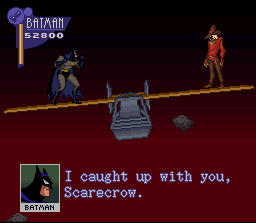
You are Batman, destroying enemies in the name of good to save Gotham City. This is a single-player game of eight stages, with each stage divided into several areas. Clear each stage by defeating the boss that appears at the end of the stage.
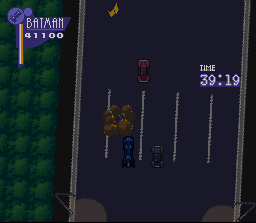
In Stage 5, you operate the Batmobile for high-speed auto action. Stage 5 operations differ from normal stage operations, so note them well before beginning play. Attacks and traps can damage Batman. Each time Batman is damaged, he loses some life. When Batman's life gauge is empty, you lose a player. You can also lose a player if you fall off the screen where there is no ground on which to land. Finally, when you lose all of your players, the game is over. You will have 3 or 5 players, depending on the level of difficulty you select.
Game Over and Passwords
Select CONTINUE when the game ends to restart play from the beginning of that stage. You can continue 3 times.
Select PASSWORD END if you don't wish to continue. The password for that level will be displayed. Input it the next time you play and you can start play from the beginning of that stage.
The password will also be displayed after you've cleared a stage, unless you select the HARD game level for which there is no password.
Items and the Batcave
Take life items during play to restore life. Take weapon items to increase the number of times you may use each weapon. You may select various weapons—some are more appropriate to a particular stage than others.
If you forget a weapon or item, press the START button to pause the game. You can then choose to return to the BATCAVE to get the proper equipment. After you're reequipped, however, you'll have to return to the beginning of the stage.
Set the level of play difficulty and controller buttons in the OPTION mode on the Title screen. You're free to make the settings of your choice.
Setting Up the Game
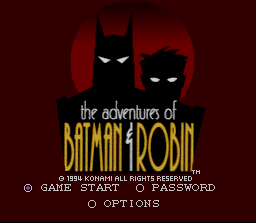
Correctly insert the game pak into the Super Nintendo Entertainment System™ and turn the power ON. The Konami screen appears followed by the Title screen. Press the Control pad to select the mode and press the START button to lock in your choice. Title Screen Options
•
GAME START: Select items and start from the beginning of the game.
•
PASSWORD: Input the previously noted password to play from the password stage.
•
OPTIONS: Change game settings.
Game Start and Equipment
The EQUIPMENT screen appears after the start demo. You can press the START button to skip the Demo screen. Reading these Demos the first time you play can help you pick up some important tips and information.
Select the items to be used in that stage. The usual items are the "Batarang" and "Grappling Gun." You may also select other items. Use the Control pad to select the item and press the A button. Press the START button to start the game. You can press the X button during game play to cycle through the weapons/items on your utility belt.
Equipment Screen Layout
Option Mode Settings
Use the up/down Control pad to select items and the left/right Control pad to change settings. Press the START button to return to the Title screen.
•
GAME LEVEL: Change the level of play difficulty between EASY, NORMAL and HARD.
•
CONTROL: Change Controller button settings. Select the controller button you wish to change by simply pressing the desired button.
•
MUSIC: Listen to the background music (BGM). Press the A button to start the music. Press the B button to stop the music.
•
SOUND MODE: Set either stereo or monaural.
Option Mode Screen Layout
•
EXTEND: 30000, 50000, 70000
.png)

.png)
.png)












_1.png)



_1.jpg)
