The Menu Screen
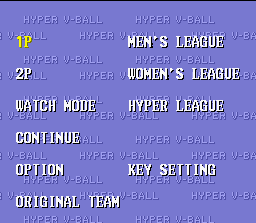
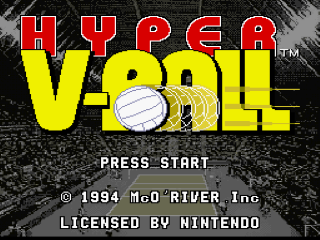
When the Title Screen is displayed, push Start to enter the Menu Screen. Here, you must establish the ground rules of the game before playing. To make selections, use the Control Pad to move the cursor to your choice and push the B Button.
Menu Options
•
1P/2P Mode: To play against the computer, pick 1P Mode. Choose 2P Mode to compete against a friend. The computer or second player team is on the right, yours (1P) is always on the left.
•
OPTION: When you select this, you enter the Option Screen where you will change various aspects of the game. You can increase the difficulty as your skills improve.
•
WATCH MODE: When you want to learn more about game techniques and strategies, choose this option. You will then be shown a simulated game. At the same time, you can learn more about your opponents. When the simulation is over, you will be returned to Menu Screen.
•
ORIGINAL TEAM: With this option, you can design your own kind of players by adjusting their skill levels. Create up to four Original Teams per League.
•
League Selection: First, choose the Men's, Women's, or Hyper League. Next, the national flags of the teams will appear. Pick the flag of the team you want, or you can choose to build your own Original Team.
•
CONTINUE: When you have saved the matches you won, you can start playing from the point where you last saved by choosing Continue. You will play the next team in the Tournament.
•
KEY SETTING (Button Functions): You can change the functions of the buttons to suit yourself. For example, you can make the A Button control coach's advice instead of L. In this booklet, instructions refer to the buttons as they are in their original setting.
V-Ball Setup
Before the first match begins, you must lay the ground rules, as described in Steps 1-3. You need to decide many things, such as handicaps, ball speed, and number of games.
Step 1: Option Screen Settings
Before you can play volleyball, you must go into the Option Screen and set up the game. As in the Menu Screen, you will make selections by moving the cursor to the option of your choice with the Control Pad and pushing the B Button.
•
Computer Level (EASY/NORMAL/HARD): When you begin, start with Easy. Increase difficulty as you improve.
•
Number of Games (1/3/5): To win a match, you must win the majority of games--best of 1, 3, or 5.
•
1P Starting Points (Handicap) (0 to 10): Choose a handicap for your team of anywhere between 0 and 10 points.
•
2P Starting Points (Handicap) (0 to 10): You can assign a handicap of between 0 and 10 points to your opponent.
•
Ball Speed (SLOW/NORMAL/FAST): Depending on your skill, adjust the ball speed.
•
Coach (YES/NO): To hear the Coach's advice before matches, choose Yes.
•
Starting SP (0, 100, 200, 300,... 1,000): You need Special Points for Hyper moves. Choose an amount to start with.
•
SP Increase (0, 50, 100, 150,... 500): Select the amount by which your SP will increase when you score.
•
Sound (STEREO/MONO): Choose stereo or mono depending on your TV's audio system.
•
BGM (1 to 93): You can sample any one of 93 sounds that occur during play.
Step 2 & 3: Mode and League Choice
•
STEP 2 (1P/2P MODE): After you leave the Option Screen and return to the Menu Screen, go to 1P/2P Mode and choose the mode you want.
•
STEP 3 (LEAGUE CHOICE): Select the League you want to play in. The Men's League consists of twelve teams from different countries, while the Women's and Hyper Leagues have eight teams.
Once you select a team, you will compete against the others in that League for the Tournament Championship. You must defeat all of the teams in your League to win. After you have chosen the Options, 1P/2P Mode, and a team from the Main Menu, the Game Start Screen will appear.
Game Start Screen
In this full-court view, you'll see the name and flag of the opposing teams. In 1P mode, the match number for the tournament will also be shown.
•
Example: CANADA VS. ALGERIA (1ST MATCH)
Volleyball Skills
The following directions apply to all Leagues. Hit the ball when it turns red. The first player on a team to get the ball is the Receiver, the second is the Setter, the third is the Spiker. In the Hyper League, your players have special skills.
Serving Controls
To serve, push the buttons for the kind of serve you want, as directed below. Once your player tosses the ball, push B. Use the Control Pad to direct the ball while it's in the air.
•
Overhand Serve: To make a normal overhand serve, push B. You can use this kind of serve before trying a fast serve, to fool your opponents into relaxing.
•
Power Serve: This serve burns just over the top of the net. It's