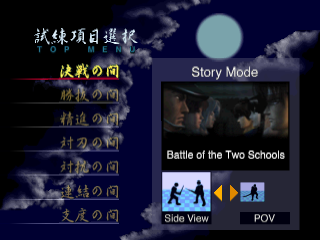
Game Modes
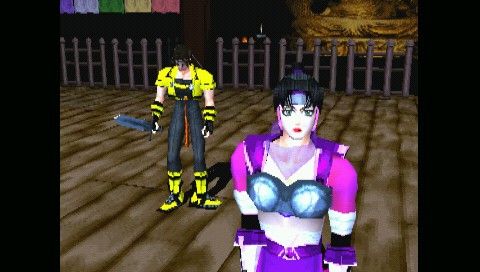
Bushido Blade 2 offers six different game modes. The Story Mode, Vs. CPU Mode and Training Mode allow you to choose from two types of viewpoint.
Viewpoints
SIDE VIEW
The view which shows both characters from the side. All instructions in this Software manual are based on gameplay from this view.
POV
The view in which you see through the eyes of the character. Your command input will differ from the Side View. For example, if you were to press the [right arrow] button in the Side View mode, you will need to press the [up arrow] button in the POV mode instead. In the upper-left corner, you will be able to see the character's stance.
Change View (POV Mode only)
•
Moves the focus of the POV back and forth.
•
Hold down the L2 button and press the R2 button to move the viewpoint forward.
•
Hold down the L2 button and press the R1 button to move backward.
STORY MODE - One Player
The player chooses a character from either school and fights the bosses and lower level Ninja of the opposing school. The entire story unfolds when the player completes all paths using all possible characters.
SUPPORT CHARACTERS
When you advance in the Story Mode, support characters will appear. The next stage will be fought using these support characters.
The support character will have the same weapon as the main character. If you complete the stage using the support character and the main character makes it to the end of the Story Mode, the support character will become a selectable character in all modes of the game.
VS. CPU MODE - One Player
The player chooses one character and faces the challenge of defeating all other characters in the game.
TRAINING MODE - One Player
There are two modes of training to refine your sword techniques.
PRACTICE
Study offensive and defensive techniques by fighting against a Ninja. The player can select the Ninja's fighting strategies. This setting can be changed during practice by pressing the START button. In this mode, sub-weapons and Karami-Waza (Special Moves) cannot be used.
PRACTICE ROUND
Mock tournament against the computer. Since the opponent and weapon can be selected, this is a useful way to study opponents that are difficult to deal with.
VS. MODE - Two Players
Each player selects a character and weapon that they would like to do battle with. Once the characters and weapons have been chosen, a battle stage is agreed upon and the fight begins.
Players cannot choose the same character.
GROUP BATTLE MODE - Two Players
A group tournament using bamboo weapons. First, select the number of entries on each team, point system and time limit. Then, choose a school to set up a team.
When a player chooses a school, the opponent's school will be selected automatically. Select the order of the characters and weapons they will use. The same weapon cannot be chosen twice.
GROUP BATTLE MODE RULES
•
A hit that counts as a fatal hit using real swords will count as one point (Ippon). Any hits short of that will not count.
•
Sub-weapons and Karami-Waza (Special Moves) cannot be used.
•
If players have set up the tournament for one-point matches, the player who gets a point first will win the match. If players set up the tournament for three-point matches, the player who gets two points first wins the match.
•
If a player steps out of the white line, falls or hits at the same time, the match will start over. If a player intentionally steps out of the white line, a warning will be issued.
•
If a player is given two warnings, the opponent will get a point.
•
If time runs out, the player with the most points will win the match. If both players have the same number of points, then the player with fewer warnings will win. (The winner will earn a point for having fewer warnings.) If players have the same number of points and warnings, the match will end in a tie.
•
When all matches are completed, the side that won more matches will win the tournament. If the number of wins are the same, the side with more points will win the tournament. If the points are the same, the tournament will end in a tie.
LINK MODE - Two Players
By using two PlayStation® game consoles, two monitors, two Bushido Blade 2 Discs and a Link cable (sold separately), you can enjoy the ultra-realistic Link Mode. There is a special stage for this mode. HOW TO START LINK MODE
•
Make sure the PlayStation game consoles are turned off. •
Connect each end of the Link cable to the Serial I/O port on the back of each PlayStation game console. •
Insert one Bushido Blade 2 Disc into each PlayStation game console and close the Disc covers. •
Choose the Link Mode on each PlayStation game console. •
After both players have chosen their characters and weapons, either player can select the battle stage.
•
A POV game in Link Mode will begin.
OPTIONS
MONITOR
Select either Color or Black & White.
DIFFICULTY
Select the difficulty level.
MUSIC
Select OFF to turn off the music and hear only the sound effects.
MEMORY CARD
Save and load data.
KEY CONFIGURATION
Change the ◯ button, ✕ button, △ button and □ button configurations.
.png)