Battles
Battles are conducted on Strategic Maps. After all ally units complete their actions in the Player Phase, the game proceeds to the Enemy Phase, in which enemy units take their actions.
Victory Conditions
Battles are turn-based. During a Phase, the player and the enemy select actions using all units on the Strategic Map. The player is victorious if all enemy units are annihilated or if the mission objective is completed.
The game is over if the player's units are completely annihilated or if a mission objective cannot be completed.
Reading Unit Data
•
2) Current/Maximum AP Points.
•
3) The AP required to attack with the selected weapon.
•
4) The weapon is shown next to the display of its Attack Class. Potential damage is displayed as (Attack Power) X (percentage of attack success). Below that, the amount of ammunition in inventory is shown. The ∞ (infinity) symbol means that this weapon has an unlimited supply of ammunition.
•
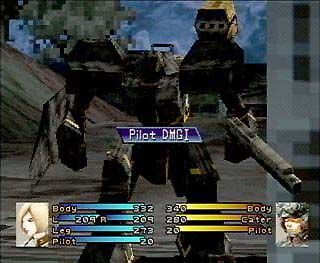
5) Current HP for each part is displayed numerically, as well as graphically in the form of a blue bar. The amount of damage is displayed in black.
Unit Positioning
Before certain battles, the player must select ally characters, distribute AP, and arrange the positions of ally units on the Strategic Map. Use the directional button to move the cursor, and press the button to select a location.
•
Assign a wanzer to each ally by pressing the directional button or left stick LEFT/RIGHT.
•
Distribute AP to each ally.
•
Repeat this process, or select <END> on the Positioning Screen to finish.
System Window
Open the System window by pressing the START button during the Player Phase of a battle. Here, the player can execute functions such as saving a "Battle Save," changing the game configuration, ending the turn, etc.
End Turn
Select this to end a turn and allow enemies to take action.
Medals
After each battle, an evaluation of the battle will be displayed. The Average Damage is calculated by dividing the total damage that player-controlled units received at the stage completion by the total number of battles fought.
The Average Weapon Level is the average Skill Level of the weapons used in attacks and counterattacks in the stage. The evaluation will be higher as these averages lower. The prize money received at the end of the battle varies according to the number of enemies defeated.
Battle Save
Select this option to save during a battle.
Config
Various game settings can be changed here. If "Skip Battle Scene" is turned <ON>, battle scenes can be skipped by pressing the button.
AP System
Every action costs AP (Action Points).
Using AP
AP decreases by 1 for each square moved. The number of AP consumed when attacking enemy units depends on the type of weapon being used. AP also decreases when using an item or counterattacking.
AP Distribution
At the beginning of the game, each character has 14 AP. As the game progresses, the player will be able to distribute the AP of each character. AP distribution may take place during Setup or the beginning of a battle, or while changing wanzers or other vehicles during battle.
Select the category to which AP are being allocated by pressing the directional button UP/DOWN, and determine the AP value of each category by pressing LEFT/RIGHT; then press the button to finish distribution. All units require a minimum of 12 AP for battle. When distributing AP, the final AP value for a character cannot be below 12.
Status Change Evasion and Damage Class modifiers will change as AP is distributed.
The Accuracy of all equipped weapons will change as the AP is distributed.
The Evasion modifier for enemy attacks will change as the AP is distributed.
AP Recovery
12 AP are awarded to the player's units at the beginning of each Player Phase; however, this will never exceed each pilot's maximum AP value.
Earning AP and Ace Points
As the player destroys an enemy unit's body parts, Ace Points will be awarded (displayed as medal marks). Each arm is worth 2 points, as are the legs, while the body is worth 3 points.
When a certain amount of Ace Points are collected, the pilot's Ace Rank increases (on the Character Status window, a mark will be displayed next to the Ace Rank), and the maximum AP will increase.
After the Battle Screen is displayed, the number of Ace Points obtained will be displayed. On the Character window of the Status window, all Ace Points obtained will be displayed. After a certain number of Ace Points are collected, a pilot's maximum AP increases.
Movement
A selected unit's movement range is marked with blue squares. Move the cursor to the destination and press the button. If the unit is not to be moved, open the Action window by pressing the button while that unit is selected.
Movement Limitations
Movement distance varies according to which type of legs the unit possesses. The "Booster" ability is required to climb up and down steps.
AP Use (Movement)
1 AP is used for 1 square of movement.
Attack
After movement, the Action window opens. To attack, move the cursor to the Attack> command and press the button.
Attack Range
When Attack> is selected, the attack range of the weapon currently selected will be displayed in orange. If the player does not have enough AP, if the HP of the arm equipped
.png)


_1.jpg)




_1.png)

_1.png)










.png)
.png)
