Starting the Game
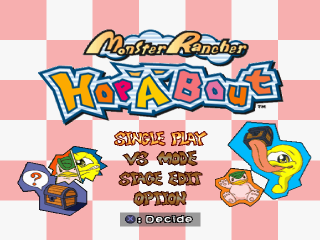
The title screen appears when the disc is inserted and power is on. Press START to see game mode choices. Select a mode and press X.
Game Start Steps
•
Choose SINGLE PLAY mode with the directional button, then press X.
•
Choose NEW GAME with the directional button, then press X.
•
Enter your name with the directional button, then press X.
•
Select a character with the directional button, then press X.
Playing the Game
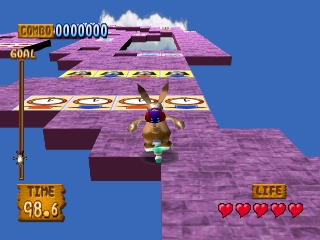
Advance your character using icons on the panels. The stage is cleared when your character reaches the goal.
The game starts with three lives. Your life decreases if you fall from the stage or step on a skull panel. The game ends when you have no lives left.
DUALSHOCK™ Analog Controller
This game is not compatible with analog mode (LED lit). Play in digital mode only. The DUALSHOCK™ analog controller will vibrate even in digital mode (LED unlit).
The vibration function can be toggled on and off in Option mode.
Controller Functions
•
Start button: Start the game
•
Directional button: Move cursor/move character
This game can also be played using the controller. Button functions are the same as the DUAL SHOCK™ analog controller.
Panel Descriptions
Many panels are placed throughout the course. Various things occur when your character steps on one. Each panel stepped on will be marked with an X and will cease to have an effect.
•
Your character's acceleration will be increased.
•
Your remaining life will increase by one.
•
Your character's acceleration will be decreased.
•
Your remaining life will decrease by one.
•
Your remaining time will be increased.
•
Your character will jump back to the direction from which your character came.
•
Your remaining time will be decreased.
•
Your character will jump far in the direction of the arrow.
•
Your character will jump far in a random direction.
•
Your character's jumping ability will decrease.
•
Your character will jump very far in the direction of the arrow.
•
Your character will be able to float in the air freely for a certain period of time.
•
This panel will disappear once it is stepped on.
•
This panel has already been stepped on, and produces no new effect.
•
Your character's jump ability will be increased.
•
This determines the location of the goal ("Stage Edit" only).
Game Mode Descriptions
This game offers four modes: Single Play, Stage Edit, VS, and Option.
Single Play Mode
This is a single-player mode where your character searches for secret items. You can also practice by selecting a stage in PRACTICE mode.
VS Mode
This mode allows two players to compete to reach the goal in the fastest time. There are no limits to lives in this mode; you can fall from the stage as many times as you like.
Option
Use Option mode to perform settings such as vibration on/off. Choose a category using the up and down directional button, then enter your selection with the right and left directional button.
Stage Edit
In this mode, players can design their own stages. Up to four stages can be created at once and saved in one memory card block.
About Editing
A cursor will be displayed in Stage Preview on the right side of the screen once a block is selected in Block Selection Field on the left side of the screen and the X button is pressed. Pressing the X button again will place the selected block. A stage is created by repeating this process.
Color Edit
Selecting COLOR EDIT in 'Block Selection Field' on the left side of the screen allows you to choose the color of a normal block. Multiple colors cannot be used in the same stage.
Memory Card
A System File or an Edit File will be created depending on the saved data. This can be verified in the Memory Card Management screen.
System File
The System File stores option settings, single-play data (up to 20 data), and high scores. This occupies one block per memory card.
Edit File
This stores stages created in Edit mode (up to four stages per block). Multiple blocks can be created in one memory card.