Setting Up The Game
MENU NAVIGATION
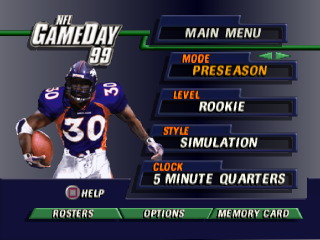
From each menu, use the directional arrow pad (D-pad) Up/Down to highlight options. Use Left/Right to cycle through available options.
Press to bring up the next menu and to cancel and return to a previous menu.
Press from any setup screen for Help.
MODE
Use mode to select a game format.
PRESEASON
Use preseason games to get used to the rigors of a season or the playoffs. Preseason games are not recorded in the season standings and cannot be saved to a Memory Card.
Before selecting the mode for the game and moving to the next setup screen, setup the Level, Style, and Clock of the game and customize rosters and options.
TEAM SELECT
Choose your favorite NFL team.
•
Press L1/L2 or R1/R2 to toggle between team strengths of Offense, Defense, and Special Teams.
•
D-Pad Left/Right to choose a Home team.
•
D-Pad Up/Down to the Away team and repeat the previous steps.
•
D-Pad Up/Down to modify the remaining options on this screen.
MODIFIED ROSTERS
Play NFL GameDay '99 with rosters that you have changed.
•
D-Pad Left/Right to ON and press, enabling you to use customized rosters.
WEATHER
Set the time of day and the weather conditions of the game.
•
D-Pad Left/Right to set the time of day to Day or Night.
•
D-Pad Up/Down to Condition and then Left/Right to choose a weather pattern of Fair, Rain, Snow, or Wind.
•
Press to exit the screen.
OPTIONS
Use Options to change the stadium for the game and to select the type of home jersey for your team.
•
D-Pad Up/Down to Change Stadium and press.
•
From Selection, D-Pad Left/Right to choose ON and press. Leaving the setting on DEFAULT will automatically select the stadium of the home team.
•
D-Pad Left/Right to choose a new stadium and press to bring you back to the Options screen.
•
D-Pad Up/Down to select Home Jersey and press.
•
D-Pad Left/Right to select a jersey type and press to return to the Preseason Team Select screen.
USER RECORDS
User Records are those tabulated from games played that have been set with a user record name. Use this option to set a user name, view records, or turn records ON/OFF.
To set a user record name:
•
D-Pad Up/Down to Set Name and press to activate the alphanumeric chart.
•
D-Pad Left/Right or Up/Down to highlight a letter or number and press to select it. To delete a letter or number, highlight DEL and press.
•
Spell out a name, highlight END, and press to lock it in and deactivate the chart.
To view User Records:
•
D-Pad Up/Down to View Records and press to view the all time record holders of NFL GameDay '99.
To turn records ON/OFF:
•
D-Pad Up/Down to Records and D-Pad Left/Right to toggle between ON/OFF.
TEAM CONTROL
From the Preseason Team Select screen, press to bring up the Team Control screen. Use this screen to select a team.
In a multi-player game, the appropriate equipment is needed. A Multi Tap must be used to allow more than two and up to eight players to compete. A maximum of four players can play per team.
•
D-Pad Up/Down to choose a team. To play against the computer, leave one controller in its original state on the screen.
•
Press to start the game.
LEVEL
NFL GameDay '99 offers four different player levels to choose from. To prepare yourself for the challenge of playing at the All-Pro or Hall of Fame levels, first master the Rookie and Veteran levels.
STYLE
Set up the style of your game by choosing Simulation for ultra-realistic game play (highly recommended for beginners), Total Control for simulation game play with advanced controls (highly recommended for advanced gamers), or Arcade for faster game play with exaggerated special moves.
Advanced controls can also be utilized in simulation play.
CLOCK
Set the length of the game by choosing the number of minutes to play per quarter.
ROSTERS
View the players and statistics of each team's roster. You can also alter the existing rosters with trades, signing of free agents, creating players, player releases, and drafts.
TEAM ROSTERS
View each team's player profiles.
•
Press R1/R2 to choose a team roster.
•
D-Pad Left/Right to cycle through the player's physical makeup and ability attributes. The higher the number for ability attributes, the greater the ability of the player.
•
D-Pad Up/Down to scroll through the entire roster.
Under the team logo, notice the salary cap information provided. You will not be able to exceed the cap when trading players and signing free agents. With Salary Cap set to OFF, salary cap information will not appear on this screen.
SALARY CAP
In the Week Setup screen of Season mode, under the Setup menu option, the salary cap restriction for the league can be turned ON/OFF. With this option set to OFF, you can sign as many high-salaried players as you like. See Options under Preseason for descriptions of other setup options.
CREATE PLAYER
Create a player of any type. Get creative



.png)







.png)
.png)
_1.jpg)

.png)