Starting the Game
1. Set up your PlayStation game console according to the instructions in its Instruction Manual. Make sure the power is OFF before inserting or removing a compact disc.
2. Insert the NHL 97 disc and close the disk cover.
3. Insert game controllers and turn on the PlayStation game console. 4. Follow on-screen instructions to start a game.
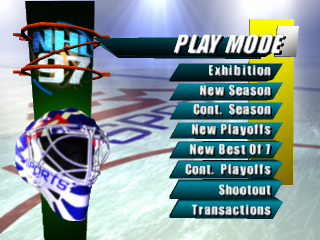
Play Mode Menu
To begin a Play Mode, D-Button to highlight your choice, then press X to select.
•
Exhibition: Play a single game between any two teams.
•
New Season: Play an 82-game NHL Season, with Best-of-7 Playoffs and Stanley Cup celebration.
•
Cont. Season: Continue a saved Season. You can save your Seasons-in-progress to PlayStation memory cards. •
New Playoffs: Take your favorite team through a single-elimination tournament.
•
New Best Of 7: Sign up for a Best-of-7 Playoff series.
•
Cont. Playoffs: Continue a saved Playoff. You can save your Playoffs-in-progress to PlayStation memory cards. •
Shootout: Practice your penalty shot technique in a five-round contest.
•
Transactions: Create, trade, sign, and release players.
Note
If you have an unused memory card connected to your PlayStation game console, you must format the card before NHL 97 recognizes it. To format a memory card, select NEW SEASON. Playing NHL 97
To quickly get down to the ice and begin an NHL 97 game, choose EXHIBITION as your Play Mode; the Game Setup menu appears.
Game Setup Menu
D-Button to highlight an option, to cycle choices, then press to select. To return to the Play Mode menu, press. Default options appear in bold type in this manual.
•
REGULAR: Team rosters are consistent with the 1995-96 NHL Season.
•
WITH TRADES: Team rosters reflect your NHL 97 transactions.
•
5/10/20 Minutes: Set the length of each period. The NHL plays 20 minute periods.
•
This option does not affect overtime periods. Exhibition and Season overtime is five minutes; overtime in the Playoffs is sudden death.
•
AUTO CONTROL: The computer controls your goalie before the save. When a save is made, you take over.
•
MANUAL CONTROL: You control your team's goalie.
•
ON: Keep an ongoing tally of your win/loss/tie record, win percentage, total goals, and saves.
•
OFF: Play a game without saving records or stats.
•
OFF: No penalties are called. Ideal for a fast-paced game with fewer faceoffs.
•
ON, NO OFFSIDES: Refs whistle all penalties except offside violations.
•
ON: Refs call the game just as they would in an actual NHL game.
•
AUTO: Lines change automatically before each faceoff. Players never show signs of fatigue.
•
ON: You must change your lines to keep your skaters fresh. Players left on the ice too long will fatigue and slow down.
•
OFF: Your best line remains on the ice for the entire game. Players never tire.
•
OFF: No matter how physical the action gets, players keep their gloves on at all times.
•
ON: Aggressive players may answer a big hit by squaring off against one another.
•
PRO: Computer skaters play to their ability but never rise to a championship level of play.
•
ROOKIE: Computer-controlled players skate and react more slowly.
•
ALL-STAR: The skating is quick, the body checks are lethal, and the passes are right on the tape.
•
Presentation: Access the Presentation menu.
Presentation Menu
•
Videos: Toggle John Davidson's game commentary ON/OFF.
•
A Note About the Analyst: Chosen by St. Louis in the first round of the 1973 NHL draft, John Davidson later led the New York Rangers to the 1979 Stanley Cup finals. This Emmy Award winning Hockey analyst has covered the sport for every major network, including the '92 and '94 Winter Olympics and four NHL All-Star games. In 1996, John enters his second NHL season with Fox, serving as lead analyst.
•
Starting Line-Ups: Toggle the Starting Line-up introductions ON/OFF.
•
Announcer: Toggle the rink announcer ON/OFF.
•
In-Game Overlays: Toggle game statistics overlays ON/OFF.
•
Puck Holder Text: Toggle player names and positions ON/OFF.
•
Sound: Toggle the sound mode MONO/STEREO (on monitors that have stereo capability).
•
SFX Volume: Set the volume level for all sound effects 1–10.
•
Music Volume: Set the volume for the pre-game music track 1–10.
•
Credits: Roll the NHL 97 credits.
Team Select Menu
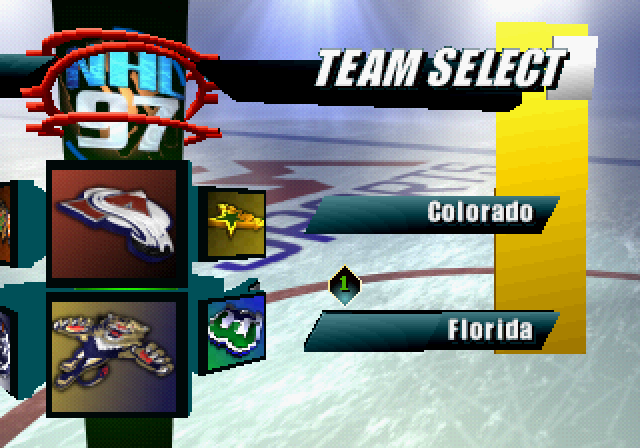
Select the teams you want to match up in the game. You can choose from all 26 NHL teams plus the Eastern and Western conference All-Star squads.
To select a team:
1. D-Button to move your controller icon to a
.png)
















.png)
.png)
.png)




