GAME SET-UP
1. Set up your SONY PlayStation™ according to the instructions in its instruction manual. Make sure the PlayStation™ power is OFF before inserting or removing a compact disc. 2. Insert the STAR FIGHTER™ disc and close the CD door.
3. Insert game controllers and turn on the PlayStation™. Follow on-screen instructions to start a game. HEY, SPACE JOCKEY!
So, you think you're the ace test pilot in FedNet Space Force? Well, we're going to make you prove it, you runny-nosed excuse for a soldier! The boys in R&D have dreamed up a new toy for you. It's called the Star Fighter— a combo planetary/space assault vehicle, and it's armed to the teeth! MAIN MENU
Use the Main Menu to start a new game, load a saved game, and configure the system. Use the Directional Button UP/DOWN to scroll through the options and press the X Button to select one. Pressing the ▲ Button backs you up to the previous menu.
PLAY GAME
There are 45 missions in Star Fighter, each one guaranteed to test your pilot skills to the max! You start with a few training missions and work your way up to the "really interesting" advanced ones. To start a mission, highlight "Play Game" and press the X Button.
A list of 15 available missions appears. You'll have to start at the bottom, rookie! If you can keep your bird in the air, you'll get more choices for your next mission. Remember, you have to finish all the missions in a row before advancing up to the next row.
When you select a mission, you get a briefing. Listen good, long and hard because you'll hear the objectives for the mission. Once the information has penetrated your brain, press the X Button at any time to skip the briefing and start the game.
When you complete a group of 15 missions, your performance will be evaluated and the top brass may decide to keep you around if you haven't messed up completely. Chances are you'll even get a promotion, and if you do really, really good, you'll get your name in the Hall of Fame! Your mama would like that, wouldn't she?
LOAD GAME
When you want to get back into the action, select this option. A list appears showing the seven possible saved game positions. Use the Directional Button UP/DOWN to highlight the game you want to play and press the X Button to start from the last saved position. If you decide not to play a saved game, move the cursor to "Exit" and press the X Button to return to the Main Menu.
SAVE GAME
If you're scared you won't make it through the next mission alive, select this option. You will be asked to name your file, and enter your selection by highlighting the green arrow. If all the slots are full, just highlight an old game that you are willing to delete and the new game will overwrite it.
CONFIGURE
We know you space jockeys like to fiddle with your controls. Select Configure on the Main Menu to bring up the Configure Game menu and then mess with the game as much as you want. Configure Sounds
Selecting Setup Sound brings up the Configure Sound menu. You can change these options:
MUSIC
Toggle music on/off during the game. Use the Left/Right Directional Button to adjust volume.
SOUND
Toggle the sound effects on/off during the game. Use the Left/Right Directional Button to adjust volume.
SET TRACKS
Turn any or all of the music tracks on or off. You can set the tracks to play in any order you wish by turning them all off and then on again in the order you want. Highlight "Exit" and press the X Button when you want to leave.
EXIT
Return to the Main Menu.
Set FLIGHT CONTROLS
When you select Setup Controls, the Set FLIGHT CONTROLS menu appears. Reconfigure the fighter controls in any way you like by using the Directional Button to highlight a control and pressing the button you wish to assign to that control.
You can set Vertical Control to either Normal or Flipped. At Normal setting, pressing the Directional Button UP makes your ship dive and DOWN makes it climb, like real flight controls. If you can't handle that, use the Flipped setting, where directions are reversed. Use the Directional Button LEFT/RIGHT to toggle between settings.
PILOTING THE STAR FIGHTER
The Star Fighter is the most advanced flying machine ever created. Yet it is amazingly simple to operate. Even you should be able to keep it from kissing the ground!
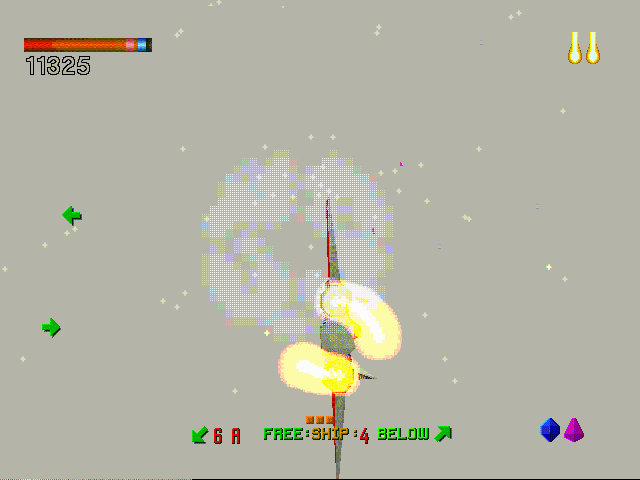
The bar at the upper left corner of the view screen shows the current status of your shield. As you take damage, the bar gets smaller. You buy the farm when the bar is completely gone. Fortunately for you, damage is automatically repaired over time. You have three lives at the beginning of the game.
If you are using a weapon that fires ammunition, the number of remaining rounds appears at the upper right corner of the view screen. If you run out of ammo, you may be able to get more... if you're smart enough and lucky enough!
If you are on a mission with a fixed time limit, the time appears in the lower left corner of the view screen.
Your THREAT INDICATOR
.png)

.png)
.png)
.png)
