Setting Up
Console Top View
Console Front View
PlayStation Setup
1. Set up your PlayStation game console according to the instructions in its Instruction Manual. Connect a memory card if you want to save your games. 2. Insert the World Cup Golf disc and close the CD door.
3. Insert a game controller and turn the PlayStation game console On. Follow the on-screen instructions to start a game. Starting World Cup Golf
Press the open button to open the CD tray, place the World Cup Golf CD in the tray (label up) and close the CD tray. Turn on the power switch on the Sony PlayStation. The power light should come on. After a few seconds the PlayStation logo should appear on screen, followed by the title sequences. Saving Game Data
World Cup Golf allows you to save Tournaments and player statistics to a memory card. If you do not have a memory card installed you will be unable to save game data, although you will still be able to play the game normally.
If a card has been installed that does not have sufficient room left to store information, you will be requested to use the Save Game facility in the Options menu. This will allow you to delete space on the memory card.
•
N.B. Press button X to skip the titles sequence.
Controlling the Game
Main Menus
To select an option from a menu, move the D-pad UP/DOWN/LEFT/RIGHT to highlight the appropriate icon and press button X.
Press the button O to return to the previous menu.
To immediately play World Cup Golf, select Quickstart.
Icons and Menu Dialogue Boxes
World Cup Golf is played by utilizing in-game icons (by pressing button) to prompt actions or activate menu dialogue boxes. Menu dialogue boxes are made up of icons which prompt actions or activate submenu dialogue boxes.
•
Land slope Indicator Icon
Press button O to open a menu or submenu dialogue box, and button X to close. Before closing a menu dialogue box, you must first close all open submenu dialogue boxes.
Use button to toggle all icons on and off screen.
Playing World Cup Golf
The quickest way to start playing golf is to select the Quickstart option from the Main Menu.
The Quickstart option allows you to play a round of golf at Hyatt Dorado Beach as an amateur (the computer will select a suitable club for each of your shots, but can be overruled using the Swing Meter box).
•
N.B. You can skip the hole introduction sequences by pressing button X.
Hitting the Ball
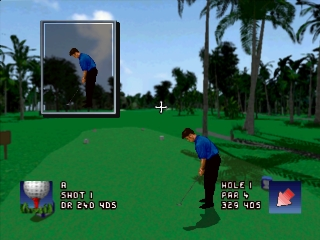
When playing a shot, the first thing to decide is in which direction to hit the ball. In World Cup Golf a perfectly hit shot will travel towards the cross-hair (see fig 1), although wind, fade, draw, hook and slice may cause the ball to deviate from this path.
Press button X to view the Cross-hair Information box, which displays the distance and height of the cross-hair relative to your ball, as well as the type of surface directly beneath it and the wind velocity. Control the cross-hair by moving the D-pad UP/DOWN/LEFT/RIGHT to nominate the direction of your shot.
Press button X again to view the Swing Meter box.
Club Selection and Power
Select your club for the shot by moving the D-pad LEFT/RIGHT to cycle through club selection. Now move the D-pad UP/DOWN to nominate the power of your shot, as indicated by the % figure.
Press button X to begin your backswing. The golf ball icon starts moving clockwise around the meter. When the ball reaches the desired position on the meter, press button X again to begin the forward swing.
You must press button X for a third time to execute your shot, as close as possible to the white ball marker at the base of the swing meter, which represents the point of contact between club and ball. If the marker stops to the left or right of the white ball icon, your shot will hook or slice.
Putting
Having played one shot, everything remains much the same until you reach the green. Here you will notice a few differences. As with previous shots, the first decision is in which direction you are going to hit the ball. Once again, the ball will start its journey towards the cross-hair.
World Cup Golf supplies a mechanism for reading the greens. Press and hold button O on the Land Slope Indicator (LSI) icon (see fig 1) and a circle with an arrow in the middle (the LSI) appears. Hold button O and move the LSI with the D