Getting Started
Note: Illustration may not match all PlayStation 2 console types. For owners of SCPH-70000 series PlayStation 2 systems, refer to the setup instructions supplied with your system. Set up your PlayStation® 2 computer entertainment system according to the instructions in its Instruction Manual. Make sure the MAIN POWER switch (located on the back of the console) is turned ON.
Press the RESET button. When the power indicator lights up, press the OPEN button and the disc tray will open. Place the UNDER YOUR SKIN™ disc on the disc tray with the label side facing up. Press the OPEN button again and the disc tray will close.
Attach game controllers and other peripherals, as appropriate. Follow on-screen instructions and refer to this manual for information on using the software.
Memory Card
To save game settings and progress, insert a memory card (8MB) (for PlayStation®2) into MEMORY CARD slot 1 of your console. You can load saved game data from the same memory card or from any memory card containing previously saved games.
Game Overview
•
TRANSFORM IN THE MYSTERY CIRCLE!
•
USE ITEMS TO CREATE PANIC!
Arriving on Planet Earth
Turn on the power to the console, load the game and press the START button. The Main Menu will display its options for getting into the game. Use the left analog stick or directional buttons to select, and press the button to confirm.
•
SINGLE MODE — Play through the game by clearing the stages in order.
•
VS MODE — When two players want to battle head-to-head, this is the mode for you!
•
BONUS MOVIE — Watch bonus footage of some coming attractions.
•
OPTIONS — Adjust a variety of game settings, view game records, and save and load game data.
Option Mode
•
Move the left analog stick or directional buttons ↑↓ to make your selections, and to change the setting.
•
Some options may not be available, depending on whether you're in mid-game or between stages.
Controller Settings
Toggle the controller's vibration function ON/OFF and toggle Camera operation between AUTO and MANUAL modes.
Sound Settings
Toggle the sound between MONO and STEREO, and adjust the volume of background music (BGM) and sound effects.
Record
•
View records of each stage.
•
Check on how to use the game items (available from the in-game Options screen).
Give Up
Quit in mid-game (available from the in-game Options screen).
Load Game
Load your saved game data.
Save Game
Save your most recent game data.
•
In order to save data, you must be using a memory card with at least 55KB of free space. •
You can save up to three games on one memory card. Previously saved data will be lost if you choose to overwrite it with new data.
•
Do not remove the memory card, reset the game or turn off the power while data is being saved or loaded.
Single Mode
Take on the challenging tests and clear eight stages to win the coveted title — MASTER OF MISCHIEF! You'll be tested in match-up battles and cooperative play depending on the stage you're playing.
Saving Your Game
When you clear a stage or end a game, you can choose whether or not to save your game data. Think about it first ... every save lowers your final ranking!
Collecting Coins
•
Collect the required amount of Coins within the time limit!
•
If a rival appears, cooperate to rob your pursuers of their Coins!
VS Mode
If you want a rollicking battle, this is it! Select the characters and stages for each battle. This is your chance to go head-to-head with a buddy!
At first, the alien characters and stages you can select are limited. But making progress in Single Mode will unlock the characters and stages you clear so you can use them in VS Mode.
•
Choose 2 PLAYER to battle a buddy or try to beat the COMPUTER.
•
In 2 PLAYER battles, both players select their character. Against the COMPUTER, select your own character and then select your opponent.
•
Select a stage to battle in.
Scanning Humans
If you manage to grab hold of a Human that you want to scan, you'll see the items that the Human is holding in the Scan Lock Marker. Press the button at this time to scan the Human.
A scanned Human is sucked into the Scan Gun where he or she remains until you transform into that Human. While you have Scan Data stored up, you cannot scan any more Humans until you transform. If you scan a Human and stock its data as Scan Data, an icon will appear for it.
Transforming
When you have stored Scan Data and you enter the MYSTERY CIRCLE of the UFO that appears, you can transform into a Human.
•
In Human form, you can give the slip to angry Humans who chase you.
•
When you transform, all items on your Item List will be switched over to the items of the Human you transform into.
Using Items
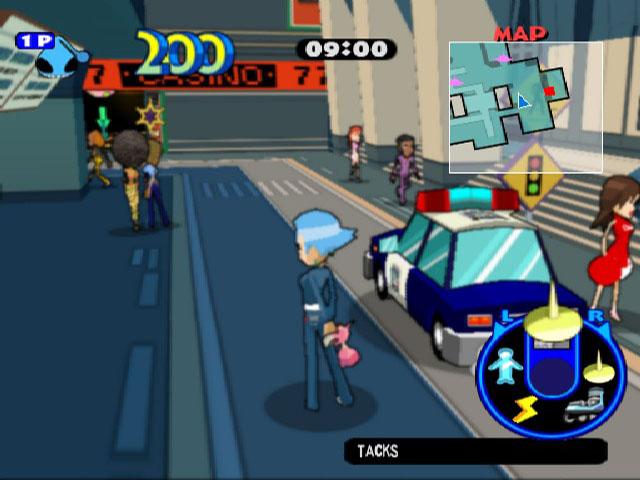
Press the L1/R1 buttons to select items to the left/right. Press the button to use
.png)


.png)
