Locking Swords
When you lock swords with your opponent, start pressing the B button repeatedly.
This will result in one of the following:
•
Slash opponent (weak slash)
•
Flip opponent's sword away
Press the B button as if your life depends on it. If you slip up, your sword will be flipped away!
Sword-Stopping
When your opponent is about to attack you and you have no sword, quickly press the B button. If your timing is right, you'll be able to catch your opponent's sword with your bare hands and thrust them away.
Your sword has limited durability. If you push it past its limits, it will break (at the end of the duel it will be returned to normal).
What You See On Screen
•
1 Life gauge: Every time you are injured your life gauge decreases. If it goes down to zero, YOU LOSE!
•
2 Character Name: Shows the name of your character.
•
3 Victory Mark: Lights up when you win a duel.
•
4 Match Timer: Shows the time remaining in the current duel. When the timer reaches 0, the duel is over.
•
5 Rage Gauge: See page 12 for details!
Game Link Mode (1P VS 2P)
To play in GAME LINK Mode, you need the following items:
•
2 Game Boy "SAMURAI SHODOWN" cartridges
•
Connect your cable according to the above diagram, then insert the Game Pak into your Game Boy and turn the power ON.
•
At the Game Mode Selection screen, each player must choose "1P VS 2P".
•
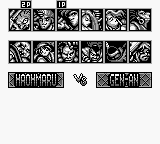
Player 1 selects his/her character first, then Player 2. The battle will then begin.
Using the Super Game Boy
Correctly insert the Game Boy Game Pack into the Super Game Boy. Next, insert the Super Game Boy into the Super NES and move the power switch on the Super NES to the ON position.
For further operation information, please consult your Super Game Boy and Super NES instruction manuals.
If you have a Super Game Boy and you want to play a versus battle with a friend on your SNES, Select VS MODE.
.png)

 (Beta) (SGB Enhanced).png)

.png)


_1.png)