HOW TO START
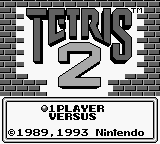
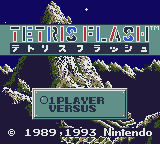
To begin your game, insert the Game Pak into the Game Boy unit. Move the power switch on the Game Boy to the ON position to display the title screen.
When you select 1-Player on the title screen, the display will change to NORMAL, PUZZLE. When you select VERSUS, the screen display changes to 1P VS 2P, 1P VS COM. The Menu Screen appears when you select either the 1-Player or Versus Modes.
The CPU Player Select Screen will appear when you select the 1P VS COM mode. Use the A Button or START to make your selections.
If the Game Link Cable is not attached to the Game Boy unit, the 1P vs. 2P mode may not be selected.
Display Menu Screen
This is the NORMAL GAME screen.
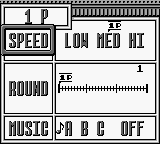
On the Menu Screen, use the +Control Pad to move the cursor. Use the A-Button or START to make a selection.
•
SPEED: This setting determines how fast the blocks fall.
•
ROUND: The current game's difficulty level increases as the round number increases.
•
MUSIC: This selects the music that is played during the game. Select "OFF" if you want to play without background music.
•
NEXT: In the Puzzle Game, NEXT is displayed on the screen rather than SPEED. You can select AUTO or MANUAL to determine whether the Falling Blocks will appear automatically or only when you press DOWN on the +Control Pad.
In the competitive modes (1p vs. 2p and 1p vs. CPU), the players can individually select the SPEED and ROUND settings. This is very useful if you want to handicap yourself or your opponent.
BLOCK TYPES
The three different types of blocks that appear in this game are Flash Blocks, Fixed Blocks, and Falling Blocks. Each of these blocks appear in black, gray, and white.
FLASH BLOCKS
The Flash Block is a flashing round block. It has a different effect in the 1-Player and Competitive Modes. Try eliminating these blocks to see what happens.
FIXED BLOCKS
The Fixed Blocks appear on the screen before the game begins and restrict the movement of the Falling Blocks. You can win the game or advance to the next stage by eliminating all Fixed Blocks on the screen.
FALLING BLOCKS
As displayed below, there are nine different forms in Falling Blocks.
1.
2.
3.
4.
5.
6.
7.
8.
9.
Falling Blocks consist of four pieces and fall from the top of the screen. Blocks 7, 8, and 9 are separated at the circled point when they touch another block in the playing field.
HOW TO ELIMINATE BLOCKS
You can eliminate blocks by moving the Falling Blocks into a position where three or more of similar shaded blocks create a horizontal or vertical line.
•
ex. 1: Arrange three black blocks vertically...... to eliminate the black blocks.
•
ex. 2: Arrange three black blocks horizontally.. to eliminate the black blocks.
HOW TO PLAY THE NORMAL GAME
To advance in the Normal Game, you must move the Falling Blocks and position them into rows and columns causing similarly colored Fixed and Flash Blocks to disappear. If you eliminate a Flash Block, all Fixed Blocks will disappear allowing you to advance to the next level.
Your game ends, however, if you allow the blocks to build above the top of the playing field.
Game Play Screen
If you erase a Flash Block, all blocks of the same color in the field will disappear. Remove the black Flash Block so all black Fixed Blocks will disappear. Flash!
Scoring System
Normal game
•
Falling Blocks: 10 points each
•
Fixed Blocks: 20 points each
•
Flash Blocks: 40 points for each Fixed Block erased following the Flash Block.
Chain Reactions
The score for each Chain Reaction is determined as follows: (# of blocks eliminated) x (points for each block) x (chain reaction bonus).
Chain Reaction Bonus
Flash Blocks Eliminated by Chain Reaction
The score is determined as follows: (# of Fixed Blocks eliminated with Flash Blocks) x (# of chains) x (40 points).
Bonus Score
You'll receive bonus points for finishing a stage quickly.
You do not receive points for eliminating blocks that disappear after you remove a Flash Block or 6 consecutive blocks (see special technique on page 25).
HOW TO PLAY THE PUZZLE GAME
In the Puzzle Game, the object is to make all Flash Blocks disappear from the field while using the fewest number of Falling Blocks. The basic rules follow the Normal Game, however, the player can only use 100 Falling Blocks in each round.
During game play, you can restart the current round by pressing the SELECT Button. "TRY AGAIN?" will be displayed. If you select YES, you can restart the current round. If you select NO, your game will end. Use the A-Button or START to make your selection.
NEXT
Selects how next Falling Block will appear.
•
AUTO: Falling Blocks will drop automatically.
•
MANUAL: Falling Blocks will drop when you press Down on the Control Pad.
.png)

.png)
 (SGB Enhanced).png)








 (SGB Enhanced).png)
.png)


.png)

_1.png)