Starting a New Game
The first time you play the game, you will need to choose a Profile by moving the butterfly cursor over Profile on the Main Menu and pressing the A Button. Once you select a profile icon, move the cursor over it and press A to load it. Using a profile saves your progress, so it is highly recommended.
As you play, your profile will be saved automatically after each mini-game. This allows you to pick up where you left off and replay any mini-game as many times as you like.
Loading a Saved Game
If you have played before, highlight your profile on the screen by moving the butterfly cursor over it and pressing the A Button. Then, move the cursor over the LOAD icon and press the A Button to load your saved game.
Deleting a Saved Game
To delete a saved game, highlight the profile by moving the butterfly cursor over it and pressing the A Button. Move the cursor over the DELETE icon and press the A Button to remove that saved game.
The Main Menu
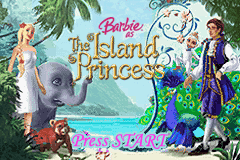
You will start on the Main Menu, where you can move the butterfly cursor over Start and press the A Button to select it. You can play mini-games in four different locations: Deserted Island, Royal Ship, Apollonian Castle, and Royal Greenhouse. As you play, you will help Barbie along on her Island Adventure. Completing games unlocks special rewards and the next part of the story, while also unlocking special items for the Dressing Room.
Options
Select this option to change game settings by moving the butterfly cursor over the slider bars with the +Control Pad and pressing the A Button.
•
Music Option: Adjust the volume of the music.
•
Sfx Option: Adjust the volume of sound effects and voices.
•
Credits: View a list of all people who worked on the game.
The Dressing Room
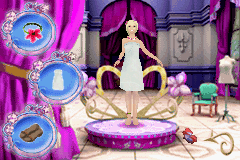
In the Dressing Room, you can dress Barbie in different outfits and accessories. You unlock more items by completing mini-games and achieving good scores. •
Choose a Dressing Room Item: Use the +Control Pad to move the cursor over category icons (accessories, dresses, shoes) and press the A Button to scroll through.
•
Return to Previous Menu: Press the B Button.
The Pause Menu
You can pause a mini-game at any time by pressing START. The menu displays the following options:
•
Continue: Return to the current game.
•
Quit: Quit the current game and return to the location menu.
Playing the Games
The following sections detail the mini-games available in each location. Deserted Island Location
•
Pearl Plunge: Swing baskets left, right, up, and down to collect treasures while avoiding fish and crabs.
•
Cast the Net: Press the A Button.
•
Move: Use the +Control Pad.
•
Coco Catch: Move Rosella left and right to catch fruit in her basket.
•
Move: Use the +Control Pad.
•
Island Tales: Help Prince Antonio learn animal language by moving and rotating shapes into the correct places.
•
Rotate the shape: Press the L or R Button.
•
Move the shape: Use the +Control Pad.
Royal Ship Location
•
Galley Grab: Grab fruit and place it in the correct barrel on the ship while avoiding birds.
•
Move: Use the +Control Pad.
•
Bebop Bubbles: Move left and right to bounce bubbles. Bounce them five times in a row for bonus points.
•
Move: Use the +Control Pad.
•
Ringing Bells: Ring the bells in the same order as Rosella and her friends.
•
Choose a Bell: Press the +Control Pad.
•
Ring a Bell: Press the A Button.