The Objective
This is an action game where you control Ultraman. Complete each stage by controlling Ultraman's kicks, punches, and special weapons. There are nine stages and three levels of difficulty. Within each stage there is a monster to be defeated. Complete the 9th level in the Expert mode to save the world from the mutant monster menace.
Starting the Game
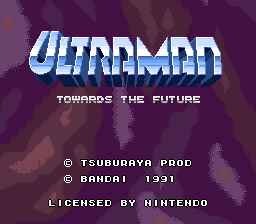
Place the game cartridge into the Super NES console and turn the power on. After the Bandai logo screen, the title screen will appear. Push start on the title screen to start the game. The Monsters
When the start button has been pressed, the game screen will then display the stage number you are entering and also give a profile of the monster you are going to fight. Press the start button during this screen to transform into Ultraman and prepare for battle.
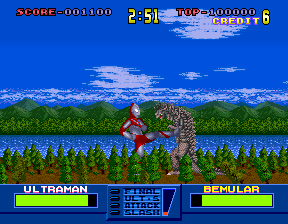
Ultraman Power Meter
In the lower left hand corner of the screen, Ultraman's power meter is displayed. When a monster hurts Ultraman, his energy in the power meter decreases.
Ultraman will die if he loses all of his energy. Ultraman's energy will restore if he isn't hurt for a while.
Monster Power Meter
In the lower right hand corner of the screen, the monster's power meter is displayed. When Ultraman hurts the monster, its energy in the power meter decreases. The monster's energy will restore if he isn't hurt for a while.
Stage Clear
When the monster's power meter energy is completely gone, the word FINISH will appear inside the power meter box. While the word FINISH is showing select to the L4 special weapon and fire it at the monster to defeat him.
Note: Any other special weapon will not defeat the monster - you must use L4.
•
Power Meter Energy Completely Gone
Your Score
After you clear a stage, your score will be calculated. Time left x 40 points + Ultraman life x 8000 points + Ultraman power meter (1 line x 40 points).
Game Over
Game Over will appear when Ultraman dies with no life left. One life is added to Ultraman for every 50,000 points.
Option Screen
To access the option mode, press and hold select button during the title screen and while doing that hit start button. Once in the option mode move the cursor up or down using the control pad to select a desired option.
Once selected to a desired option, push left or right on the control pad to change the option to the way you want it.
Option Mode Settings
•
1 DIFFICULTY: There are three modes of difficulty: Easy, Normal, and Expert. Select your choice by using right or left on the control pad. Then go to exit and press start to begin. Make sure to play all modes to see the three different endings. Each mode has a different ending, expert mode has the best ending.
•
2 TEST MODE: For each stage you have cleared you may sample your fighting skills at another difficulty mode. Simply select your test fight stage and push start. If you are just starting out, stage one is your only choice. Note: You will return to the option screen before you end the stage. •
3 SOUND TEST: All sound effects can be sampled simply by pushing the start button. Use left and right on the control pad to select desired sound effects.
•
4 MUSIC TEST: All background music can be sampled by pushing the start button. Use left and right on the control pad to select desired music.
•
5 EXIT: Push start button to return to the title screen.
.png)

.png)
.png)
.png)
