Getting Started
•
Insert your CAPCOM's Soccer Shootout Game Pak into your Super Nintendo Entertainment System. Turn the power on. •
Press the Start button to advance to the MODE SELECT screen. Press the control pad to highlight a game mode. Press the A button or the Start button to select a mode. Scout the following sections for more details on each mode.
Mode Selection
This guide will give you a basic understanding of the different ways to play CAPCOM's Soccer Shootout. Each mode of play is described in further detail throughout this instruction manual.
Exhibition
In Exhibition mode you may play a single game against the computer or with up to four players with a multi-player adaptor. If you prefer to watch a match to learn strategies used by the computer select CP. vs. CP.
To play a single exhibition match, use the control pad or the SELECT button to highlight EXHIBITION from the MODE SELECT screen. Press the A button or START to choose this mode.
Next select the type of game you would like to play by pressing the control pad up or down or use the SELECT button. Press the A button or START button when you have decided which type of game you want to play.
You can play the following player configurations:
•
Two-player game: {1P VS 2P} or {1P 2P VS CP}
•
One-player game: {1P VS CP}
•
Three-player game: {1P 2P VS 3P}
•
Four-player game: {1P 2P VS 3P 4P}
For multiple-player games you must use a multi-player adaptor.
Now select the length of each half between 3, 5 or 10 minutes and choose between two different stadiums to play in. Each stadium has a different grass surface which affects the speed of the ball.
After you have selected the three aspects of your EXHIBITION match, a final check will appear. This is your final chance to change any of these aspects before playing the game. Before you reach the Final Check you may take a step back at any point by pressing the B button. Should you not require any changes, select YES at the final check.
The flags of the twelve nations will then appear for you to select. Choose the team you would like to use. As you move the cursor from flag to flag, the name of the country will appear at the bottom of the screen. Next the player and team set-up screens appear.
Main Game
This mode of play allows you to choose from the 12 international teams and play a 22 or 44 game season against the computer. You can have one or two player teams, with the maximum being 4 one-player teams or 2 two-player teams. You may also create a combination of one and two player teams.
After selecting this mode, you will be asked to start a NEW GAME or continue a game from a PASSWORD. If you are starting a NEW GAME, the team select screen appears. Here you can select the number of one-player or two-player teams from the maximum of four players.
Select one-player teams first. With the yellow arrows highlighting 1 PLAYER 0 TEAM, press left or right on the control pad to change the number of one-player teams. For example, if you change 0 TEAM to 3 TEAM this means there will be 3 one-player teams competing in the season. Thus, at the bottom of the select screen you will see 1P 2P 3P. Two-player teams will appear as 1-2P or 3-4P, respectively.
Press the control pad down to select the number of two-player teams. When you have selected a number of one-player teams it affects the number of two-player teams you may select. For example, if you have 1 or 2 one-player teams, the most two-player teams you may select is 1. If you have no one-player teams, you may select up to 2 two-player teams.
After selecting the number of teams for the season, select the time for each half throughout the campaign. Then, for a short tournament select 22 games or for a long tournament select 44 games. After a full round of 6 games has been completed, you may save your progress with a password.
As in the EXHIBITION mode the B button will take you back one step, but once you select YES at the Final Check your Main Game is set unless you hit RESET. Next select your team or teams for the season.
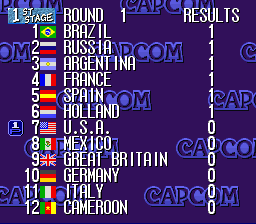
The schedule for the 1st stage will appear automatically, and the first game of the round will lightly flash. If the game involves two teams you did not select you have the opportunity to watch the demo of the game or just to see the final score. Press the control left or right to choose "YES" or "NO" to signify whether you want to WATCH THIS GAME.
All-Stars
Every international team in Soccer Shootout has those special players who excel game in and game out. To recognize these players you may play an exciting exhibition All-Star game where you can select which players make it onto the teams.
You can choose from two set All-Star squads or select a team made up of players randomly selected from all the teams.
The set-up for the All-Star game is identical to the EXHIBITION mode. Once you reach SELECT A TEAM, you have a choice of four different All-Star teams to choose from:
-
.png)

 (Beta).png)


.png)


.png)
.png)
.png)

.png)
.png)
_1.jpg)

.png)

.png)
.png)
.png)
