Game Options
Options allow you to configure the game.
•
From the Menu screen press the Control Pad to highlight "Options."
•
Press any button to advance to the Options screen.
Options Screen Settings
•
Inning: Choose from a 9, 7, 5, 3, or 1 inning game.
•
Called Game: Will call the game if one team scores 10, 8, 6, 4, or 2 more runs than the other team.
•
Exit: Exits the Option screen.
Adjusting Options
•
Press the Control Pad up/down to highlight the Option to be changed.
•
Press the Control Pad left/right to change highlighted Option.
•
Highlight Exit and press any button to return to the Menu screen.
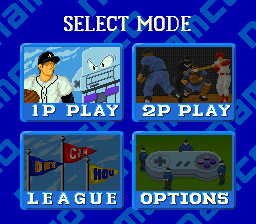
1P Play Mode
Select this mode for a challenging game against the computer.
•
From the Title screen press Start to advance to the Menu screen.
•
Press the Control Pad to highlight 1P vs Computer.
•
Press any button to enter selection.
•
Press any button to advance to the Select Team screen.
Selecting Your Team
•
Press the R button to view National League Teams.
•
Press the L button to return to the American League teams.
•
Press the Select button to change Home/Visiting status.
•
Press the Control Pad to highlight the team you wish to play.
•
Press any button to enter highlighted team.
•
Press the Control Pad to highlight the computer's team.
•
Press any button to enter the computer's team and advance to the Select Stadium screen.
Selecting Stadium and Pitcher
•
Press the Control Pad to highlight a stadium. Information about the stadium appears in the bottom right corner.
•
Press any button to select highlighted stadium and advance to the Select Starting Pitcher screen.
•
Press the Control Pad to highlight a pitcher.
•
Press any button to select highlighted pitcher and advance to the Select Starting Lineup screen.
Managing the Lineup
•
Press the A button to accept the starting lineup.
•
To change the lineup, highlight the player to be changed with the Control Pad and press the A button.
•
Press the Control Pad to highlight the player to be switched with previously highlighted player. Press the A button.
•
Press the Control Pad to highlight Exit.
•
Press the A button to begin the game.
2P Play Mode
Pick your favorite team and go head-to-head with a buddy. Take control of the Major Leagues.
•
Follow the procedure for the one player game.
•
Player 2 enters selections instead of the computer.
League Play
League play is a one player mode that gives you the chance to play a season. To start out, press the Control Pad to highlight a team then follow the same procedure as a one player game.
Continuing League Play
To continue a league play, the Password option will be highlighted.
•
Press any button to advance to the Password screen.
•
Press the Control Pad to highlight characters of the password.
•
Press any button to enter highlighted characters.
Pinch Hitters and Runners
•
Press the Start button to call time out. A menu will appear on the side of the screen.
•
Press the Control Pad to highlight Pinch Hitter or Pinch Runner.
•
Press the Control Pad to highlight the pinch player.
•
Press any button to return to the game.
Running Bases
•
While pressing the Control Pad to the runner's target base, press the B button to advance to that base.
•
While pressing the Control Pad to the runner's starting base, press the A button to return.
Stealing Bases
•
While pressing the Control Pad to your target base press the B button to steal.
•
Press the Control Pad to the base you started from and press the A button to return.
Post Game Show and Newspaper
After the game check out the score on the Post Game Show. For more details on the game, pick up a Newspaper.
•
Press the A button to advance from the Post Game Show screen to the Newspaper screen.
•
Press the Control Pad to view different areas of the paper.
•
Press the B button to zoom in.
•
Press the A button to zoom out.
•
Press the X button to return to the headline.
•
Press the L/R button to rotate the paper.
Newspaper Rotation Note
If you win the game, you can rotate the paper horizontally. If you lose the game, you can only rotate the paper to the left or right.
.png)

.png)
.png)
.png)
