Getting Started
Turn OFF the power switch on your Nintendo® Game Boy® Advance. Never insert or remove a Game Pak when the power is on.
Insert the Game Pak of Virtua Tennis™ into the slot on the Game Boy Advance. To lock the Game Pak in place, press firmly. Turn ON the POWER switch. The logo screens will appear (if you don't see them, begin again at step 1). When the title screen appears, press START to proceed to the Main Menu.
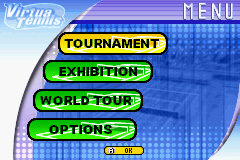
Thank you for purchasing Virtua Tennis. Get ready to compete in tournaments, exhibition matches and even go out onto the World Tour. Do you have what it takes to be the number one ranked player? In order to reach the top you will have to hone your skills in eight mini-games. The game is waiting, find out if you can become the best of the best. Main Menu
Tournament
Compete in singles or doubles tournament. Select your player(s) from the list of twelve players (you can unlock four more players), including Venus and Serena Williams. See page 9 for more information.
Compete in a single elimination tournament against some fierce competition. In a singles tournament, you will have to win four consecutive matches while in a doubles tournament you will have to win three consecutive matches. As you move deeper into the tournament, your opponents will get tougher and tougher to beat.
After selecting Tournament from the Main Menu, you will first select either a singles or doubles game. Then you will get to pick which tennis player(s) you want to control. Each player has his own strengths and weaknesses, so make sure you pick a player that fits the type of game you like to play.
Exhibition
Compete in a singles or doubles match. See page 10 for a description of the Exhibition setup menu. You can also play 2 to 4-player games with the Game Boy Advance Game Link® Cable. See page 13 for more information on multi-player setup.
After selecting Exhibition from the Main Menu, you will choose to play a singles or doubles match. After setting up the rules for the game, you will pick your player. You can then set the location of your match. Play on different courts and surfaces from around the world.
World Tour
Create a male and female tennis pro and compete on the world stage. You start out with a player ranking of 300. Can you become the number one ranked player in the world?
Options
Change the game settings and check the sounds. See page 29 for a further description.
Exhibition Mode Details
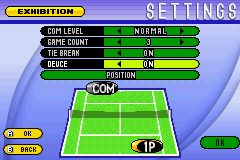
EXHIBITION
•
COM Level: Easy, Normal, Hard, Very Hard
•
Position: Choose to serve or receive first
Exhibition Multiplayer Games
Get together with your friends for some intense tennis action in the Exhibition game mode. One to four players can compete in competitive and cooperative Singles and Doubles matches. Make sure you use the POSITION option on the setup menu to determine which side of the net each player will start.
In order to play a Multiplayer game, each player will need a Game Boy® Advance game system and their own copy of Virtua Tennis™. In addition, one Game Link® Cable is required for two players, two Game Link® Cables for three players, and three Game Link® Cables for four players to compete. Each player needs to choose EXHIBITION from the Main Menu in order to compete against each other. An icon for each player (1P, 2P, 3P, and 4P) will appear on the Exhibition setup screen. The player designated as 1P can change the settings for the upcoming match.
Note: For a 3 or 4 player game, all players should enter from the match type screen to the Exhibition set-up screen simultaneously. The player icons on the Exhibition set-up screen may take anywhere from 5-10 seconds to appear on all Game Boy® Advance systems.
MULTIPLAYER SETUP
Two to four players can compete in an Exhibition match. Use the POSITION option to determine which side of the net (or which Doubles team) each player will compete from. After selecting OK from the bottom of the setup screen, each player can now choose a Pro to compete as. Finally, select a stage using the Control Pad and press the A Button to head to the court.
Pro Tip
There are several courts to choose from in Exhibition Mode, each with a different playing surface. You can unlock several other courts by purchasing them with your winnings in the World Tour mode.
Creating Your Players
Before beginning your World Tour, you have to create a male and female player. Your characters will be beginners on the tennis scene and will be ranked 300th in the world. You'll have to play mini-games to increase your characters' skill and compete in tournaments to increase your ranking.
When you are done entering your character's information, select END to continue. After you've entered the info for your male player, you will have to repeat the process for your female player.
•
Name: Enter your character's name via the keyboard. Use the A Button to select the letter. Use the B Button to delete the previous letter. Select END when you are finished.
•
Body: Change the outfit and skin color of your player.
•
Plays: Is your character right-handed or left-handed? You can also select your player's main strength - Power, Footwork, Control, or Stamina.
•
Color: Choose the color of your player's outfit.
Pro


 (En,Fr,De,Es,It).png)
.png)
 (En,Fr,De,Es,It).png)






_1.png)




.png)



 (En,Fr,De,Es,It).png)
.png)

_1.png)
.png)

.png)


.png)
_1.png)
.png)
 (En,De,Es).png)


.png)