Town Development Basics
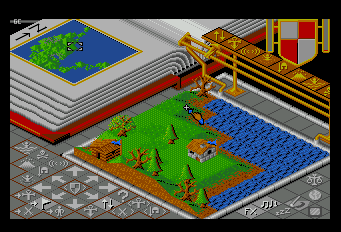
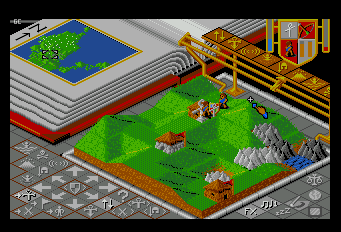
Head to the Leader's location using the quick access icon. Flatten the land around the Leader to create a flat area, which prompts the Leader to build a structure.
•
The God race Leader has a small symbol.
•
The Demon race Leader has a small symbol.
Expanding Population and Structures
Humans live inside buildings and reproduce. When the population exceeds the building's capacity, humans spill out to build new structures.
•
Redevelop the land to make buildings grander once a new building is finished.
•
Repeating this cycle increases the number of humans and buildings.
•
The final stage of a grand building is a Fortress City.
Guiding Human Movement
Humans cannot be moved directly. Use the "Symbol of the God" or the "Symbol of the Devil" to guide them in a desired direction.
•
Move the Symbol to the destination.
•
The Leader starts walking towards the Symbol.
•
Commoners follow the Leader.
Combat and Natural Disasters
Once the town is strong, initiate attacks against enemies.
•
Use the Symbol to command "Move forward" and "Fight."
•
Utilize natural disasters such as Volcanoes, Earthquakes, Floods, and Marshes to gain an advantage.
Game Modes Overview
There are three primary modes: Tutorial, Conquest, and Application.
•
Tutorial: For beginners to learn basic play.
•
Conquest: The main stage-clear mode.
•
Application: For custom map and setting conditions.
Tutorial Mode Details
This mode is designed for first-time players and starts from a lost state.
•
Press the 'RUN' button to start the game.
•
Conditions are set to allow easy clearing for beginners.
•
You can change settings for the God side and Demon side attack methods.
•
Re-run the game after changing settings to apply them.
Conquest Mode Settings
Conquest is a stage-clear mode where advancing to the next stage depends on clearing conditions. Memorizing displayed passwords allows for continued play.
GENESIS (Stage 0) Configuration
•
Map Name: Also valid as a password.
•
Map Number: Battle Number; start stage is '0'.
•
Terrain: GRASS PLANES, DESERT, SNOW AND ICE, ROCKEY (Lava).
•
Enemy Reaction Speed: From VERY SLOW to VERY FAST.
•
Enemy Population Growth Rate: From VERY POOR to VERY GOOD.
•
Construction Conditions: CANNOT, BUILT JUST (visible enemies), ONLY (above enemy), BUILT ON (humans see enemy).
•
Swamp Type: SHALLOW (extinguishing) or BOTTOMLESS.
•
Sea Type: FATAL (drowning) or HARMFUL (dangerous).
•
Allies: Presence of a person who can ally with the enemy.
•
Disaster/Structure Abilities: Earthquakes, Fortresses, Ships, Volcanoes, and Floods for enemy and ally sides.
Custom (Application) Mode
Create a world by changing settings or freely editing maps.
•
Access specific map editing details on pages 29-32.
•
Adjust terrain and operation characteristics.
Power Icons and Divine Miracles
Power Icons execute 'Divine Miracles' like Creation, Earthquake, and Harmagdon. Usage depends on accumulated Psycho-Power.
•
Check available icons via the Psycho-Frame in the top right of the screen.
•
Accumulate power by letting allies flourish.
Available Power Icons
•
A. Creation: Dig up or fill in land to create flat terrain for building.
•
B. Symbol: Move friendly symbols to guide the populace within the leader's range.
•
C. Earthquake: Causes shaking and building collapse within the close-up map.
•
D. Swamp: Creates a bottomless swamp on flat ground to trap enemies.
•
E. Knight: Turns the leader into a Berserker Knight that defeats nearby enemies.
•
F. Volcano: Creates a huge mountain and destroys buildings within the close-up map.
•
G. Flood: Raises sea level globally, drowning populace and submerging buildings.
•
H. Harmagdon: Moves God and Devil symbols to the center for the final war.
Game Controls and Icons
Use these icons to manage SFX, BGM, and game play conditions before starting.
•
A. Pause: Temporarily stops the game. Press RUN to unpause.
•
B. SFX: Toggles sounds like heartbeats, earthquakes, and rain.
•
C. BGM: Toggles background music.
•
D. Display: Adjusts screen position, color tone, and game speed.
•
E. Game Balance: Adjusts attack methods and activity speeds for both tribes.
Game Balance Settings (Standard and Advanced Modes)
•
Land Creation: COM side only.
•
Attack Towns: COM side only.
•
Attack Leader: COM side only.
•
Icon Usage: Toggles for Earthquake, Healing, Knight, Volcano, Flood, and Armageddon.
•
Aggression Level: Adjusts enemy invasion intensity (Low to High).
•
Reproduction Speed: Adjusts human reproduction rate in buildings.
•
Tribal Development: Adjusts enemy attack levels based on development.
Paint Mode: Map Creation
Select the Paint Mode icon to enter Paint Map Mode and edit the world.
•
Press button ① to cycle to the next icon


.png)
 (Alt 1).png)