SELECT A TURTLE
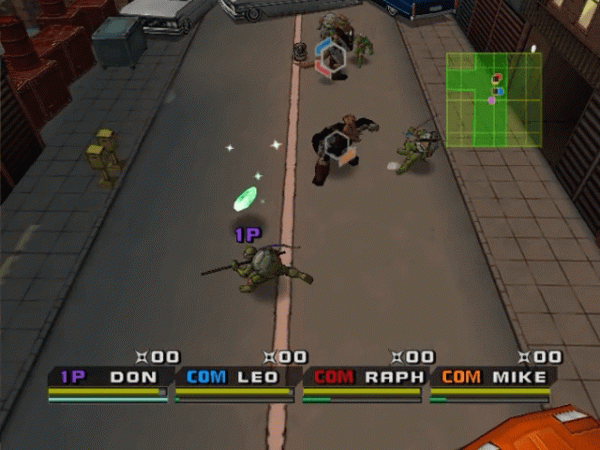
All Turtles participate in single-player games, but you control only one. Other Turtles are CPU-controlled. If multiple controllers are attached, each controller requires a Turtle selection.
Each Turtle has unique skills, combos, and a specialty weapon. Choose wisely.
The Turtle Selection screen appears during setup in Story and Challenge Mode. You can also access it by pressing the R Button during Episode/Mission selection in Story Mode, then choosing CHARACTER SELECT from the menu.
To select your Turtle:
•
Press Start/Pause to select the Turtle you will control.
•
Press the +Control pad to highlight a Turtle. Its HP and AT values are displayed.
•
Press the A Button to confirm your selection.
•
Press Start/Pause to proceed to the Episode/Mission Selection screen.
HP and AT Values
HP (Health Point) represents your Turtle's life. A higher number means more life.
AT (Attack rating) indicates the damage dealt with a single hit. A higher number means more damage.
STORY MODE
This mode takes you through New York City, a space-borne Triceraton base, and another dimension. It features epic battles and skill-based mini-games. There are three Episodes and over 60 Missions. You start with Episode 1, Mission 1, and others become available as you progress.
Episode and Mission Selection
Episodes and Missions must be played in sequential order. Completing a Mission makes the next one available.
To select an Episode and Mission:
•
Press the +Control Pad/ to highlight an Episode, then press the A Button.
•
Press the +Control Pad/ to highlight a Mission, then press the A Button to proceed to the Mission's start screen.
After clearing a Mission, you can replay it at any time. Completing specific Missions unlocks Challenge Mode. Completing Episode 1 unlocks Arcade Mode.
Menu
This menu is accessed by pressing the R Button during Episode and Mission selection in Story Mode or Free Battle.
•
Upgrade Turtles - Shows each Turtle's Health, Attack, Shuriken, Slots, and Ninja Scrolls status. Acquire Combos and Skills, and equip Ninja Scrolls here. •
Character Select - Change the character you control. Players can join or quit a game from this screen.
•
Options - The same Options menu accessible from the Title screen.
•
Save - Manually save your current game. Game data is saved manually or automatically, adjustable in the Options screen.
•
Load - Continue a saved game. If it's your first time playing, this option is unavailable. The next screen is Episode Selection.
•
Return to Title - Returns you to the opening Title screen.
To select an option from the Menu:
•
Press the +Control Pad/ to highlight your choice.
•
Press the A Button to confirm your selection.
Upgrade Turtles
The status of seven components is displayed when you select Player Settings from the Menu. Press the +Control Pad/ to scroll through each Turtle's stats.
•
Number of Crystals - Shows collected crystals, shared among all Turtles.
•
HP - Shows remaining life. Can be improved by finding power-ups.
•
Attack - Shows attack rating. Adjusted by equipping Ninja Scrolls.
•
Slots - Each Turtle starts with one slot for Ninja Scrolls and items. Additional slots can be acquired.
•
Ninja Scrolls - Found in secret spots. Equip them here for special power-ups.
With any Turtle's stats displayed in the Upgrade Turtles screen, press the A Button to open a sub-menu and customize abilities. There are three ways to customize:
Acquire Combos
Add new Combo skills. You need to collect enough Crystals during a Mission and Free Battle in Story Mode. The number of available Combos increases with progress.
Even with enough crystals, you may need to complete a specific Mission to acquire certain Combos.
•
Press the +Control Pad to highlight an Attack icon. Its description and cost are displayed.
•
If a Combo is unaffordable or unavailable, it appears ghosted.
•
Press the A Button to acquire a Combo. The cost is deducted.
The icon's position and icons to its left indicate how to summon the attack. Strong and Weak Attack icons correspond to the Strong (Y Button) and Weak (B Button) attack commands. For example, Leonardo's Spin Slash A has an icon in the Combo A top row. It's a Strong attack with two other Strong Attack icons to its left (the big icon counts). This means you press the Y Button three times to summon it. Acquire Skills
This screen lists skills and their costs for each Turtle. "SCROLL SLOT #" allows your Turtle to carry more Ninja Scrolls.
•
If a skill is unaffordable, it appears ghosted.
•
Press the R Button to sort the list.
•
Press the +Control Pad/ to highlight a skill, then press the A Button to acquire it.
Equip Ninja Scroll
Ninja Scrolls add special powers. They are hidden in Missions and Free Battle. They must be equipped to be useful.
•
Press the / +Control Pad to highlight a Scroll in the list.
•
Press the L Button to see details.
•
Press the R Button to sort the list.
•
Press the A Button to equip the highlighted Scroll. There is no cost.
PAUSE MENU
Press Start/Pause during gameplay to access the Pause Menu. It offers RESUME and QUIT options.
-