Handling Your Compact Disc
The Sega Saturn disc is intended for use exclusively with the Sega Saturn™ system. Do not bend, crush, or submerge it in liquids, and do not leave it in direct sunlight or near heat sources. Take occasional breaks during extended play to rest yourself and the disc. Keep the disc clean by holding it by the edges and storing it in its case when not in use. Clean it with a lint-free, dry soft cloth, wiping in straight lines from the center to the edge. Never use solvents or abrasive cleaners.
Medical Warnings
A very small percentage of individuals may experience epileptic seizures when exposed to certain light patterns or flashing lights. Exposure to patterns or backgrounds on a television screen while playing video games may induce seizures in these individuals. Certain conditions may induce undetected epileptic symptoms even in persons with no history of prior seizures.
If you or anyone in your family has an epileptic condition, consult your physician prior to playing. If you experience dizziness, altered vision, eye or muscle twitches, disorientation, loss of awareness, or involuntary movements while playing, IMMEDIATELY discontinue use and consult your physician before resuming play.
Projection Television Warning
Still pictures or images may cause permanent picture-tube damage or mark the phosphor of the CRT. Avoid repeated or extended use of video games on large-screen projection televisions.
ESRB Rating
This product has been rated by the Entertainment Software Rating Board. For information about the ESRB rating, or to comment on the appropriateness of the rating, please contact the ESRB at 1-800-771-3772.
Seal of Quality and Game Saving
The Official Sega Seal of Quality assures that this product meets the highest quality standards of SEGA™. Buy games and accessories with this seal to ensure they are compatible with the SEGA SATURN™ SYSTEM. You must use Saturn Backup Cartridges to save games, as one cartridge can hold up to 6 saved games; otherwise, you can only save one game. BEWARE: Insert the Backup Cartridge before starting the game. DO NOT INSERT THE BACKUP CARTRIDGE DURING THE GAME, as it could damage your system. Getting Started
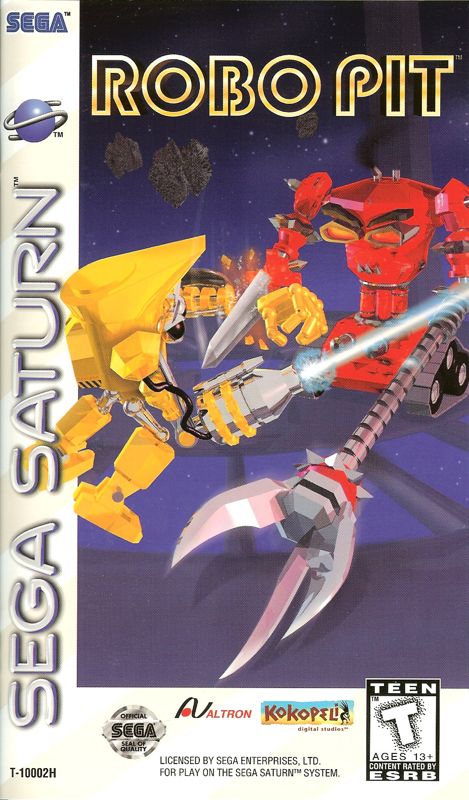
This CD-ROM can only be used with the Sega Saturn System. Do not attempt to play this CD-ROM on any other CD player, as doing so may damage the headphones and speakers. Set up your Sega Saturn system by following the instructions in your Sega Saturn System Instruction Manual and plug in Control Pad 1. 1. Place the ROBO PIT™ CD-ROM, label side up, in the well of the CD tray and close the lid.
2. Press the Power Button to load the game. The game starts after the Sega Saturn logo screen. 3. If nothing appears, turn the system Off and make sure it is set up correctly.
4. To stop a game in progress or restart after the game ends, press the Reset Button on the Sega Saturn console to return to the ROBO PIT Title Screen. 5. If you turn on the system power without inserting a CD, the Audio CD Control Panel appears. To play a game, place the Sega Saturn CD in the system, press the D-Pad to move the cursor to the top left button on the Control Panel, and press Start. IMPORTANT: Your Sega Saturn CD-ROM contains a security code that allows the disc to be read. Keep the disc clean and handle it carefully. If the system has trouble reading the disc, remove it and wipe it carefully from the center out towards the edge. Creating a Fighter
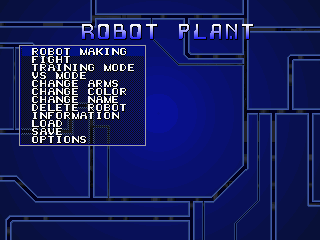
When you first enter the Robo Pit, you must create a Robot to make your challenge. Select "Robot Making" from the Main Menu to enter the Robot Lab, where you will select various components that affect your fighter's speed and maneuverability. You can also customize colors, facial features, and weapon arms, though you start with a minimal arsenal.
You can add to your weapons by crushing opponents and taking their arms as trophies. Remember to save your creation to use in the main tournament.
1. Choose a Body type using the D-Pad to scroll through available options, pressing A to select or B to cancel. Body types vary in power, weight, and defense.
2. Choose a Face type by scrolling through the available faces and pressing A to select.
3. Choose a Base type using the D-Pad, pressing A to select or B to cancel. Base types vary significantly in speed, turning ability, and jumping height, affecting your fighting style.
4. Choose two Weapon Arms using the D-Pad, pressing A to select or B to cancel. Each weapon differs in offensive strength and attack type, with skill values that increase through effective use. Weapons can be exchanged between battles and obtained by winning.
5. Enter the Name of your Robo Pit fighter using the D-Pad to scroll through letters, pressing A to select and B to delete, with a maximum of 10 letters.
You can change the colors of certain Robot parts by pressing the Up or Down buttons during selection. The color of a Weapon Arm can be changed whenever you select that arm to use. After creating a Robot, you can proceed to FIGHT, VS, or other options.
Deleting a Fighter
While developing your perfect combination of parts and weapons, you may need to scrap one or more Robot designs. The Robot List can contain up to 10 custom Robots at one time; to add additional Robots, you must delete older ones.
1. Choose "Delete Robot" from the Main Menu and press the A Button.
2. Select the Robot you want to delete from your Robot List and press the A Button.
.png)

.png)
.png)





.png)


.png)
_1.png)
.png)
 (En,De,Es).png)


.png)



.png)