Game Modes
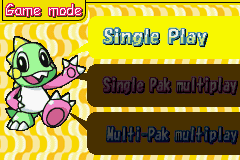
The game offers several play options, including single-player and multiplayer formats.
•
Single Play: A single player mode where you control BUBBLEN. Stages can be revisited at any time, and best scores are saved to the ranking list.
•
1 Game Pak Multiplay: A multiplayer mode using one cartridge. Only the OLD version is available. Player 1 plays as BUBBLEN and Player 2 as BOBBLEN. Best scores are not saved. •
2 Game Pak Multiplay: A multiplayer mode using two cartridges. Both OLD and NEW versions are available.
Game Versions
Two versions of the game are available:
•
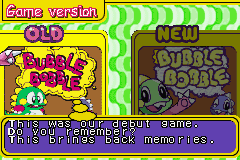
OLD: The 1986 arcade classic. Stages, enemies, and items are identical to the original.
•
NEW: A Game Boy® Advance original with improved graphics and sound. An ITEM LIBRARY is included to record all discovered items.
Starting The Game
Follow these steps to begin a session:
•
Title Screen: Turn on the power switch to start the opening movie and title screen. Press START to proceed to the SELECT SAVE FILE screen.
•
Select Save File: There are two save files. Use the Control Pad (Left/Right) to select one, then press A to confirm. Player progress is visible on each file.
•
Game Modes Select: After selecting a save file, choose a game mode using Up/Down on the Control Pad and press A to confirm.
•
Game Version Select: For Single Play and 2 Game Pak Multiplay, select the OLD or NEW version using Left/Right on the Control Pad, then press A.
Save Data Management
Manage your save files using the following options:
•
Auto Save: The game saves automatically at game over.
•
Continue: Select a save file to resume from your last progress point.
•
Delete: Select the save file to delete, then choose DELETE. A confirmation message will appear; select YES to delete the data.
Score Ranking
The Score Ranking screen appears after the game ends, displaying the top 5 scores.
•
If your score exceeds the 5th highest, it is saved along with your name (up to 3 characters).
•
Use Up/Down on the Control Pad to select characters and press A to enter your name.
•
Continue Prompt: In Single Play Mode, you can resume from the last reached round. Select YES to continue or NO to quit.
Multiplayer Games
Multiplayer play requires a Game Boy® Advance Game Link® Cable.
•
Requires 1 cartridge, 2 Game Boy® Advance systems, and 1 link cable.
•
Player 1 selects this mode on the GAME MODES SELECT screen. Data transfers to Player 2's system, displaying the OLD version title screen.
•
Player 1 sets the Number of Rounds and Items.
•
Only 12 rounds are available; clearing round 12 restarts the game from round 1.
•
Food and Item variations are limited in this mode.
•
Requires 2 cartridges, 2 Game Boy® Advance systems, and 1 link cable.
•
Both players select this mode on the GAME MODES SELECT screen.
•
Player 1 selects the game version on the GAME VERSION SELECT screen to begin.
•
Round Select: Player 1 always chooses the starting round. For example, if Player 1 has cleared up to round 20, the game can start from round 20 even if Player 2 has only cleared up to round 10.
Multiplayer Controls
•
You can continue playing if you lose all lives while your friend is still active in the round. Press START to continue.
•
Note: In multiplayer games, you cannot pause the game by pressing START.
Special Bubbles
These bubbles appear from the lower side of the screen. Pop them to use their special powers:
•
Thunder Bubble: A lightning bolt flows in the opposite direction you are facing.
•
Fire Bubble: Dozens of tiny fireballs fall to the floor.
•
Water Bubble: Water is released and keeps flowing in the opposite direction you are facing.
•
Extend Bubble: Collect all 6 bubbles ("E", "X", "T", "E", "N", "D") to activate.
BOBBLEN
In Single Mode, you play with a CPU-controlled BOBBLEN. •
His name appears in the Pause Menu once he is unlocked.
•
BOBBLEN is non-playable and controlled by the CPU. •
Please help BOBBLEN, as he is not as strong as BUBBLEN. Secret Code
Somewhere during the game, you will find these codes. No one knows what they are. Try to solve it.

 (En,Fr,De,Es,It).png)
.png)
.png)

_1.png)






 (Budget - The Hit Squad).png)


.png)
 (Rev 1).png)
 (Rev 2).png)
_1.png)
 (Rev 1).png)










.png)


.png)