Health and Battle Gauges
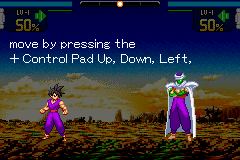
The colored bar above each character is his Health Gauge. If a character's Health Gauge is depleted, he loses the match.
A character's Battle Gauge depletes as he blocks an opponent's continuous attacks. When a character's Battle Gauge is depleted, he cannot block attacks until his Battle Gauge level returns to 50 percent.
Story Mode
Story mode lets you battle your way through the legendary Dragon Ball Z® battles and story. Choose Story to follow the path of a single character, beginning with his/her first major battle. Choose Saga to step into a complete saga, controlling various characters in historical battles. Only certain stories are available at the beginning of the game. In order to unlock new characters and sagas, you must win prize money and then visit the Shop (see “Shop” on page 17).
To play:
•
Press the +Control Pad ▲ or ▼ to select a character or saga.
•
Press the A Button to play.
When you successfully complete a character story or saga, you collect prize money. You can use this money to purchase various items at the Shop.
Z Battle Mode
In this tournament mode, you choose either a team or a single character and compete in an all-out fighting championship. You must defeat a roster of opponents to win a Z Battle tournament. You collect prize money for winning.
Choose 1 on 1 Battle or Team Battle and press the A Button to begin. You can view the top five scores for each battle type by going to the Options mode and selecting Ranking.
*1 on 1 Battle*
•
Press the +Control Pad up or down to select a character.
•
Press the +Control Pad left or right to select a level.
•
Press the A Button to compete in the tournament as a solo fighter.
*Team Battle*
•
Choose a team of three fighters to take into battle.
•
Press the +Control Pad up or down to select a character.
•
Press the +Control Pad left or right to select a level.
•
Press the A Button to confirm.
•
When you have chosen your team, press START to proceed.
Note: The order in which you pick your fighters is the order in which they will appear on the battlefield when you cycle through them.
Challenge Mode
Choose one to three characters to match up against a team of three predetermined opponents.
To select characters:
•
Press the +Control Pad ▲ or ▼ to select a character.
•
Press the +Control Pad ◄ or ► to select a level.
•
Press the A Button to confirm.
When you have chosen all characters, press START to select the challenge team. Press the +Control Pad ▲ or ▼ to select the Challenge Team. Press the A Button to select and then press the A Button again to confirm.
You will receive prize money if you successfully defeat all of the opposing teams.
Enemy Select
Select between the Freeza Team and Heroes Team.
Free Battle Mode
Fight solo or in a team against your choice of opponents. Money is not awarded for winning a Free Battle match.
•
Press the +Control Pad ▲ or ▼ to select a character.
•
Press the +Control Pad ◄ or ► to select a level.
•
Press the A Button to confirm.
•
When you have chosen all characters, press START to begin the battle.
Training Mode
Learn basic to advanced techniques and hone your skills in Training Mode.
*Practice*
Choose Practice to try out moves against a particular opponent or team, with particular fight parameters.
•
Press the +Control Pad ▲ or ▼ to select a character.
•
Press the +Control Pad ◄ or ► to select a level.
•
Press the A Button to confirm.
•
When you have chosen all characters, press START to set up fight parameters.
Training Setup Options:
•
Training Start: Choosing this option begins the practice match.
•
Enemy: Press the +Control Pad ◄ or ► to select an opponent.
•
Stage: Press the +Control Pad ◄ or ► to select a battle arena.
•
CPU: Choose the level of fighting ability the AI opponent will display. Press the +Control Pad ◄ or ► to select your opponent's skill level: OFF, Beginner, Easy, Normal, Moderate, or Difficult. If you select OFF, your opponent will not fight back.
•
Ki: Press the +Control Pad ◄ or ► to select the Ki level at which your character begins the match: 0%, 50%, or 100%.
•
Battle Gauge: Press the +Control Pad ◄ or ► to choose the starting position of your character's Battle Gauge.
•
Team Select: Select this to return to the character select screen, where you can choose a different character or team.
•
Title: Quit Training mode and return to the Title screen.
Note: Press SELECT during a Practice session to reset the session. Press START during a Practice session to end the session and return to the Practice setup screen.
*Tutorial*
Select Tutorial to receive a step-by-step demonstration of fighting moves. Press the +Control Pad ▲ or ▼ to select one of the following courses and then press the A Button to confirm:
•
Movement Course (character movement)
•
Fighting Course (melee attacks)
•
Power Shot Course (Ki attacks)
•
Certain Kill Course (special attacks)
•
Substitution Course (how to switch between characters)
•
Combo Course (basic strategy and combo moves)
Link Versus Mode
Select Link Versus to battle against friends using a Game