Getting Ready
Insert the Game Pak into your Game Boy® Advance system and turn the power on.
•
WARNING: Inserting the Game Pak when the Game Boy® Advance is already on might result in damage to the Game Pak.
Language Selection
Upon powering up the game, the language selection screen will appear.
•
Use the Control Pad to select your language.
•
Press the A Button to confirm.
•
You can change the language setting in the Options menu later if you choose.
Main Menu
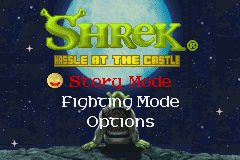
After the introductory screens have played, you will be taken to the Main Menu. From here, you can:
•
Begin a game in Story Mode.
•
Play head to head with up to 3 other opponents in Fighting Mode.
•
Select Level (available only once the game has been completed in Normal or Advanced mode).
•
Access the Options menu.
Options
Upon entering the Options menu, you will see the following items:
•
Difficulty: The level determines the time limit and speed of enemies. Certain items won't be available in specific difficulties. Select a difficulty with the Control Pad and confirm by pressing the A Button.
•
Languages: Use this function to change the language setting. Select a language with the Control Pad and confirm by pressing the A Button.
•
Erase Saved Data: Highlight the option using the Control Pad and press the A Button to confirm. A screen with three Saved Game slots will appear. Select the desired Save File using the Control Pad and press the A Button to erase.
•
WARNING: Erased data is not retrievable, meaning level progression under the selected file will be lost.
Game Play
After completing various missions, you will be able to have access to other characters to play such as Donkey and Princess Fiona™.
•
At the Character Select screen, use the Control Pad to move over the desired character.
•
Press the A Button to confirm.
Each Chapter has up to 3 levels. Beat each level and Boss to earn more characters and advance through the chapter.
Continue Game
Once a new game has begun, your progress through the Fairy Tale Land will be automatically saved to the Game Pak. Select the desired Saved Game to resume where you last left off.
Pausing the Game
At any time during gameplay, you may press START to access the Pause Menu. Press START to resume play.
Collectables
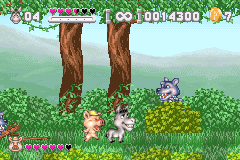
Items that characters can pick up are known as Collectables. Collectables improve your score and grant a special effect once a certain amount have been collected.
•
Gold Coins: Once you have successfully collected 10 Gold Coins from various locations, you will earn an extra life.
•
Silver Coins: Collecting Silver Coins increases your score. Silver coins appear in fighting mode only.
•
Small Heart: Collecting a small heart will replenish your life meter by one full heart.
•
Large Heart: A large heart replenishes the character's meter to full life.
Fighting Mode Gameplay
Players compete for the highest score by collecting Gold and Silver Coins in a certain amount of time.
•
One Gold Coin is released from one of the four corners of the map at a time.
•
The four corners are labeled A, B, C, and D.
•
The HUD will tell you which corner the current coin is being released from.
•
The number in the upper left of the HUD tells you how much the Gold Coin is worth.
Silver Coins
When you attack other players, you knock a certain number of points out of them, depending on your strength. These points are applied toward the Silver Coin.
•
The Silver Coin is released when the Numerator is higher than the Denominator (look in the upper right corner of the HUD).
•
The Denominator is random for each Silver Coin.
•
Silver Coins are usually worth a lot more than the Gold Coins.
Multi-Pak Multiplayer Linking
•
Make sure that all the power switches are turned OFF. Insert Shrek® Hassle at the Castle Game Paks into the individual Game Pak slots.
•
Connect the Game Boy® Advance Game Link® cables and plug into the External Extension Connector on each Game Boy® Advance system.
•
Player 1 will be the person who plugs the purple connector into his or her game system. This player will be in charge of starting each game when everybody is ready.
•
Turn the power switch on each Game Boy® Advance ON. From the main menu, all players need to select Fighting Mode.
•
Once everyone is visible on screen, Player 1 should press START and proceed with the game.
Troubleshooting
If you experience problems with linking Game Boy® Advance systems, turn off all systems and try again. Watch out for the following:
•
Make sure all Game Link® cables are fully inserted into all game systems.
•
Do not remove the Game Link® cable during the transfer of data.
•
Do not link more than 4 Game Boy Advance systems.
•
You may experience problems if using any cables other than Game Boy® Advance Game Link® cables.
Product Support / Tips
The TDK Mediactive Product Support Department provides technical support, customer service, and game hints. There are several different ways to receive assistance. Online Support
TDK Mediactive provides support via the World Wide Web 24 hours a day, seven days a week. •
Address: www.tdk-mediactive.com


 (En,Fr,De,Es,It,Nl).png)
 (En,Fr,De,Es,It,Nl).png)
 (En,Fr,De,Es,It,Nl).png)

.png)
 (Rev 1).png)
 (Rev 2).png)
_1.png)
 (Rev 1).png)








.png)
.png)
_1.png)








_1.png)