INTRODUCTION
You are the ruler of a young civilization, struggling to survive and grow from 4000 B.C. to 2020 A.D. You will compete with rival civilizations for survival and resources. Your opponents are unpredictable and will challenge even experienced players.
Your decisions control your civilization's economy, diplomacy, exploration, scientific research, and military development. As your civilization expands, you'll face increasingly difficult choices, such as where to build cities, what improvements to make, and whether to form alliances or pillage neighbors.
The world is constantly evolving, requiring you to adapt your policies, replace obsolete military equipment, and change your form of government. Beyond rival nations, you will also encounter internal strife, hunger, misallocation of resources, pollution, and overpopulation.
You can achieve victory by conquering the world through military might or by being the first to conquer space through scientific advancement. Your final goal will shape your strategies and decisions throughout the game.
BEFORE YOU PLAY
Civilization II requires a memory card to save your games. A saved game uses ten memory blocks. You may need multiple memory cards for many large saved games. Memory cards can be purchased from your PlayStation game console retailer or where you bought this game. GETTING STARTED
There are two modes of movement:
•
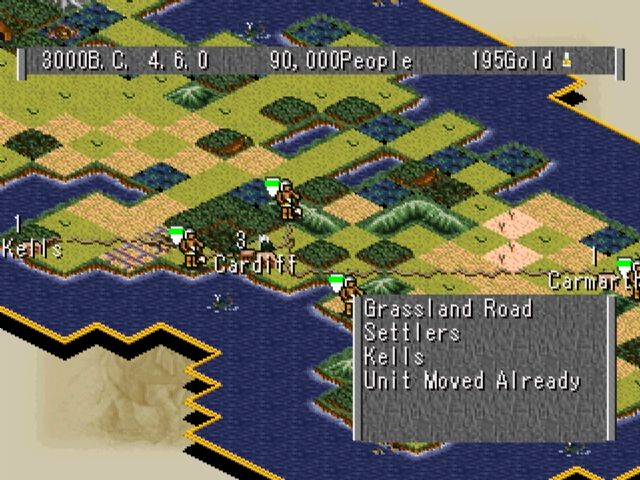
Move Pieces Mode: Your cursor is a white arrow. Use L1 and R1 buttons to highlight active units available for orders. Active units blink when highlighted.
•
View Pieces Mode: When no units are active, you can move around unexplored territory and make changes on your city screen using L2 and R2 buttons.
MENUS
Menus and the City screen are your primary control tools. Menus on the lower left contain all available actions. Dialog boxes with options will appear at various points, such as when clicking on units in the Unit Roster or when a foreign emissary arrives.
To open a menu, press the button. A menu will appear on the lower left of the screen. Use the arrow keys to highlight an option and the X button to select it.
EXPLANATION OF MENU OPTIONS
GAME OPTIONS
•
Always Wait at End of Turn: Guarantees your turn won't end until you press End Turn. If off, pressing X ends your turn when no active units remain.
•
Show Enemy Moves: Makes enemy unit progress visible within your observation range. If off, you only see enemy moves resulting in combat.
•
Instant Advice: When on, advisors provide helpful hints when they have an opinion.
•
Tutorial Help: When active, provides advice for novice players.
•
Throne Room: Notifies you of spontaneous improvements to your throne room offered by citizens.
•
Diplomacy Screen: When checked, diplomatic discussions occur on the full diplomacy screen.
•
Town Council: A video-animated town council will occasionally convene to offer advice.
CIVILOPEDIA
•
Information for Wonders: Allows you to view Wonders full screen.
•
Background Music: Select from four background tunes.
•
Background Screen: Select your preferred background screen from ten choices.
•
Change Player Name: To change your name.
GAME MENU
•
Save Game: Civilization II suggests a save file name based on the year.
•
Load Game: Load a previously saved game. Select a file from your memory cards.
•
Retire: Quit the current game and see the closing display.
•
Quit: Exit the game without closing displays. You can confirm or cancel quitting.
KINGDOM MENU
•
Tax Rate: Adjust the proportion of taxes, science, and luxuries each city generates per turn. Increasing one decreases one or both of the others.
•
View Throne Room: View the status of your throne room and additions made by citizens.
•
Find City: Select a city from a list; the map will center on it.
•
Revolution: Change your form of government. Requires specific technological advances for governments other than despotism. A revolution usually causes a short period of Anarchy.
ADVISORS MENU
•
Town Council: Access a video-animated meeting of your advisors. You can ask one or all for advice.
•
City Status: Lists vital statistics for all cities in your empire, ordered by founding. Click on a city name to open its display.
•
Defense Minister: Reports on military assets, including unit information and battle statistics.
•
Foreign Minister: Summarizes known information about other civilizations. If you have an embassy, it shows their gold. Use X to select leaders for negotiations. If an embassy is established, "Check Intelligence" opens a report with city lists and Wonders under construction.
•
Attitude Advisor: Summarizes citizen happiness, including base status and modifying influences. Use X to select city names and open the City Display screen.
•
Trade Advisor: Reports on luxury, tax, and scientific research percentages for each city, and maintenance costs for improvements. Suggests increasing taxes or adjusting cities for higher revenue if your treasury is shrinking.
•
Science Advisor: Records your civilization's advances and scientific progress toward the next advance.
WORLD MENU
•
Wonders of the World: Shows Wonder icons, locations, and owning cultures.
•
Top Five Cities: Important statistics for the world's top five cities, including population, citizen attitudes, culture, and Wonders.
•
Civilization Score: Displays your current civilization score.
•
Demographics: Provides real-world statistics on your civilization's health, growth, economy, and military status. Useful for comparing with rivals.
•
Spaceship: Contact space advisors and
.png)

.png)




.png)




.png)


 (v855.01).png)

 (v825.03).png)

 (v1.01).png)