Introduction
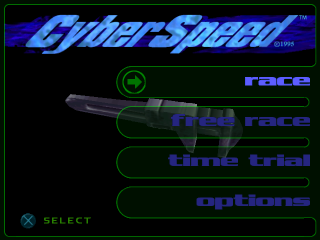
After choosing your language, the main introduction for CyberSpeed will begin. You can skip the introduction by pressing the X Button on your controller. The Main Menu will then be displayed.
The first three options (Race, Free Race, Time Trial) allow you to choose the type of race your pilot will compete in. Details on how to race your ship can be found in the Racing your Ship section. Race
This is a tournament of up to 10 races, with additional bonus races. You will race against 7 other opponents. To qualify for the next race you must finish in the top three finishing positions. If you fail to do this, the tournament will end.
If you manage to get through the first three races, you will be awarded the chance to pit your skills against one of the legendary Super Ships in a bonus race. Bonus races will then appear after every second race from then on, although to qualify for one you need to have won (come in first) in at least one race since the last bonus.
Tournament points are not awarded in bonus races, but there is a special mystery prize on offer for any pilot who is skilled enough to win all of them. The pilot with the most points at the end, wins the tournament.
Tournament points are awarded for the following:
Free Race
This is a single race-off against 7 other opponents. You will find that you can only choose a track from those races that you have previously completed (i.e. finished in the top three).
If you haven't completed any races yet, you will find that only the first two tracks are available for selection. To select Free Race track screen, press circled x and choose circled triangle to abort.
Time Trial
Time Trials are one off races between two pilots. As with the other race types, you can choose your ship first and then select a race track.
You will find that you can only choose a track from those races that you have previously completed (i.e. finished in the top three). If you haven't completed any races yet, you will find that only the first two tracks are available for selection.
Options
The Options menu gives you the chance to alter the way the game plays as well as load in any saved games.
Load
Please see the Load option in the After the Race section of this manual for details.
Difficulty
There are two difficulty modes to choose from. Rookies should begin in Normal mode until they feel confident enough to progress to Hard.
The opponent pilots in Hard mode are more highly skilled and the race will follow the track in the opposite direction to Normal!
Sound
The options on this screen are self-explanatory. You can toggle the music, sound effects and speech on or off by highlighting the relevant option with your joypad and pressing the X Button. Select Continue when you have finished.
Controls
CyberSpeed contains four different pre-defined control setup configurations for you to try. They affect which controls on your joypad perform which functions during a race.
By using your left/right controls you can step through the four configurations. When you find one you are happy with, press the X Button to select it. (The setups are shown on-screen. See Racing your Ship below for further control details). Ship Selection
Regardless of the type of race you have chosen, your first port of call will be to select your ship. Each participating country has a different custom built ship to offer.
Each ship has four design attributes that affect performance. They are displayed to the right of the screen. Each rating shows marks out of ten for that attribute. The higher the rating the better, except for Mass.
•
THRUST: The driving force of the ship. How quickly it can gain momentum. •
MASS: The physical bulk of the ship. The lower the rating, the smaller the ship.
•
SPEED: The top speed of the ship. How fast it can go.
•
SHIELDS: The shield strength of the ship.
Some of the attributes affect others. For example, if you have a ship with a high Thrust rating, the ship might not be as fast as you would like if it also has a high Mass rating.
Use your left/right controller button to step through each ship. Press the X Button when you have found a ship you like.
Tracks
There are 10 different race tracks spread far and wide across the Galaxy. In recent years, new tracks have been constructed away from Earth in the vacuum of deep space and on other off-world colonies. A track consists of a looped force beam, with other force beams branching off it. Some are harder than others, especially when extra obstacles are added!
If you are racing in a tournament, you won't need to choose a track to race as this is done for you automatically. However, in a Free Race or Time Trial you can choose from those tracks you have previously completed (i.e. finished within the top three). If you haven't finished any races, only the first two tracks will be available. Use your controller to highlight the track of your choice, then press the X Button to confirm.
Ship Technical Details
Each ship is attached to the track by a visible force beam. The ship draws its power from the force beam. The amount of power available to each ship is finite, so power management is important.
The following ship functions use power:
-
 (Rev 1).png)


 (v1.0).png)
 (Rev 1).png)
.png)
 (Rev 1).png)





 (Es,It,Pt).png)
.png)



.png)

 (USA).png)