Starting Up
Insert the Epidemic™ disc and close the CD door. Turn the PlayStation game console ON. The opening video begins. Select NEW GAME or CONTINUE on the Game Start Menu and press the Ⓧ Button to begin play.
Select NEW GAME to go to the opening video. After it is over, the screen displays the Garage which contains your Protect Armor suit. Select MISSION START to begin play.
Select CONTINUE (and press the Ⓧ button) to skip the cinematic sequences and proceed to the Garage.
Save and Load
Game SAVE and LOAD operations are performed at the Garage. To LOAD, select LOAD GAME and the appropriate mission data.
Each time you successfully accomplish a mission, you return to the Garage. Select SAVE GAME to record data for the next mission. One Memory Card records enough data for three missions.
PlayStation Console Features
Accessing the Data Screen
The Data Screen is standard equipment on Protect Armor. To access, press the Start Button.
Use the Directional Buttons to highlight an option, and press the Button to select it. Press the Button to cancel a command. Press the Start Button again to exit the Data Screen.
Status
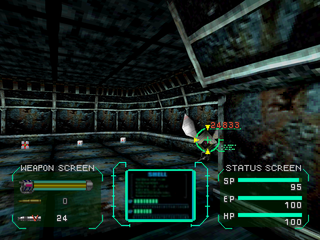
Displays current condition of Player and Protect Armor. The Status Screen displays:
•
(1) HP, which indicates Player endurance
•
(2) SP, which indicates current Shield level
•
(3) EP, which indicates Special Option energy
Weapons
Displays the weapons currently in your possession and the remaining number of rounds of ammunition or energy.
For missiles, displays the number remaining for each category. Change missile firing capabilities using this display.
Map
Displays a floor plan of the entire floor the Player is currently on.
•
Green indicates areas and corridors already covered.
•
Dark green indicates accessible corridors and rooms.
•
Light green indicates walls and other obstacles.
•
Computer terminals are shown in red.
•
The areas not yet covered are shown in blue.
•
The direction the player is currently facing is displayed in the small window at bottom right.
Item (Property Manifest)
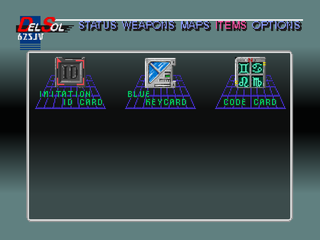
Displays Items currently in Player's possession. Items other than weapons activate automatically as needed.
Options
Allows Player to change screen displays, and shows time elapsed since beginning the game.
•
Weapon: Turn Weapon Screen ON and OFF.
•
Map: Turn Map Screen ON and OFF.
•
Status: Turn Status Screen ON and OFF.
•
Data: Turn Data Display ON and OFF.
•
Visual Stabilizer: Turn this on to see up-and-down movement of armor while walking.
•
Map Rotation: Turns Map Rotation ON and OFF.
Mission Objectives
To get into your Protect Armor suit, and accomplish a number of various missions while fighting enemies you encounter.
To solve the game, pay close attention to the video clips you see during these missions.
Garage
The Garage is the starting point for every mission. Once you have accomplished a mission, you return to the Garage.
In the Garage, a repairman named Jim provides you with valuable information for your next mission. Also, the items that are brought back can fortify the Protect Armor.
Item Acquisition and Use
Acquire items by moving directly over them. You cannot pick up items when your Shield, Exelgy, or Hit Point level is at 100%.
Item chambers house necessary items. Press the Button to open these chambers, and press again to acquire the item inside. Key Cards and Record Cards remain with you to use when you arrive at their needed locations.
Doors
To open most doors, stand directly in front of the door and press the Button. Some doors require a corresponding Key Card to be opened. You must devise other means to open certain doors.
Elevators
Open elevators like normal doors. Stand directly in front of them, press the Button then enter. To take the elevator to the next floor press the Button in front of the control panel on the right hand side.
Activating Switches
Most switch levers release door locks. To turn switches ON and OFF, stand directly in front of them and press the Button. To activate door lock release switches, stand directly in front of them and press the Button.
Exelgy Station
To replenish the EP (Exelgy) of your Protect Armor, stand directly in front of an Exelgy Station and press the Button.
Computer Terminals
To play recorded data, stand directly in front of a Computer Terminal and press the Button. If you have a Record card, you can see the recorded data on the card.
Game Over
A game is over when you complete the last level, or when your HP level drops to zero.
When the game is over, you automatically return to the Game Start Menu. If you are not using a Memory Card, you can only select NEW GAME and begin the mission from the Garage.
Radar
Your Protect Armor is equipped with radar which allows you to detect enemies at close range.
When most enemies are within a certain distance of the Player, a warning alarm sounds. The closer the enemy approaches, the more the alarm sounds. Radar cannot detect certain enemies.
Combat
When you encounter an enemy, center it in your weapon site, and press Button to fire your weapon.
Enemies can attack from above and below, as well as from straight ahead. Press L1 + R1 to look up, and L2 + R2 to look down.
Destroying an enemy usually entitles you to acquire an Ammunition
.png)







 (Es,It,Pt).png)

.png)






.png)







.png)


