ARCADE MODE
ARCADE is a quick-start mode for immediate action. It includes Speed, Motocross, and Supercross gameplay styles. You race a series of 11 tracks in a predefined order against 4 rival racers.
In beginner mode, you need to place at least third to advance. If you fail to qualify, you get 6 chances to restart the race. Failing after 6 attempts ends the game.
In advanced and expert mode, you must place first to move to the next track and are offered only 3 replays. This mode uses a pre-selected bike with default characteristics.
You must validate checkpoints within a time limit. Your best lap time and position can be saved in the Top 5.
WORLD TOUR GAME MODES
Use the directional buttons to highlight a game mode, then press the button to select it. Some options become available only after meeting certain criteria, such as completing other modes.
PRACTICE
A basic training mode. You are alone on the circuit and assisted by telemetric information, including braking indicators (on Speed circuits only).
Initially, only 4 circuits are available (2 speed, 1 supercross, 1 motocross). Other circuits unlock once accessed in CHAMPIONSHIPS mode.
Beginning a Practice
•
Select PRACTICE from the MODE menu.
•
Press [UP] / [DOWN] to highlight a track (not all are initially available).
•
Press the button to select the track.
Select Bike
Bikes are graded by MAX SPEED, GRIP, ACCELERATION, and HANDLING.
•
Press [LEFT] / [RIGHT] to view available bikes.
•
Press the button to select a bike that suits the circuit.
Gearbox
•
Choose between AUTOMATIC or MANUAL transmission.
•
Press the button to proceed.
•
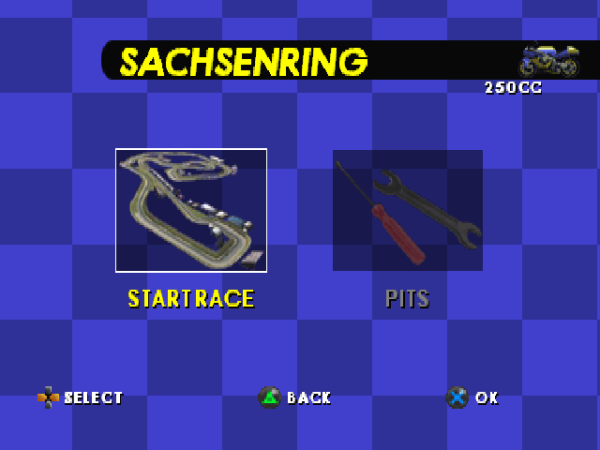
On the next screen, you can START RACE or go to the PITS to adjust bike parameters.
PITS
The PITS option adds realism by allowing you to adjust your bike for the circuit terrain or personal preferences. New players are advised to try ARCADE mode before making adjustments.
Available menu options are: GEARBOX, POWER RATIO, TIRES, SUSPENSION, RESTORE PARAMETERS.
Technical information displayed to help tune bikes includes:
•
The type of tires selected.
•
The type of suspension selected.
•
The time to reach a reference speed (e.g., 60 and 120 mph for speed mode).
•
The pick-up of acceleration between two reference speeds.
•
The time to cover a reference distance (e.g., 1 mile and ¼ mile for speed mode).
•
The maximum speed and the time to reach it.
Gearbox Tuning
•
Press [UP] / [DOWN] to highlight each gear, the PRIMARY or the SECONDARY reductions.
•
Press [LEFT] or [RIGHT] to adjust the ratio.
•
Tuning a specific gear affects its theoretical maximum speed.
•
Tuning PRIMARY or SECONDARY reduction changes all theoretical maximum speeds for the gearbox.
•
The maximum top speed is the final speed the bike reaches, considering the power ratio.
Power Ratio
•
Press [LEFT] or [RIGHT] to choose a Power ratio configuration.
•
The Power ratio shows power produced at a given engine capacity.
•
Different curve graphs display performance differences, making your engine more "coupled" or "sharper."
Tires/Suspension
•
TIRES: Choose SOFT, MEDIUM, or HARD tires. Tire type changes bike adherence during the race.
•
SUSPENSION: Choose SOFT, MEDIUM, or HARD suspension. This parameter helps tune jumps.
Restore Parameters
•
Select this to restore default parameters.
TIME ATTACK
There are two TIME ATTACK sub-modes:
•
ONE RACE: Complete a race. When you restart, a ghost of your previous race accompanies you.
•
MULTI LAPS: Each time you finish a lap, a ghost of your previous best lap starts.
To begin:
•
Press [UP] / [DOWN] to highlight a TIME ATTACK mode.
•
Press the button to confirm.
•
Choose your race circuit (not all circuits are initially open).
•
Select your bike as in PRACTICE mode.
•
Choose AUTO or MANUAL transmission.
•
You can start the race directly if you don't visit the PITS.
In TIME ATTACK, you aim for the best possible time against the clock. A "ghost" rider of your previous best lap helps you gauge your performance. Consistently beating the ghost improves your driving skills. SINGLE RACE
This mode allows you to race a predefined number of laps on one of 11 circuits (Speed, Supercross, and Motocross). You compete against 4 other competitors.
Initially, only 4 circuits are accessible (2 Speed, 1 Supercross, 1 Motocross). Other circuits become available once unlocked in Championships mode. You can save your best lap and position in the Top 5.
CHAMPIONSHIP
To enter a Championship:
•
Use directional buttons to highlight a team's icon, then press the button.
•
Choose your championship.
•
Select your transmission.
•
You can begin the race if you don't visit the PITS.
This mode offers 3 Championships, unlocking new circuits and 4 new disciplines.
SPEED CHAMPIONSHIP
•
Consists of 3 seasons of speed circuits.
•
Season 1: 3 circuits (2 practice/single race, 1 new), 250cc motorbikes only.