Starting the Game
After the opening movie, you will reach the title screen. Press any button to proceed to the Start Menu.
Start Menu Options
LOAD GAME
To continue a saved game, insert a memory card (8MB) (for PlayStation®2) with a save file into MEMORY CARD slot 1. Select LOAD GAME.
Use the up and down directional buttons to highlight a save file and press the X button to continue.
NEW GAME
To start a new game, select NEW GAME. You will then choose the difficulty level.
The difficulty cannot be changed once the game begins.
BEGINNER Difficulty
Battles are easier. You will have ten chances to continue the game after a Game Over.
NORMAL Difficulty
This difficulty is for players familiar with the game.
EXPERT Difficulty
The difficulty of battles will be higher.
CONFIG
Here you can adjust various gameplay options. This screen can also be accessed during gameplay by selecting System from the Command Menu.
VIBRATION
Turn the vibration function of the Analog Controller (DUALSHOCK 2) on or off.
VOICE
Switch the in-game voiced dialogue on or off.
AUTO-ADVANCE
During events, the text can be auto-forwarded to match the spoken dialogue. This option is only available when voices are ON.
CURSOR MEMORY
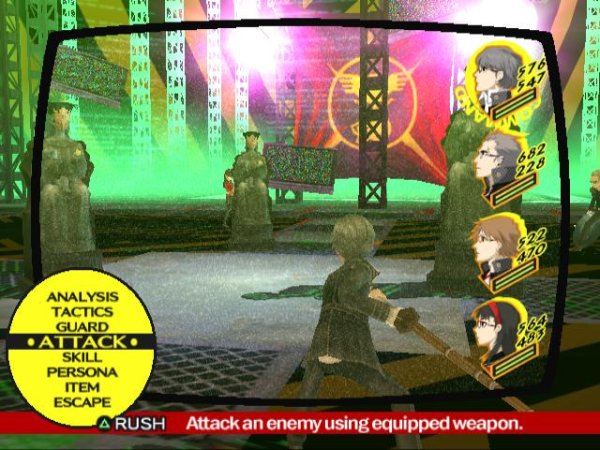
During battle, the cursor will remember the last action chosen.
TACTICS MEMORY
Ally tactics will carry over from battle to battle until changed.
CAMERA REVERSE
Reverses the direction of the camera's rotation with the L1 and R1 buttons or the right analog stick.
Saving the Game
You can save your progress by approaching the phone in Dojima's living room or other save points and pressing the X button.
Use the up and down directional buttons on the file menu to highlight a save file and press the X button to confirm.
You need at least 230KB of free space on your memory card (8MB) (for PlayStation®2) to save. Only MEMORY CARD slot 1 is used.
Game Flow
Your life in Inaba begins in April. You must balance your daily life with visits to the TV world. Each day has its own schedule, events, and weather.
The Flow of the Day
Day
While at school, you can participate in classes, overhear conversations, and eat lunch with other characters.
Afternoon
After school, you have free time until you return to the Dojima residence in the evening. If you return home without doing anything else, it will immediately become evening.
Evening
At night, you can work at a part-time job or do other activities. This is unless you have special plans for the next day or need to watch the Midnight Channel.
Calendar & Weather
The weather significantly affects your schedule, so check the forecast regularly. Periods of rain precede the fog.
If you don't rescue a missing person before the fog appears, your game will end. Pay attention to the weather while gathering information.
Game Over Menu
If you run out of time and get a Game Over, you will reach this menu:
Return to a week ago
The game will continue from one week in the past. You will have one week from that point to successfully rescue someone before the fog comes.
Return to the title
The game will end, and you will return to the title screen.
Holidays
On days off from school, you may be invited to spend time with a friend. Time will progress just as it does during a school day, and it will be evening once you return from spending time with your friend.
School Life
You will get up early, attend classes, and go to extracurricular activities after school.
In Class
Classes are held in the morning and afternoon. Occasionally, you will answer a question from the teacher; a correct answer will increase the protagonist's stats.
Strengthening Social Links
At school, you can join clubs and meet people to form new Social Links. The closer you become to these people, the higher the Social Link's rank will be.
Strengthening Social Links provides more bonus EXP during Persona fusion. There are also Social Links with people outside of school; try to find them all.
On Campus
If an icon appears above a character's head, it means there is something special about them. An exclamation mark shows that a Social Link character is available to hang out with you that day.
Using the button
The most convenient way to change locations is to use the button menu. Choose an area shown in the menu to instantly go to that area's entrance.
The TV World
You can enter the world inside the TV using the television at Junes. Inside the television, you will have access to a number of dungeons.
You can explore these dungeons after school on school days or during afternoons on holidays.
Exploring the TV World
1.
Gather at the Junes food court
When you choose to go to the food court, you will call your friends to gather there before choosing a course of action. If you accept an ally's invitation to search the TV world, you will automatically go there.
•
Check the weather report