Starting the Game
1. Make sure the power switch is OFF and there is no CD in the Sega Saturn System. 2. Open the unit, insert the Primal Rage CD gently, close the cover, and turn the system ON. Handling Your Sega Saturn CD-ROM
•
The Sega Saturn CD-ROM is intended for use exclusively with the Sega Saturn System. •
Keep the surface of the CD-ROM free of dirt and scratches.
•
Do not leave it in direct sunlight or near a radiator or other sources of heat.
•
Take occasional breaks during extended play to rest yourself and the CD.
Primal Rage - The Story
Eons ago, before humans walked the planet, there was rage. Life on Earth was complex, as were the instincts of its life-forms. To grow and multiply, a delicate balance existed between protecting one's own life and feeding off the life energy of others. As these instincts evolved, so did the gods.
These gods embodied the spirits of Hunger and Survival, Life and Death, Insanity and Decay, and especially Good and Evil. They took forms suited to their needs and fought countless battles on Earth's primordial frontiers. As life spread to all corners of the Earth, the gods became more powerful and their battles more intense. Dinosaurs became the dominant land animals, and civilizations emerged.
Then the delicate balance was disrupted. Balsafas, a great wizard from a parallel dimension, recognized the threat Earth posed to the galaxy. Lacking the power to kill a god outright, he banished one to an isolated rock tomb on the moon. This caused an explosion that blanketed the Earth with volcanic dust, killing most life and sending surviving gods into suspended animation.
Now, millions of years later, a meteor collides with Earth, destroying cities and erasing technology. The rage of the devastation is so strong that the imprisoned gods awaken.
Start Game Menu
When you select this option, you will go to the Start Menu:
•
Arcade Game: The default setting. Players select one of seven dinosaurs to conquer lands for Urth domination. •
In 1 Player mode, you face each of the other 7 dinosaurs in their home territory.
•
In 2 Player mode, both players battle for Urth domination until one conquers all lands.
•
*Note:* Player 2 can press any button to jump in at any time, stopping a 1-player game to start a 2-player game.
•
1P Training: Practice bone-crushing moves and fighting tactics. Select a Dino and a computer opponent from the Dino Select Screen. •
2P Game: Go directly to 2 Player mode. Two players select Dinos and battle for Urth domination until one player conquers all lands.
•
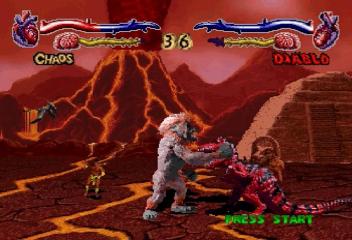
Tug Of War: Select one Dino to fight a friend. The game screen has just one Life Blood Bar. The goal is to battle until your Dino completely covers the bar. Control of the bar moves back and forth like a real tug of war.
•
Endurance: Select 4 Dinos to work as a team. Your opponent also selects 4. Battle until one player loses all Dinos. Life Blood Bars are not replenished between fights.
Ingame Options
Press the D-Pad Up or Down to move arrows, then press the C Button to select options:
•
Credits: Set the number of game credits from 1 to 10. Lower settings create a greater challenge.
•
Rounds: Set the number of rounds to determine the winner.
•
Options: 7 (best of seven), 5 (best of three), 3 (best of two), or 1 (winner-take-all).
•
If tied in the final round, the game goes into Sudden Death. A tie in Sudden Death means both players lose.
•
Round Time: Set bout time from 30 to 80 seconds in 5-second increments, or XX for unlimited time.
•
Lower times put more pressure on players for quick kills.
•
Difficulty Level: Set from 1 (easiest) to 16 (most difficult).
•
Increase difficulty as skills improve.
•
2 Player Handicap: Adjust damage amounts between 50% and 150% (Default 100%).
•
Beginners should set higher damage modifiers; experienced players should set lower ones.
•
Dino strength is displayed below the percentages.
Options Menu
Press the C Button to select from these options:
•
Reset High Scores: Resets the High Score Table.
•
Reset Defaults: Returns all options to their default settings.
•
Music Test: Listen to game music. Press D-Pad Up or Down to cycle through tracks.
•
Gore Level: Select ON or OFF (Default: ON).
•
If OFF, there is no blood, Fatalities, or eating worshippers.
•
Instead, you automatically receive 50% refuel power for the Final Battle.
•
Modify Controls: View controller graphics and change button configurations.
•
Press D-Pad Left or Right to change.
•
Player 2 sets their controls here. Press C to confirm and return to the menu.
•
Animations: Select Yes (Default) to leave animations On, or No to turn them Off.
*