Introduction
Welcome to Euro '96, the fastest, smoothest football game ever on any home console. Euro '96 is the result of many months of painstaking research, both for the game engine and for the Euro '96 tournament. Sega is confident that Euro '96 will establish the benchmark for quality, playability, and presentation. Once the game has loaded, it will alternate between Demo mode and the Main game screen. Pressing the Start button will take the player to the Main Menu Screen.
Main Menu Screen
To select an option from the Main Menu, use the directional buttons on the Control Pad to highlight an option and press Button A to toggle through the options offered.
•
Play/Close: Once you have completed your setup, click on this option to take you to the next screen.
•
Save/Load: Allows you to load or save a game.
•
Number of Players: Allows you to select the number of players (one, two, three, or four).
•
Euro Icon: Allows you to select the type of game: Friendly, Practice, or Euro '96 tournament.
Once you have completed your choices, click on the European Cup to move onto the next screen.
Euro '96 Tournament: Team Select
If you choose to play a full Euro '96 tournament, the official Team Select Screen will appear. You can choose which team to control by scrolling back and forth with the left and right directional buttons. When the desired team is highlighted, press Button A to select it.
•
Multiple players choose teams in order (Player 1, then Player 2, etc.).
•
Two players may choose the same team, but no further players may select a team already chosen by two others.
Euro '96 Tournament: Game Draw
This screen features the actual groups for the Euro '96 tournament. It is the default configuration, playing all scheduled games in their actual order.
Options available include:
•
Default Draw: Plays the official group division.
•
New Draw/Redraw: Randomly redistributes teams. England remains seeded in its group; other seeded teams and the remaining twelve teams are randomly allocated.
•
Done: Proceeds to the Next Match screen.
Match Setup
Match Setup allows you to alter game parameters to suit your preferences. Use the D-Button to highlight an option and press Button A to toggle through available settings.
•
Game Environment: Alter game length, offside rule, free kicks, bookings, wind power, and substitutions.
•
Sound Controls: Adjust crowd volume, commentary, pre-game music, and game sound effects.
Controls
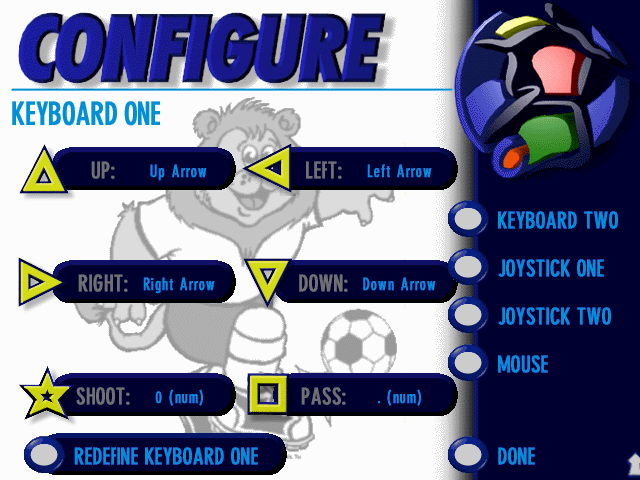
Clicking this option allows you to reconfigure the Control Pad. The default configuration is shown upon entry.
•
Highlight Redefine and press Button A to enter custom keys for each in-game action.
•
Highlight Default and press Button A to reset to original settings.
•
Click Done to return to the Team Select Screen.
Save/Load Game
After every match, you can save your progress by returning to the Main Menu Screen.
Team Setup Screen
On this screen, you can reconfigure your team and squad to your exact specifications.
Changing Team Formation
•
Click the Formation button in the bottom left corner to toggle through available formations.
•
To swap player positions, highlight a player and press Button A (their name turns red). Then highlight the player they will swap places with and press Button A.
•
Click the icon next to the country name to view the opponent's team setup.
Team Statistics
Clicking Goalstat takes you to a page detailing team statistics, including past European Championship performance, star players, president, coach, and form over the last ten games. Use the button next to the country name to view stats for all sixteen teams.
Player Stats
Clicking the question mark displays individual player evaluations for speed, tackling, passing, shooting, general skill, and fitness. These fluctuate throughout the tournament.
•
Use Up/Down on the Control Pad to cycle through players and press Button A to view stats.
•
Fitness is the most important stat; rest star players to ensure they are match-fit.
•
In multiplayer, only Player 1 can alter game parameters; other players take turns configuring their teams.
•
Click Done to proceed to the first match.
Knockout Stages
If you reach the knockout stage, a new screen details the draw and your next opponents. You are taken to the Next Match Screen to make team adjustments.
•
The Golden Goal rule applies: if a match is drawn after ninety minutes, two fifteen-minute periods of extra time are played.
•
The first team to score in extra time wins.
•
If no goals are scored, the match is decided by penalties.
Practice and Friendly Matches
If you select Practice or Friendly from the Main Menu, the Team Select Screen appears. Unlike the tournament mode, this screen lists which players (human or CPU) are allocated to each team.
•
Highlight the allocation icon and press Button A to swap player/team assignments.
•
On the Match Setup Screen, a new icon allows you to select from eight venues.
•
Use Preview to view information about a specific ground.
•
A Random option selects a venue at random.
Practice Mode
In Practice mode, you play against the opposition's goalkeeper only. This is ideal for practicing passing and shooting.
•
You only play one half; use Match Setup to increase game length for longer practice sessions.
In-Match Controls and Cameras
Cameras
.png)

.png)
