Replay Mode Controls
After each race, you may select to replay a portion of the race. To do this, press Button B when the text appears (just after the "GAME OVER" message). Be careful, if you press the C Button or START, you will exit the Game Over Screen and not be able to view replay.
At the Replay screen, highlight the button you want, then press the A Button to activate the replay. The available options are:
The controls in Replay Mode are the same as the controls on a VCR-with the addition of seven camera angle select buttons. Highlight the Camera Angles Button, then press the C Button to cycle through the angles. The B Button will cycle back to a previous angle.
Starting The Game
At the title screen, or any time during the racing demo, press the START button to get to the MODE SELECT screen. Mode Select Screen
Here you can choose your race mode and set the race options to your own specifications:
•
ARCADE - Heat up your tires in the classic arcade game. Race for the best lap time-and go for those extended time bonuses.
•
GRAND PRIX - Race a full season tour through 10 tracks-using five hot machines.
•
PRACTICE - Hone your racing skills against the clock or computer drones. •
OPTIONS - Customize the game settings to your liking.
Arcade Mode
Out here, speed is everything. Fastest time wins. Just like you remember. To get started, press the Directional Pad Up/Down to cycle through the following options. Once you have made all your selections, press START or Button C to begin racing. •
Track - Choose an arcade track by pressing the Directional Pad Left/Right.
•
Transmission - What'll it be-Automatic or Manual? (Press Left or Right Buttons to select.)
•
A Button or Start - To begin racing. •
B Button - Go Back to Previous Menu.
Arcade Tracks allow you to relive those glory days in the arcade on three ultra-fast tracks:
•
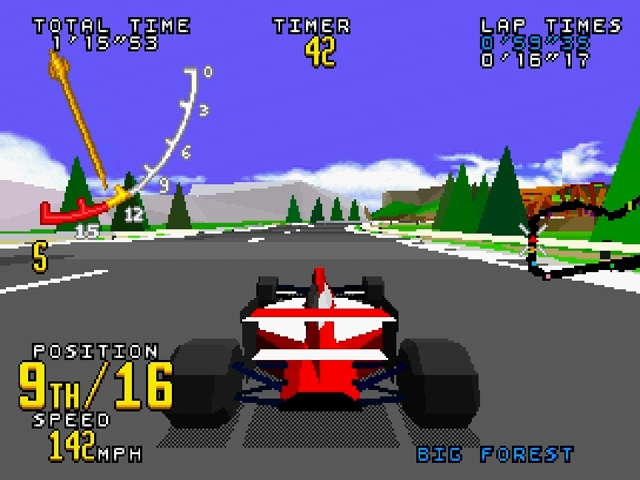
Big Forest: Location: Europe, Length: 3.72 Km, Skill Level: Easy
•
Bay Bridge: Location: North America, Length: 3.34 Km, Skill Level: Medium
•
Acropolis: Location: Greece, Length: 3.53 Km, Skill Level: Hard
Grand Prix Mode
Press the Directional Pad Up and Down to select a new game or to load your previous standings. When you first enter a new Grand Prix, you need to enter your initials so that the racing officials can score your progress. Hope all your practice pays off! Now you're ready for a full season of Virtua Racing. Once you have chosen a new game or loaded your previous standings, press START OR BUTTON C to go to the next menu. BUTTON B takes you back to the previous menu. Loading a Saved Game
When you select Grand Prix, you may choose to load a saved game state. Five saved game spots appear above the 'New Game' selection. If the spot does not say <EMPTY>, then it can be chosen so that a Grand Prix can be continued where you left off. The saved state is displayed below the entry menu, and tells you the car class circuit, next race, and total points tallied thus far. Choose “CANCEL” to exit without loading a saved Grand Prix.
Grand Prix Menu Items
After you have selected a new game or loaded a saved game, the following menu items appear:
•
Track - Select which race course to use.
•
Gear Box - What'll it be -Automatic or Manual? Press LEFT or RIGHT to choose. This is only available when starting a new game or after you graduate to a new car class.
•
Team - Select your car color and your team. (The team you choose will dictate your racing strategy.) Change teams by pressing D-Pad LEFT or RIGHT. Team select is only available in a new game. •
BUTTON C or START - Select this to begin racing. •
BUTTON B - Go Back to Previous Menu.
End/Save a Grand Prix Race
After your Grand Prix race is over, you are asked if you want to save the results. A 'YES' answer, using BUTTON C or START, brings up the name entry screen and allows you to choose one of five slots to save your Grand Prix status.
An <EMPTY> slot has not been used yet. If you select an empty slot, you are expected to enter a saved game name using the joy-pad directionals. Use LEFT/RIGHT to select the position of the character in the name. Use UP/DOWN to select which letter goes in that position. After you enter the game name the way you want it, press BUTTON C or START to accept the name and save the game state. Press BUTTON B to cancel name entry and go back to the previous menu.
You can also choose a slot that already has a name but be careful since a slot with a name already has a saved game associated with it! If you select a slot with a name and save to it, the previously saved game is overwritten with the current game.
Points For Placing
You begin racing with the Go Kart class vehicle. To graduate to the next class, you need to accumulate the correct number of points. Points are