Battle Mode
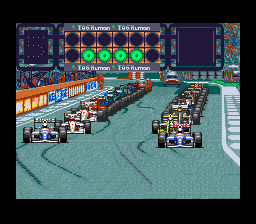
After selecting Battle mode, a screen is displayed to configure your race. Move through the menu using the directional pad to modify the circuit selection, number of laps, weather conditions, and mechanical trouble (on/off). When all choices are made, go to exit and confirm with the B button.
Select your driver using the up and down keys of the directional pad, then confirm with the B button.
To select your rivals, confirm with the B button the names of the drivers you wish to race against from the list provided. If you want them all to be present, select "FULL ENTRY". To finish, go to EXIT and confirm with the B button to access the next screen.
Before starting the race, you can adjust your car's settings. When you select EXIT, the race begins.
At the end of the race, a screen displays the results and offers the following options:
•
TRY AGAIN: Restart the same race
•
CHANGE COURSE: Race on another circuit
•
EXIT: End the game and return to the main screen
Test Run
These are free practice sessions. Choose your track, weather conditions, and the number of laps you wish to complete, then select your car and adjust its settings.
The start takes place from the pits. During these practices, you can modify your car's settings by pressing START + SELECT.
Edit Mode
This mode allows you to build your own car and your own team. It gives you access to the following menu:
•
Member Clear: Returns to the default configuration if you have already chosen a custom configuration.
•
Files: Allows you to save or load a custom configuration.
•
Edit: Allows you to create a custom configuration.
•
Exit: Takes you back to the main menu.
When you have selected EDIT, the following menu appears:
•
Driver Edit: Create your driver's name, date of birth, nationality, and face.
•
Entry Member: Place your driver or "guest drivers" into the teams of your choice.
•
Engine Contract: Assign different engines to the chassis (e.g., Ford engine on Williams).
•
Exit: Return to the first Edit menu.
Config
•
Computer level: Set the speed of other competitors on a scale of 0 to 3 (3 being the fastest).
•
Machine touch: Determine the impact of contact with another vehicle.
•
Machine Damage: Set the degree of damage to your vehicle on a scale of 0 to 3 (0 being the minimum).
•
World GP Lap: Set the number of laps to run in Grand Prix mode. Choose between 10, 20, 30, 40, or MAX (the actual number of laps run for each Grand Prix).
•
Weather: Set the weather conditions in Grand Prix mode.
•
Sound: Select your sound mode: Mono or Stereo depending on your television.
Machine Touch Settings
•
1: Only a major crash will have an impact
•
2: Except for the tires, any crash will have an impact
•
3: Any contact has an impact
Grand Prix Weather Options
•
Real: Weather conditions identical to those of 1993.
•
Normal: Weather conditions are determined at random.
Pit In
To enter the pits, take the deceleration lane indicated by yellow arrows. Repairs will be carried out automatically.
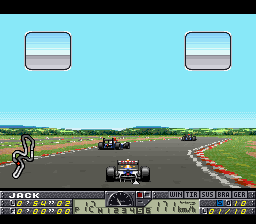
If you wish to change your tire equipment, use the left and right keys of the directional pad, then confirm with the B button. Damage indicators are shown to you by a color variation: from yellow for light damage to red to indicate a dangerous situation.
Vehicle damage affects performance in the following ways:
•
WIN: In the event of a crash, a damaged wing reduces your speed and your road handling.
•
TIR: During the race, your tires wear out and your car's grip is reduced.
•
SUS: Collisions or running off the track can damage your suspension and reduce your road handling.
•
BRA: As they are used, the effectiveness of your brakes decreases.
•
GER: If your gearbox is damaged, your car's acceleration will be weaker and you will have less control over your vehicle.
Machine Setting
•
AUTO SET: Use the default settings.
•
STEER: Adjust the steering sensitivity and the steering wheel return after a turn.
•
TYRE: Select slick tires (dry weather) or rain tires (wet weather) and define the rubber hardness.
•
GEAR: Choose your gearbox ratio style.
•
MAN/AUTO: Choose between 3 types of transmission: Automatic, 5-speed manual, or 6-speed manual.
•
BRAKE: Choose from 7 possible braking settings, between SOFT (very durable, but not very effective) and HARD (very effective, but not very durable).
•
SUSPENSION: Determine the stability of the car's chassis with 7 settings between SOFT (soft, low grip, but durable) and HARD (stiff, not very durable, but providing a lot of grip).
•
WING: Adjust the aerodynamics with 7 settings between MAX SPEED (prioritizes speed) and DOWN FORCE (focuses on greater stability).
•
METER: Choose your tachometer model: Analog or Digital.
•
PIT IN: Select the type of service that will be performed when you enter the pits.
•
FILES: Save or load data.
Steering Types
•
Type 1: The steering wheel returns a little bit.
•
Type 2: The steering wheel does not return at all.
•
Type 3: The steering wheel returns automatically (default setting
.png)



.png)

.png)