Starting Up
Set up your PlayStation® game console according to its Instruction Manual. Make sure the power is OFF before inserting or removing a compact disc. Insert any one of the four The Legend of Dragoon™ discs and close the disc cover. Insert a game controller and turn ON the PlayStation® game console. Follow the on-screen instructions to start a game. PlayStation® Console
Memory Cards
To save game settings and progress, insert a MEMORY CARD into MEMORY CARD slot 1 of your PlayStation game console before starting play. You can load your saved games from the same card, or from any MEMORY CARD containing previously saved The Legend of Dragoon games. See "Saving and Loading Game Data" on page 45 for details.
The Main Menu
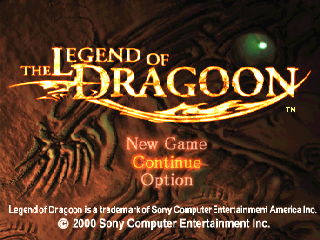
1. From the Title screen or intro movie, press the START button to display the Main Menu.
2. Press the Directional buttons or Left Analog Stick UP/DOWN to highlight a selection and press the X button.
New Game
Begin a new game.
Continue
Load a previously saved game. See "Saving and Loading Game Data" on page 45 for details.
Option
Adjust game settings. Press the Directional buttons or Left Analog Stick UP/DOWN to select or change the setting.
Sound
Select STEREO or MONO.
Vibration
Turn the DUALSHOCK™ analog controller vibration function ON/OFF.
Note: You can also adjust these and other settings during the game in the Config Screen of the Main In-Game Menu. See page 27. Travel
Use the Directional buttons or Left Analog Stick to move around. The Maps and Icons will help you navigate through the world. Review "Finding the Way" on page 20 for details.
Talking
Press the button to talk to other characters. Press the button to scroll through the conversation at your own pace.
Press the Directional buttons or Left Analog Stick UP/DOWN to select a response and press the button. Talking to townsmen and villagers will help you in your journey.
Fighting
Some enemies are just animals and they will attack whenever and whomever they want. Others are out to specifically seek and destroy. As the story unfolds, the motives of the different enemies will begin to reveal themselves.
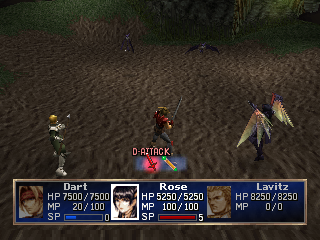
During combat, you can control as many as three fighters at one time. Each warrior fights with his or her own weapons. Use weapons, spells and defensive tactics to win battles. Resort to retreat when the threat is too great. Power
•
Power to survive is measured in Hit Points (HP), the amount of damage a fighter can take before falling in battle. Every fighter can increase HP.
•
Gain power by fighting. In each battle, a fighter gains Experience Points (EP). When Experience Points reach a certain number, the fighter gains a Level and HP increases.
•
A fighter's experience is measured in Levels. Levels increase through combat experience.
•
SP measures a Dragoon's ability to fight using combat techniques known as Dragoon Additions.
•
Delivering attacks in a Human state increases Spirit Power and eventually the fighter's Dragoon Level (See the section "Addition Attacks" on page 42.)
•
Successfully delivering 20 Addition Attacks raises the Additions' level (maximum of 5) resulting in more damage and/or SP upon future attacks with that Additions.
Note: All beings are tied to certain Elements, and they respond differently in combat based on their Elemental relationship. See the section "The Elements" on page 12 for details.
The Rules of Warfare
Hit Points
HP (Hit Points) is how much damage a combatant can take before falling. When any combatant (friend or foe) takes damage, his or her HP is lowered. The amount of HP lost appears over the head of the damaged combatant.
If a combatant loses HP during battle, the number appears in yellow by the affected combatant.
•
Combatants can gain HP during battle. The amount of HP gained appears in blue by whomever gained it.
•
Some enemies damage your characters HP by stealing it. The HP loss to your fighter appears in yellow and the number of HP gained by the attacker appears in blue. Your fighters can turn the tables with certain attacks.
•
Battle is turned-based most of the time. The more agile combatant attacks first and may attack multiple times.
•
When fighters use the Defend Icon during combat, they regain 10% of their total HP.
Elements
From the moment the first fruit fell from of the Divine Tree, all that lived drew its life force from one of the Elements. In combat, an opponent will respond to attacks based on his or her Elemental source.
Certain magical attacks (found in the Item Menu in the In-Game Menu) also draw their power from the Elements. The most potent attack is with a weapon that is an Elemental opposite of the enemy it is used on. So it is important to know your enemy's Element as well as the Element of the item you're using.
When you select an enemy, its name will appear in a frame at the top of the screen. The color of the frame will tell you what Element the enemy is tied to.
•
To deliver maximum damage, attack with an Element that is the opposite
 (Disc 1).png)

 [NTSC-U] [SLUS-94586].png)

_1.jpg)


_1.png)