Arcade Mode
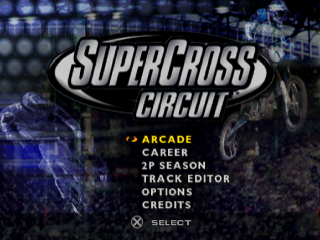
Arcade mode allows you to race in a single race, time trial, or free ride race.
Single Race
Use single races to learn how to play SuperCross Circuit. Get a feel for how the bikes perform on each of the tracks. You can also play in a single race using a 2-player format without having to play a season.
Player Setup
To play a game involving more than one player, you need the appropriate equipment. In a 2-Player game, the player using controller 1 of the PlayStation is Player 1. When the game begins, Player 1 will be shown racing on the top portion of the screen. Player 2 will be shown racing on the bottom. Rider Skill
Three different player levels give you the opportunity to race at your skill level. To prepare yourself for the challenge of racing at the Professional level, first master the Novice and Intermediate levels. Player 1/Player 2
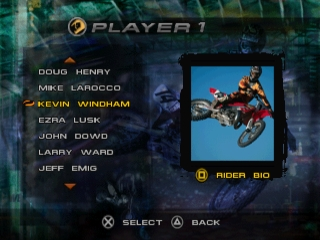
Choose a rider for your race from any of the 16 racers listed.
•
D-Pad Up/Down to highlight a racer and press. •
To read a bio on a particular racer, highlight the racer's name and press. Select Track
Select this option to choose a race track from the categories of Local Tracks, Supercross, or Motocross.
Local Tracks are simple to master and are a great way to learn the game. Supercross races are stadium events that consist of tighter tracks with bigger jumps and sharp turns. Motocross races are outdoor events with longer tracks and fewer jumps.
After selecting a track category:
•
D-Pad Up/Down to select a track location and press.
•
Press to view track data.
Lap Count
Choose the length of your race in lap counts of 5, 10, or 20.
Race Setup
This menu allows you to set the characteristics of your bike and race your selected track for your race.
989 Sports' Tip
To short jump a Double, D-Pad Up while on the face of a jump. Remember to press to throttle burst at the base of the jump.
Bike Setup
Set up your bike to fit your racing style and the difficulty of the track you'll be racing. Suspension
A bike's suspension is its system of flexible members, such as springs of the bike intended to insulate it against road shocks. Stiff will give your bike a tight ride and your racer will feel the effects of the road more prominently. A Soft suspension will allow your bike to absorb more of the road's conditions. A medium suspension gives your bike a normal setting.
Exhaust
A Torque exhaust system gives your bike fast acceleration but has a slower top end speed. This type of system is best utilized on a track with short straightaways and many tight turns.
A Midrange system is a balanced system of both Torque and Top End. A Top End system has a high rate of top end speed but doesn't have powerful acceleration. This system works best on tracks with longer stretches.
Brakes
Setting up your brakes with a Front Bias will give your bike a front braking system that causes quicker stops and is more useful on tracks with fewer turns. A Neutral Bias is a basic braking system. Rear Bias will give your bike less brakes and allow your bike to increase sliding out around turns.
Done
Done brings you back to the Race Setup screen.
Race
Starts the race.
Time Trial
A time trial race is a 1-player race with a main objective of beating the clock and getting the lowest time possible.
Free Ride
After winning enough career races, free ride will be unlocked. Free rides are trick competitions in which the object is to score as many points as possible by performing tricks in a certain time period.
Records
View the time and point records established on each track.
•
D-Pad Up/Down to cycle through each track.
989 Sports' Tip
When entering a corner, press while you are turning for a tighter turn.
Bonus Items
Bonus Items are unlocked at the end of career stages. Once you've completed and won at the local level, cool bonus items will become available for you to use in the next career stage.
Enter Code
If you know a secret code capable of unlocking game items and options, press and then spell out the code name.
Career Mode
Career mode allows you to race in a series of events. Careers consist of six race series on three different types of tracks: Local, Supercross, and Motocross.
New Rider/Load Rider
Create a new rider for your career by selecting a name, purchasing a bike, and choosing rider gear. You can also load a previously saved rider from your MEMORY CARD. All loaded riders will be equipped with their latest bike and gear.
NOTE: Loading a rider will take you straight to the Career menu.
Enter Name
Enter the name of your new rider.
•
D-Pad Left/Right to move spaces and Up/Down to select a letter or number.
•
To delete a letter or number, highlight it and press.
•
Press to accept your rider's name.
Buy 125
This is where you purchase your rider's bike. At the start of a career, the only bikes available to you are the 125 models. 250CC bikes will be unlocked after you complete the 125CC season.
•
Press to view bike data.
Career