How to Start the Game
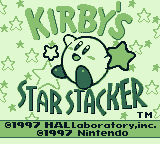
Correctly insert the Kirby's Star Stacker Game Pak into the Game Boy system and switch the power to the ON position. The "Nintendo" logo will appear for a few seconds, followed by the title screen and a demonstration. Press any button to display the Game Select screen.
Game Select Screen
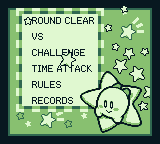
On the Game Select screen are four modes to choose from as well as the options for Rule Explanation and See Records. Make your selection using and on the + Control Pad, and enter by pressing the A Button.
Game Modes
Stack the required number of Stars to move to the next round.
2-Player VS game.
Compete against your high score to stack the most Stars.
Try to stack up the highest numbers of Stars within the time limit.
A visual explanation of the rules.
View the highest scores from the Challenge Time Attack modes.
Playing the Game
Kirby's Star Stacker is a simple action puzzle game. All you have to do is sandwich the Stars between two like Friend Blocks. Block Types
There are four different block types.
•
Star Block: Sandwich it between like Friend Blocks, and the block will disappear, so Kirby can stack the Star. •
Bomb Block: Sandwich it between like Friend Blocks and the bomb will explode, taking out that row.
•
Hard Block: Sandwich it between like Friend Blocks, to transform it to a Star Block.
•
Friend Blocks: Rick, Kine and Coo.
Eliminating Blocks
You can eliminate a block by stacking it with a like Friend Block.
1. Block pairs will fall from the top into the center two columns. Each block pair is a random pairing between Friend, Star and Hard Blocks.
2. Rotate and switch the falling blocks to line up like Friend Blocks.
3. The like Friend Blocks, and Star Blocks sandwiched between will disappear. Kirby will catch the stars and stack them away. •
If an unlike Friend Block or blank spaces are between the ones you line up, they will not be eliminated.
•
You can sandwich Stars either vertically or horizontally.
•
When like Friend Blocks touch each other, they will be eliminated.
How to do Chains
When blocks are eliminated and those remaining fall into line, they too will be eliminated in a chain reaction. This is termed simply a Chain.
1. Eliminate the block(s) sandwiching Stars using like Friend Blocks.
2. If a block disappears and another block falls into that space, and if like Friend Blocks line up, they too will be eliminated.
3. If this happens at least twice, it's called a Chain and bonus Stars fall.
•
If a Bonus Star is sandwiched between like Friend Blocks, this too is a Chain and the action will continue.
•
The more Chains you get, the more Bonus Stars will fall.
•
Any Bonus Stars sandwiched will also be stacked by Kirby. Rising Blocks
Not only do blocks fall onto the playfield, they also push up from below. After two to three blocks fall from the top, a new row of blocks will push up through the bottom.
Whether the blocks push up after the second or third time depends on the difficulty level of the game.
•
When you are in Crisis (the music changes to the Crisis tune), one row of blocks will be pushed up after every third pair has fallen.
•
Just before the blocks push up, King Dedede's fist appears.
Game Over
When either of the two center columns fill with blocks, the game is over.
Erasing Saved Data
Erase All Data
On the Title screen, press SELECT to open a window. Use the + Control Pad to select YES and press the A Button to enter.
Erase Individual Game Data
On the Game Select screen, select the game mode you want to erase the data from. Press SELECT to change the cursor to a bomb. Use the + Control Pad to select "ERASE IT," then press the A Button to enter.
The data contained in the RECORDS mode will not be affected. The VS, RULES or RECORDS modes have no data that can be erased and cannot be selected.
About Each Game
Round Clear mode
You must stack a certain number of Stars to clear each round. On the Game Select screen, select the Round Clear mode. Set the difficulty level using and on the + Control Pad. You can also select your beginning round using or. When ready, press the A Button to start.
Round Clear Display
•
Difficulty level and round number
•
King Dedede (Before the blocks rise, his fist appears.)
•
The remaining number of Stars Kirby needs to stack •
The number of Chains completed
Markers
When you start the game, flashing blocks appear momentarily. If you place the first falling blocks in that place, it will be advantageous. (Markers do not appear in every round.)
Back-up Data
.png)

 (SGB Enhanced).png)
