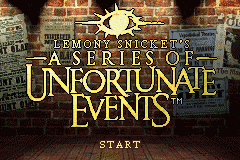
Main Menu
New Game: This is where you begin the children's adventure. From the Start menu, select a game slot to use and the game will begin.
Load Game: From here you can load a previously saved game. Upon loading a saved game, you'll begin at the start of the last level you attempted.
Saving and Extras
If you select a save slot with an existing game, you'll be asked if you wish to replace it. Replacing a saved game permanently deletes the original saved game, which is described as an unfortunate event.
Eye Icon: Once you've completed a mini game, an Eye Icon will appear on the Main Menu. Go here to see the extras you've unlocked:
•
Skipping Stone: Automatically unlocks once you've played the game.
•
Train: Automatically unlocks once you've played the game.
•
Ocular: Automatically unlocks once you've played the game.
•
Handsome Man: Only available for purchase when you collect 200 butterflies. Invention Menu
Once you pick up an item that's part of your invention, you can access the Invention menu at any time by pressing START. However, you can't put your invention together until you've collected all the pieces.
A silhouette of the invention is shown in the Invention menu. As you navigate the silhouette, the individual components highlight as they're selected. To "build" your invention, select an item from the inventory pane and drop it into the appropriate highlighted segment in the invention pane.
Use the +Control Pad to steer, and the R and L Buttons to rotate the invention piece. When a new invention plan is unlocked, a fully silhouetted invention will be displayed.
Inventory Screen
The Baudelaire children have a shared inventory with no limit to the number of objects you can hold. Press START to access the Inventory screen.
Use the + Control Pad to scroll through the Inventory items and see a text description of each one. You can also use the R or L Buttons to scroll through to the Attic, Inventory, and Library screens.