Getting Started
•
Turn OFF the power switch on your Nintendo® Game Boy® Advance. Never insert or remove a Game Pak when the power is on.
•
Insert the Game Pak of Tetris Worlds™ into the slot on the Game Boy® Advance. To lock the Game Pak in place, press firmly.
•
Turn ON the POWER switch. The credit screens will appear (if you don't see them, begin again at step 1).
•
When the title screen appears, press START to proceed to the Main Menu.
Options
•
Sound: Adjust the sound options in the game. Select a song, increase/decrease volume for music or sound effects, and turn music or sound effects ON or OFF.
•
World: Select a world to begin gameplay or select Default to allow the game to choose for you.
•
Next Piece: Choose ON to view the next three available Tetriminos. Select OFF to not see any of the upcoming pieces, making the game more difficult.
•
Ghost Piece: Select ON or OFF. When ON, an outline of the current Tetrimino will appear on the bottom of the screen, helping you see where to drop it.
•
Hold: When ON, you can press the R Button to move the current Tetrimino to the side. When you want to use the piece, press the R Button to bring it back to the game screen. Select OFF to disable this option. Select Default to allow the game to choose for you.
Game Style
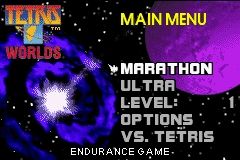
Choose either MARATHON or ULTRA from the Main Menu to begin a new game.
•
Marathon: Play until you lose. You lose when the Tetriminos reach the top!
•
Ultra: Try and beat your best time while limited to 2 minutes per round.
Now select a game mode to begin play. See GAME MODES on pages 13 - 21 for descriptions of each game available in Tetris Worlds™.
Available modes include:
Pausing the Game
Press START at any time to pause the game and view the following options:
•
Resume Game: Press the A Button to return to the current game.
•
Options: Change the game options. See OPTIONS MENU on page 8 for more information.
•
Quit Game: Quit the game and return to the Main Menu.
Sticky Tetris
In Sticky Tetris the player must dig through Garbage using Multiminos to clear the bottom row of Blocks. Blocks of different colors will fall when a piece is Locked Down or a line is cleared. However, if some part of the Multimino comes to rest next to a Block of the same color, they will Stick together forming a Polymino. If there are 25 blocks in the Polymino, it will become Critical Mass and will clear from the Matrix.
When no more Multiminos can fit into the Matrix the player Tops Out and the game ends.
There are 15 Levels in Sticky Tetris. For each Level, there will be that many rows of Garbage in the Matrix.
Hot-Line
In Hot-Line the player will use Tetriminos and Multiminós to clear lines on any of the six apparent lines in the Matrix. These lines are called Hot-Lines. The higher the line, the more of a bonus that will be awarded to the player. If you clear a line that is not on a Hot-Line, you will not receive anything towards the Goal. When no more Tetriminos can fit into the Matrix the player Tops Out.
There are 15 Levels in Hot-Line. The player's Goal is to clear 5 times the Level in Hot-Lines.
•
Level 1: Clear 5 Hot-Lines
•
Level 2: Clear 10 Hot-Lines
•
Level 3: Clear 15 Hot-Lines
•
Level 15: Clear 75 Hot-Lines
Cascade Tetris
The objective of Cascade Tetris is the same as Tetris, clear lines to reach your Goal. However, since there is Gravity in Cascade Tetris, clearing a line causes the individual Blocks of left over Tetriminos to fall into the cells below. When these falling Blocks cause another line to clear, a Cascade is achieved. The more Cascades a player can cause with one Tetrimino, the bigger the bonus will be. When no more Tetriminos can fit into the Matrix the player Tops Out and the game ends.
VS. Tetris
Two players can compete head to head using the Game Link® cable. In order to play Tetris against another player, you will each need a Game Boy® Advance system and each need a copy of Tetris Worlds™. One Game Link® cable connects two systems.
The player that selects LINK GAME from the Main Menu will be in control and will be the only player able to start the game.
*Note: See GAME MODES on page 13 for a description of Tetris.*

.png)
 (En,Es,It).png)
 (En,Fr,De,Nl).png)