GAME SETTINGS
The Game Mode screen appears shortly after you turn on the game. Use it to set your play options:
•
Press the Directional Pad up/down to highlight the option bars.
•
If an option has different settings, press the Directional Pad left/right to highlight the one you want.
•
Press any button to start the game or go on to the next menu.
STORY
One player. Confront the worlds in a set pattern, from merely brutal to totally insane. You must defeat each new challenge in order to advance.
ARCADE
One player. Challenge the worlds in any order.
•
A Planet menu appears, showing five worlds. Choose a planet with the Directional Pad, and then press any button to begin.
•
In each chase, you must reach the waypoint before your quarry. If you succeed, you return to the Planet menu, where you can choose to continue on the current world, or warp to a different planet. If you don't succeed, you must run the course over.
If you choose a different planet before conquering the world you just left, you lose all progress on that world. Each planet harbors a different desperado. After beating him on all courses on the planet, you must destroy him in the final chase. Then, and only then, you can go on to a mystery planet for a no-mercy ordeal that's beyond comprehension!
Here's the kicker: you gotta be driving the right vehicle to bust each boss. And you gotta figure out which one it is. We're not telling. BATTLE
Two players. Drive head-to-head against a former buddy for all-terrain domination.
•
Press the Directional Pad left/right to display your vehicle of choice and its weapons system.
•
Press the Directional Pad up/down to adjust the handicap feature, shown by the highlighted bars. Light up all the bars for maximum power. Use this feature when one of you is awesome and the other guy sucks.
•
Press any button to lock in your settings and advance to the Satellite menu. Use the Directional Pad to choose one of the three satellites of any off-world, and press any button to begin.
•
Your goal in each competition is to destroy your friend. If he's pounding you, drive through a teleporter to get directly behind him. Now it's YOUR turn to beat HIS tail.
When the contest is over, the Satellite menu records the winner with a blue flag for Player 1 and a red flag for Player 2. The latest winner controls which satellite you'll race on next. The latest winner can also choose to go to the Shop, where both players can acquire new vehicles. (The latest loser can force a trip to the Shop by pressing the X Button.)
Defeat your pal in two out of three races and you win the planet.
OPTIONS
Go to the Options menu to change the following game settings:
•
Controls - Rearranges the play controls.
•
Music - Toggles the game music on/off.
•
Sound - Toggles sound effects on/off.
•
Exit - Returns to the Game Mode screen.
PREVIEWS
Check out the incredible new games from Crystal Dynamics. CHOP SHOP
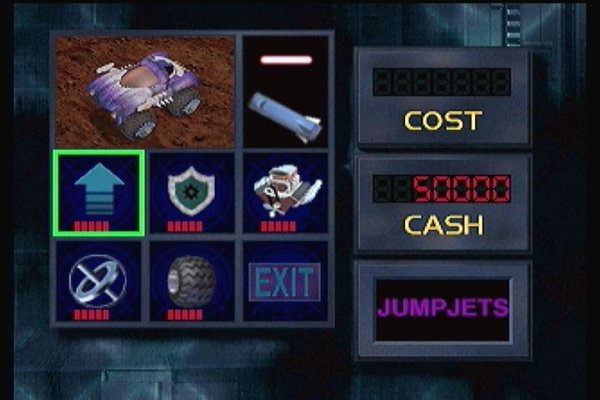
Go to the Chop Shop before each chase for equipment and upgrades.
•
Use the Directional Pad to highlight an item. The number in the box shows how many of that item you already have. You'll also see:
•
Cost - What the highlighted item costs.
•
Cash - Your cash. The cost of each item you buy is deducted from this total.
•
ID - The name of the highlighted item.
•
Press any button to select the highlighted item. The “Exit” option changes to “Buy/Don't” with the “Buy” option highlighted.
•
Press any button to buy the item, or move the highlight to “Don't” and press any button to continue making selections.
•
Highlight “Exit” and press any button to start the action.
NITRO
Increases your engine power and top speed temporarily with each use. Load up on these babies for that extra “winning edge.” CLONES
Bits of yourself (scraped from the dirt) are transformed into expanded DNA replicas, complete with regenerated memory. Clones will continue the mission, should your original body be mangled in battle. The more skilled you become, the fewer of these you'll need. MISSILES
Long-range offensive weapons.
SHOP
Select this item to access a sub-menu of vehicles and upgrades. Cycle through the six vehicles to compare their on-board cannons and select one to buy. (For more information on the vehicles, see pages 15-18.)
Upgrades:
•
Jump Jets - Launches your vehicle faster on jumps, and increase the height and length of your flight.
•
Shields - Protects your vehicle from damage.
•
Engine - Increases your acceleration power.
•
Gyros - Keeps your vehicle balanced and prevent rolling on steep terrain.
•
Tires - Improves a vehicle's road-handling and traction.
You are limited to the number or quality of the upgrades you can pack into each vehicle. The maximum you are allowed is indicated by the vertical bars in the boxes. The red bars show how many you have. The black bars show how many more you can acquire.
NOTE: You can only upgrade the vehicle you own.
HEADS-UP DISPLAY
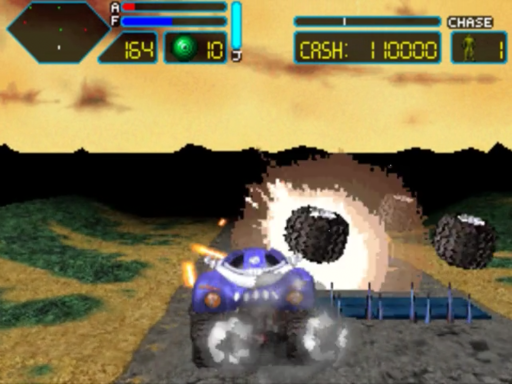
ARMOR
The color bar decreases to show your increasing damage level as the vehicle bashes into terrain and takes enemy