Button Functions
These controls apply to TYPE 1 settings.
•
B Button: Accelerator. Speeds up the car.
•
X Button: Brake or Reverse. Hold down to reverse.
•
Direction Buttons (Right & Left): Steering. Moves the car left or right.
•
L Button: Fast Steer. Enables sharp steering.
Advanced Steering
If the car goes slightly off course, press the B button, C button, and L button simultaneously to turn the car 15 degrees in the current direction of travel. If you check the rearview mirror, you do not need to keep holding the direction change button. You can continuously press these buttons to change direction at that moment.
Camera Views
There are 4 types of viewpoints available in-game. You can switch between Type 1 (3/4 overhead) and other views by rapid button pressing.
•
Driver View: Camera placed behind the car. Allows you to look down.
•
2/3 Overhead View: Camera in the front upper area. Allows you to see forward.
•
Normal View: Camera in the forward area. Allows you to survey the area.
•
Full Overhead View: Full overhead view showing the whole scene.
Other Controls
•
Start Button: Pause. Pauses the game to check the race.
•
X Button: View Down. Changes viewpoint to forward (3/4 overhead).
•
Z Button: View Up. Changes viewpoint to look forward and up (overhead view).
Car Type Selection
You can select from three car types: ROOKIE, AMATEUR, and PRO. Driving ability changes depending on the selected type, which adjusts the game difficulty accordingly.
•
It is recommended to start with the ROOKIE car.
•
After selecting a car type, you can perform an action at the bottom right of the car select screen.
Track Selection
Three types of tracks are prepared for the game: SPEEDWAY, CROSSOVER, and OCEAN DRIVE. Additional tracks like CACTUS CREEK and CITY HEAT are also available.
•
Wreckin Racing / Stock Car Racing: Start is limited similarly to ChronoRally scenes. There are no track restrictions for this console mode.
•
Time Trial / Practice: You can select tracks at will.
Backup and Save Data
To save game data, 113 blocks of capacity are required. Check the free space in Save RAM or Save Player RAM within the game.
•
If you resume a Championship, First Line ranking data is recorded.
•
Replay data also requires 113 blocks and should be overwritten approximately every 8 minutes.
Audio Options
Selecting Audio allows you to configure play environments.
•
Music Volume: Adjust the music volume.
•
Music Test: Test the BGM.
Fastest Laps and Control Pad
•
Fastest Laps: Check the best lap times for each course recorded in Time Trials.
•
Control Pad: Buttons on the control pad can be set in 3 different types.
Start Race
Once selections are complete, select "Decide" to fasten your seatbelt and proceed with the race.
Race Style Selection
You can choose from four modes: Wreckin Racing, Stock Car Racing, Destruction Derby, and Time Trials. Wreckin Racing
This mode includes Wreckin Racing, Stock Car Racing, Destruction Derby, and Time Trials. For example, select Destruction Derby to start playing that specific mode. Destruction Derby
Compete in "The Bowl" arena to destroy opponents by making 3 cars explode, spinning bolts, nuts, and other body parts. You cannot gain points by using dynamite to damage the body.
•
Destroy an enemy car: 10 points.
•
Spin an enemy car 80 times: 10 points.
•
Spin an enemy car 180 times: 4 points.
•
Spin an enemy car 90 times: 2 points.
Race Screen Display
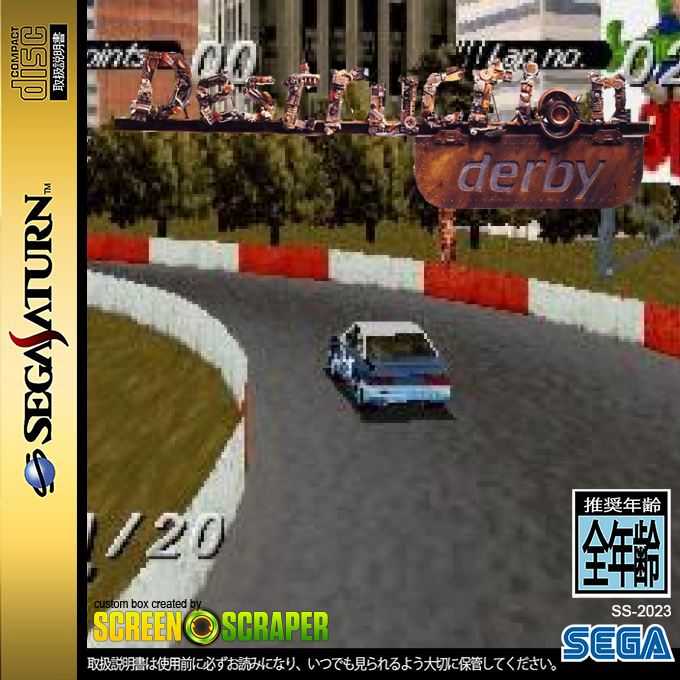
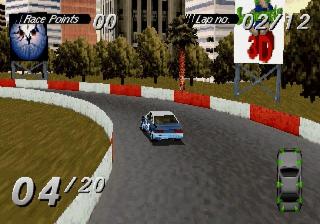
•
Race Points: Displays damage points obtained by each vehicle during Wreckin'Beast Destruction Derby. •
Lap No.: Shows the current lap number and run count.
•
Damage Indicator: Indicates damage status. Colors darken through 4 stages: Blue, Yellow, Red, Black.
•
Position: Indicates player placement. Displays 1st through 3rd place. If the player is in 2nd or 3rd, this specific display is not shown.
Wreckin' Racin' Bonus Points
Racing Mechanics
This is a race on a regular track where you control vehicle speed and position to gain bonus points. Points between positions (e.g., 1st to 2nd) are not directly linked to points gained. The goal is to stack as many points as possible while changing positions.
Time Trials
Drive freely on the course without getting hit. This mode displays lap times without position or points. You can visualize recorded lap times by topping up your lap time. Best laps for each course can be seen in Format: 1st Lap.
Stock Car Racing
This is a standard race aiming for 1st place. You do not destroy enemies or overtake at high speed. However,






.png)


 (Rev A).png)