Game Mode Selection
Press the START button at the title screen. The GAME MODE SELECTION SCREEN is then indicated.
Move the joystick up or down to highlight your selection and confirm by pressing the "A" button.
Select Game
•
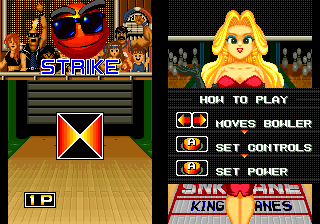
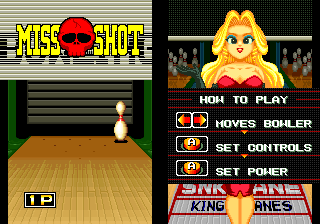
1 PLAYER: For 1 bowler. "How to Play" will be displayed on Lane 2.
•
2 PLAYER: For 2 bowlers.
•
3 PLAYER: For 3 bowlers. The third bowler will bowl on the 1st lane.
•
4 PLAYER: For 4 bowlers. The third and fourth bowlers will bowl on the 1st and 2nd lanes.
Game Mode Descriptions
SCORE GAME
Regular bowling competition with pins scoring points.
FLASH
Flash mode gives you between 50 and 300 points from the board flashing above your lane. To receive points, you must bowl a strike (top level) or a spare (bottom level).
STRIKE "90"
The Strike 90 mode gives you "90" points for a strike and "60" points for a spare.
*In FLASH and STRIKE 90 modes, points will be added on the next frame. At the 10th frame, there will be no bonus throw.
Magnified Screen
•
① Demo Window: You will see different responses depending on the number of pins you knock down.
•
② Pins: This is the same arrangement of pins from the "Throw Screen".
•
③ Ball: The ball you have thrown.
•
④ Gutter: Gutter balls are when no pins are knocked down.
•
⑤ Bowler's Number: Indicates the order of each bowler.
Communication Multi-Play
The communication function enables this game to be played with up to four players simultaneously.
Requirements for Communication Multi-Play
•
1. Two (2) NEO-GEO Consoles
•
2. Two (2) NEO-GEO Controllers
•
3. Two (2) League Bowling Cartridges
•
4. One (1) Communication Cable
•
5. Two (2) TVs or Color Monitors
How to Connect
•
① Connect 2 NEO-GEO consoles to 2 TV sets.
•
② Insert the game cartridges.
•
③ Connect the cartridges with the communication cable.
•
④ Turn both NEO-GEO units "ON". Both players must select "Communication multi-play". (The console turned on first will be player #1).
•
⑥ When "entry screen" is sent to another NEO-GEO, press the "start" button to begin.
Power Gauge
After you confirm the control gauge, the power gauge appears on the screen. Quickly select the power by pressing the "A" button.
If maximum power is used, the ball may edge to the left. The power will be automatically selected for you if you fail to press "A" fast enough.
Bowler's Movement
Move the bowler left and right with the joystick to the desired bowling position.
Control Gauge
Confirm the direction of the ball by pressing the "A" button.