GETTING STARTED
•
directional buttons (D-buttons)
•
left analog stick (L3 button when pushed down)
•
right analog stick (R3 button when pushed down)
•
multitap connector (for PlayStation®2)
PlayStation®2 System Setup
1. Set up your PlayStation®2 computer entertainment system according to its Instruction Manual.
2. Make sure the MAIN POWER switch (located at the back of the console) is turned on.
3. Press the RESET button. When the power indicator lights up, press the open button and the disc tray will open.
4. Place the Medal of Honor™ Rising Sun disc on the disc tray with the label side facing up. Press the open button again and the disc tray will close. 5. Attach game controllers and other peripherals, as appropriate.
Controller Requirements
A DUALSHOCK®2 analog controller must be connected to controller port 1 to play the game.
When using the multitap (for PlayStation®2), a controller must be connected to controller port 1-A.
Game Start
Follow on-screen instructions and refer to this manual for information on using the software.
COMMAND REFERENCE
DUALSHOCK®2 analog controller configurations
Menu Controls
•
Press the D-button to browse or cycle through the different options.
•
Press the button to select an option.
•
Within a menu, press the button to return to the previous screen.
MAIN MENU
The first time you start Medal of Honor Rising Sun, you are loaded directly into the Day of Infamy level in Single Player Campaign mode after a short introduction. Once you have a save file on your memory card (8MB) (for PlayStation®2), you no longer load straight into gameplay upon start-up, but instead proceed to the Main menu. From the Main menu, you can learn more about the game, load or save a game, change game options, or begin the Pacific campaign.
To access the Main menu during gameplay, press the START button to access the Pause menu, press the D-button to highlight EXIT, then select EXIT TO MAIN MENU.
Main Menu Options
•
Single Player Campaign: Start the campaign when the first bombs land on Pearl Harbor.
•
Two Player Campaign: Play cooperatively with friends.
•
Multiplayer: Play head-to-head against friends on a variety of maps.
•
Online Multiplayer: Go online to match up with the world's best soldiers.
Single Player Campaign
Ready to enlist? From the Single Player Campaign screen, you can leap from your bunk into the war in the Pacific or manage your saved games.
Profiles Screen
Create a profile to store your progress and your settings for Medal of Honor Rising Sun. To save a profile, you must have a memory card (8MB) (for PlayStation®2). •
To load a profile, press the D-button to highlight the profile, and then press the button. You advance to the Single Player Campaign menu.
To create a profile:
1. To create a new profile, press the D-button to highlight NEW PROFILE then press the button.
2. Press the D-button to highlight a letter, and then press the button to enter it. Continue entering letters until you complete the profile name.
3. To finish, highlight SEND and press the button. Press the D-button to select the MEMORY CARD slot you would like to save to, then press the button. The profile is saved to your memory card.
Single Player Campaign Menu
•
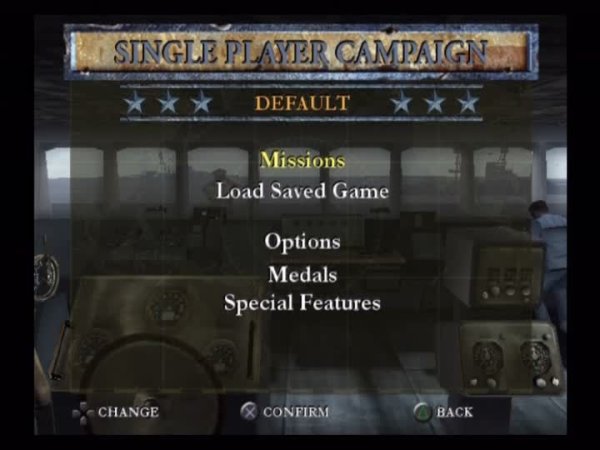
MISSIONS: Resume playing the Pacific campaign, access bonus materials, and check mission statistics.
•
LOAD SAVED GAME: Load a previously saved game location.
•
OPTIONS: Set controller, audio and subtitles, difficulty level, and gameplay options.
•
MEDALS: Review your hard-earned medals.
•
SPECIAL FEATURES: Check out bonus features such as historical videos.
To begin the Single Player Campaign:
•
To begin the campaign at the bombing of Pearl Harbor, highlight MISSIONS and press the button. Press the button again to begin "Day of Infamy".
•
To return to the Single Player Campaign menu, press the button.
The Campaign
The attack on Pearl Harbor threw the US back on its heels and into a war on two fronts. Already strategically involved in the European Campaign, the United States Armed Forces must rise from the ashes of Pearl Harbor to lead the fight against the Japanese war machine before it overruns the entire Pacific Theater.
From the first bombs landing on Pearl Harbor, you begin an odyssey through the critical battles of the early parts of the Pacific Campaign. Always scrambling against time and a battle-hardened enemy, you must claw and scratch to turn the tide of the War in the Pacific.
To play through other missions that you have already reached, press the D-button to highlight the mission, and then