GETTING STARTED
DUALSHOCK™ 2 ANALOG CONTROLLER CONFIGURATIONS
•
LEFT ANALOG STICK (L3 BUTTON WHEN PUSHED DOWN)
•
RIGHT ANALOG STICK (R3 BUTTON WHEN PUSHED DOWN)
INITIATION
Set up your PlayStation®2 computer entertainment system according to the instructions in its instruction manual. Make sure the main power switch (located on the back of the console) is turned on.
Press the RESET button. When the power indicator lights up, press the OPEN button and the disc tray will open.
Place the Midnight Club disc on the disc tray with the label side facing up. Press the OPEN button again and the disc tray will close. Attach game controllers and other peripherals, as appropriate. Follow on-screen instructions and refer to this manual for information on using the software.
Starting the Game
1. Set up your PlayStation®2 according to its instruction manual. Connect a DUALSHOCK™ Analog Controller(s) and/or a DUALSHOCK™2 Analog Controller.
2. If you wish to save your Midnight Club game, insert a Memory Card (8MB) (for PlayStation®2) with at least 350KB of free space into Memory Card Slot 1. Midnight Club only supports Memory Card Slot 1. 3. Press the main power switch ON. The indicator will be red.
4. Press the OPEN button. The disc tray will open, the indicator will turn green, and the indicator will flash blue. The indicator will stay a solid blue when the disc tray has stopped moving.
5. Insert the Midnight Club disc, label side up, into the PlayStation®2, and press the OPEN button. The disc tray will close. 6. If the PlayStation®2 logo, and subsequently the Rockstar logo, do not appear, press the OPEN button. The disc tray will open. Ensure that the Midnight Club disc is properly inserted, and press the OPEN button again. 7. If the game does not load, press the main power switch OFF. Ensure that your PlayStation®2 is set up correctly, press the main power switch ON again, and then press the OPEN button.
8. It is also recommended that you do not insert or remove peripherals once the power is turned on. Do not reset, power down, or remove the Memory Card from the PlayStation®2 during loading/saving, as this may destroy data.
ARCADE MODE
Arcade Mode allows you to jump right in and race throughout the cities, competing in a variety of races without getting involved in the bruising battle that is Career Mode. You have four modes to choose from, and four cars to start with.
As in Career Mode, you will be able to acquire new vehicles by winning Head 2 Head and Way Point races. Unlike Career Mode, however, the cars you earn and save in Arcade Mode will only be available to you in Arcade Mode.
City Select
After selecting Arcade Mode, choose which side of the Atlantic you'll be racing on. Will it be the hard, brutal, canyons of New York City, or the battle-hardened, time-tested thoroughfares of London?
In Head 2 Head and Waypoint, you have to race your way into London by defeating all of the New York racers, while Cruise and Capture the Flag allow you instant England access.
Race Select
Highlight one of the four modes, and then press X.
CRUISE
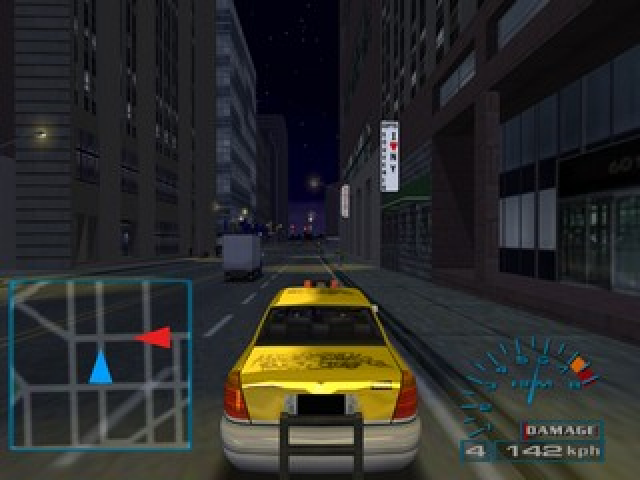
See the sights! Take a pleasant drive. Sideswipe a few buses. The city is your oyster. Learn all the nooks and crannies, and sidestreets and alleys of the city.
Practice your swerving and veering in and out of traffic, as it will come in very handy in the other modes.
HEAD 2 HEAD
You race mano a mano against a Hookman, with the Hookman's car on the line. The race is linear and the waypoints must be touched in sequence.
The waypoints appear as searchlights and change from blue-green to red when you hit them. On the map, the next waypoint you need to hit will be a solid red while the rest will be transparent. Once you have hit the waypoint it will disappear from the map.
WAYPOINT
You race against the Hookman and his homeboys (4-6 of 'em) to hit all of the waypoints, in no particular order, and then get to the finish point first. As in Head to Head, the searchlights will change to red when you hit them.
On the map all the waypoints will appear as red (you can hit them in the order you choose) and will disappear when you hit them.
CAPTURE THE FLAG
Compete against a friend and/or AI racers and/or the clock (depending on the settings) to collect flags and drop them off at the proper place. Points are awarded based on how much time it takes to drop the flag off.
The flag can be lost by a hard collision with pretty much everything. You can steal the flag from your opponents, and they in turn can steal the flag from
.png)

_1.png)
.png)

_1.png)
.png)


.png)

.png)
_1.png)


.png)
.png)

.png)

 (En,Fr,De,Es,It).png)

