Starting the Game
1. Set up your PlayStation®2 computer entertainment system according to the instructions supplied with your system.
2. Check that the system is turned on (the on/standby indicator is green).
3. Press the OPEN button to open the disc cover.
4. Place The Sims 2 Pets disc with the label side facing up in the disc holder, and then close the disc cover. 5. Attach game controllers and other peripherals as appropriate.
6. Follow the on-screen instructions and refer to this manual for information on using the software.
Building Your Sim Family
To create a new Sim person, dog, or cat, select a location, choose MOVE IN FAMILY, then select CREATE A NEW FAMILY. You can also select the Real Estate building and select CREATE A NEW FAMILY.
Creating a Sim
To create a Sim, select ADD A FAMILY MEMBER then select SIM. Select either a MALE or FEMALE Sim, or choose RANDOMIZE.
Create-a-Sim Menu
Create and customize your Sims from head to toe. Shape, appearance, personality, and aspirations: your Sims are a reflection of your creativity.
•
Choose your Sim's skin tone and body type, morph their body shape and head, select a hair style and color.
•
Determine your Sim's Aspiration Family, Wealth, Knowledge, Popularity, Creativity.
•
Is your Sim a fashion force or a fashion faux pas? Customize your Sim's tops, bottoms, shoes, and accessories here.
•
Adjust your Sim's personality.
•
Save your Sim and return to the Create a Family menu.
Create a Pet Menu
You can customize the appearance and personality of your Sims' pets. Everything from their noses to their tails can be uniquely theirs.
To create a dog, select ADD A FAMILY MEMBER then select DOG. To create a new cat, select ADD A FAMILY MEMBER then select CAT. Select a breed for your pet or choose MIXED BREED to create a random pet. Pressing the button with MIXED BREED selected allows you to keep generating random pets until you are happy with what you see.
•
Shorn or shaggy? Body type, fur, markings, and tail length can be adjusted here.
•
Morph face and ear features.
•
Adjust your Sim pet's personality.
•
Hats, glasses, and neckwear. Your pet can be as fashionable (or fashion less) as its owner.
•
Save your Sim pet and return to the Create a Family menu.
Pet Sharing
You can share pets you have uniquely created with your friends.
Once you have saved your pet, you can access its Pet Sharing code by opening the Pause menu during gameplay, selecting PERSONAL INFO, then selecting PET PROFILE.
To enter a Pet Sharing code, press the button in the Create a Family screen, then enter the code exactly as you received it.
Game Screen
•
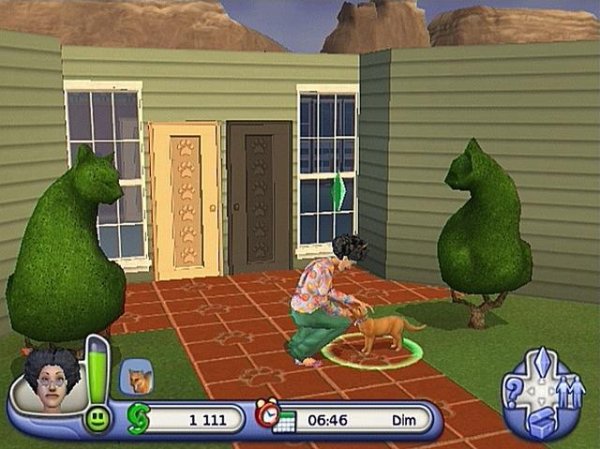
Mood - A lot of green indicates your Sims are happy; a lot of red indicates they're unhappy.
•
Simoleons (money) your family has
•
Quick text/Wants of the nearest pet (D-button)
•
Relationships (D-button)
•
Wants and Aspiration meter (D-button)
Personal Info
A wide variety of important information is at your fingertips in the Personal Info menu.
To access the Personal Info menu, press the START button to open the Pause menu then select PERSONAL INFO.
•
Review your selected Sim or pet Wants.
•
See what kind of relationships your Sim has with other Sims and their pets.
•
Reinforced Behaviors—How a pet is progressing with reinforced behaviors and commands. (Pets only)
•
Your Sim's career—How well are they climbing the corporate ladder?
•
Details on your Sim's personality traits.
•
Pet Profile—Are they gifted or lazy? Independent or cowardly? Find out here. (Pets only)
•
Family and individual stats.
•
Skills—How's that logic or cooking pursuit coming along? (Sims only)
Motives and Mood
Your Sim's overall Mood meter displays a summary of their needs. The more green that shows, the happier they are. The more red, the less happy. Sims who aren't in a cheery mood are less likely to head off to work, look for a job, or engage in skill building.
Sim Motives
•
Social: Keep your Sim socialized by interacting with other Sims or pets.
•
Bladder: Eating and sleeping increase your Sim's need for the toilet. Find a bathroom to avoid an embarrassing puddle.
•
Hygiene: Some activities cause your Sim's hygiene to decline. Hit the showers or wash your hands.
•
Hunger: Quiet a Sim's rumbling tummy by eating some tasty vittles. Some food recipes satisfy hunger better than others.
•
Fun: Find something entertaining for your fun-deprived Sim to do: watch TV, dance, or play a game.
•
Energy: Take a snooze or eat some energ