Game Start
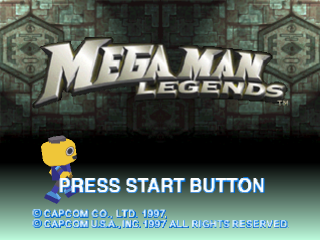
Press Start to reach the title screen after the demo begins. The title screen allows you to start a new game, load a saved game, or configure options. Use the Directional buttons to select one of these choices.
•
With New Game highlighted, press X or Start to begin a new game.
Load Saved Game
To load a saved game, use the Directional buttons to highlight Load Saved and press Start or X. Say Yes to continue and access any previously saved games.
Options
To see Options, use the Directional buttons to highlight Options, then press Start or X to view the Options menu. In the options menu you will be able to change the Operation settings, sound options, Lock On/Off, and Map On/Off.
Saving and Loading Games
(requires memory card)
Load Data
From the Title screen, highlight Load & Save. Press X or Start to continue, then highlight the saved game you want to load and press X or Start to select it and begin loading.
Save
Throughout the game you can ask Data to call up the Save Game menu. While speaking with Data, highlight Save Game and press X or Start. You can save as many as five different games, or you can overwrite a previously saved game by saving a new game to its menu location. Note: Be careful not to turn your PlayStation game console off or press reset while saving a game as it may erase other saved games. Game Stages
The world in which Mega Man, Roll and Barrel explore is divided into Normal areas and Battle areas. You will progress through the game by fully utilizing both areas. Normal Areas
In these areas, you can collect information and clues by talking to and listening to people in the streets. It is in these areas where the storyline unfolds. You cannot use weapons in these areas - only kicks.
Battle Areas
In these dangerous areas, such as the underground caverns, you will meet and battle your enemies. Use your weapons or items freely to overcome these enemies and advance through the game.
How to Play
Practice Makes Perfect
When the game begins after the opening demo, a brief tutorial automatically appears for the first few areas you encounter. Learn how to use the general operations by following the on-screen instructions.
Life Shield
Mega Man is protected by a Life Shield. The shield limits the amount of damage you receive from enemies. Damage temporarily slows Mega Man down, but after a short period of time he will be back on his feet. If you find yourself destroyed and don't have any tokens, call out to Data to come fix you up. Mega Buster
Press to fire. By upgrading it, you will become stronger.
Special Weapons
The weapons you can arm are strong but are limited in the amount of ammo available. The available weapons power is shown in the Special Weapons gauge (p 13).
If you get something that looks like a potential weapon, you should show it to Roll. Roll arms the weapons and modifies them for use.
Support System
As the game progresses, talk to Roll and bring her items you find and/or buy. Her expertise and mechanical genius may help you to discover how items work or to develop special weapons.
Item Development
By using items obtained by Mega Man, Roll can make new items. Talk to Roll to hear her ideas on ways to mix or use items. Special Weapons Change
You can get new weapons for your right hand and charge them up. By giving Roll money for parts, she will strengthen your special weapons. You can customize weapons by refitting, by raising the attack power, or increasing a weapon's range.
Data
Mega Man's mysterious partner who appears in several places throughout the game, usually with Roll. Speak to him to replenish your Life Shield and to save your progress. It's certainly a good idea to talk to him whenever you see him. Game Over
When Mega Man's Life Shield is reduced to zero, the game is over. You can restart from the point you last saved. Options Screen
The options screen can be accessed at the title screen or in the game by pressing the Start Button. Use the Directional buttons to change the options.
•
Turn L1/R1 Directional button
•
Free Look Reverse Normal
Turn
Sets motion operation for changing direction.
•
L1, R1 - Changes Mega Man's direction, and does side roll/jumps when used with the Directional buttons. •
Directional Button - Change direction left or right looking up or looking down-R2 button to look up or down.
Free Look
•
Reverse - This will switch the orientation of "looking" with the direction key so that you press Up to look (or lock) down, Down to look (or lock) up.
•
Normal mode is the opposite of Reverse (Up to look/lock up, Down to look/lock down).
Sound
Map
•
Turns the map feature on or off.
Lock-On
•
This turns the Lock On auto-targeting feature on or off.
When you are done with Options, press O to return to game.
Beginners Guide
Junk Shops
There are various strengthening items in junk stores and shopping areas. There are Mega Buster power ups, support, and body armor.
.png)


.png)