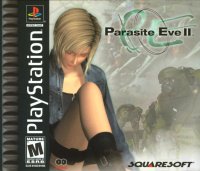
Getting Started
Set up your PlayStation® game console according to its Instruction Manual. Ensure the power is OFF before inserting or removing a compact disc. Insert Parasite Eve™ Disc 1 and close the Disc Cover. Insert a game controller and turn ON the PlayStation game console. Press the START Button anytime during the opening movie sequence to advance to the Title Screen. Memory Card
A Memory Card (sold separately) is required to save your game position. Insert a Memory Card into the PlayStation game console BEFORE starting play. Data can be saved or loaded from either Memory Card slot. Do not remove a Memory Card while saving or loading games, as this could damage the game data.
Saving Data
You can save your data by making phone calls from telephones on the Field. Telephones are indicated by flashing red lights.
Move Aya so that she stands in front of the telephone and press the Button. The Save Menu will be displayed asking, "Do you want to save?" Select the appropriate Memory Card slot to use. You will need a Memory Card with at least one block available.
Do not insert or remove a Memory Card while saving games. There will be save points other than telephones available during the game.
Continuing From Saved Data
Insert the Disc from the previous saved game and the Memory Card with the saved data, then turn ON the PlayStation game console. Go to <Continue> on the Menu Screen and choose the data file you want to resume. Do not insert or remove a Memory Card while loading data.
Beginning a Game
After the game's opening movie is completed, the Title Screen will appear. Press either the START Button or the Button to skip the opening movie and go directly to the Title Screen.
Press the START Button to go to the Menu Screen and choose either <New Game> or <Tutorial>. If you choose <New Game>, the game will start.
If you choose <Tutorial>, a general overview of the game will be displayed. Press the Button to advance the tutorial. Press the SELECT Button to exit the Tutorial and return to the Title Screen.
Game Progression
In the game, you control Lieutenant Aya Brea. How the game progresses will depend on whom Aya speaks to and what she finds. It may also change depending on which option you choose when asked to make a choice.
When you encounter enemies on the Field map, a battle will begin. If Aya's HP falls to 0, the game is over.
Field
Control Aya using the Directional Buttons or the Left Analog Control (hereafter referred to as the Directional Buttons). When you see people, move close to them and press the Button to speak to them.
When standing in front of an object, press the Button to search or collect items. You can retrieve important information and useful items this way. Be especially thorough when talking to people and searching suspicious objects.
World Map
As the game progresses, a map of Manhattan will appear, offering different locations to explore. Use the Directional Buttons to choose where you want to go on the map and press the Button.
Additional locations will be added to the map later. Use your detective skills to determine which location to examine. If you wish, you can press the SELECT Button to activate the Heli-Cam, which follows the helicopter as it travels over the city. Press the SELECT Button again to return to the normal World Map view.
Status Screen
While on the Field, press the Button to display the Status Screen. This shows the status of Aya's overall skills and items she possesses.
Scroll through the icons on the left side of the screen using the Directional Buttons and press the Button to proceed to the next screen.
•
A] Bonus Point (BP) - Awarded when your level goes up. The number of points awarded after a battle will increase if you evade enemies' attacks.
•
B] Offense - Aya's offensive skills.
•
C] Defense - Aya's defensive skills.
•
D] PEnergy - Affects the PE bar's recovery rate as well as the diminishing rate when Parasite Energy is used.
•
E] Status Recover - Affects the time needed to recover from abnormal status attacks.
Item Icon
All items that Aya is currently carrying will be displayed. Items she is equipped with will be highlighted in blue.
Here you can <use> or <discard> items, as well as <move> items and <reload> guns. Use the Directional Buttons to scroll through the items and press the Button to show the commands listed above. Choose the command you want and press the Button to execute.
Items highlighted in gray may not be chosen. There is a maximum number of items Aya can carry at any one time (including weapons and armor). Your item capacity is a maximum of 10 items at the beginning of the game. Item Capacity can increase upon increasing Aya's level and/or by distributing Bonus Points (BP).
•
Item - Usable items such as Medicine 1 are displayed in white. Items that cannot be used at this time are in gray. Select an item to see its purpose at the top of the screen.
•
Move - Organizes the displayed items. It may be convenient to move the items you use most frequently to the top of the list.
•
Reload - Reloads the weapon with the specified number of bullets.
•
Item Capacity - Your maximum item capacity (number of items you can carry).
 (Disc 1).png)

![Parasite Eve [Greatest Hits] box art for Playstation](https://media.retro.gold/moby_img/Sony_-_PlayStation/Named_Boxarts/Parasite Eve [Greatest Hits]_Front_Cover.jpg)
![Parasite Eve [Greatest Hits] screenshot 3 for Playstation](https://media.retro.gold/moby_img/Sony_-_PlayStation/Named_Snaps/Parasite Eve [Greatest Hits]_screenshot_0.jpg)
![Parasite Eve [Greatest Hits] screenshot 4 for Playstation](https://media.retro.gold/moby_img/Sony_-_PlayStation/Named_Snaps/Parasite Eve_0.jpg)
![Parasite Eve [Greatest Hits] title screen for Playstation](https://media.retro.gold/Sony_-_PlayStation/Named_Titles/Parasite Eve (USA) (Disc 1).png)
![Parasite Eve [Greatest Hits] title screen for Playstation](https://media.retro.gold/Sony_-_PlayStation/Named_Titles/Parasite Eve (Disc 1 of 2) [NTSC-U] [SLUS-00662].png)
![Parasite Eve [Greatest Hits] title screen for Playstation](https://media.retro.gold/Sony_-_PlayStation/Named_Titles/Parasite Eve (USA).png)



.png)

.png)



_1.png)




.png)



.png)