GETTING STARTED
Insert the cartridge and turn the power on. The screen will scroll and the title mode will appear.
Mode Select Screen
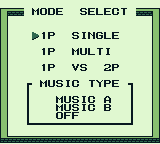
Press the Start button when the title screen comes on. Choose either 1P SINGLE maze, 1P MULTI maze, or 1P VS 2P and MUSIC TYPE by pressing the Select button. Press the Start button to decide.
Music Select Screen
Press the Select button to move the cursor. Press the Start button to decide.
The game will begin automatically with the indication of ROUND 1 after the player decides Music Type.
Game Over
When the game ends, the words GAME OVER will appear on the screen.
HOW TO PLAY
This is a jigsaw puzzle, maze and labyrinth game. When Dexter turns the color of the game field at the start of the game into an opposite color, he clears a round. There are some tiles or blocks that are permanent and some that are not. These tiles or blocks can hide many items, magic puzzle friends, and treats. There are several game stages, including bonus and super bonus stages.
Lives
Dexter begins with three lives. He will lose a life in these situations:
•
When he bumps into an enemy.
•
When he is put between blocks.
If he loses all three lives, the game is over.
In a Bonus Stage: If his time runs out, or if he flips the skull tile, the game is over.
How to Flip Tiles or Blocks
Press the A button to flip the tiles. Dexter can flip tiles one by one, or he can turn an entire row by pressing the A button on one end of a row and then running to the opposite end of that row and pressing the A button again.
Some blocks are fixed, but magic friends can move them. Dexter can place enemies between and get items by moving blocks.
Getting Items
When Dexter moves blocks to places such as the corners, until he can't go any further, items will automatically come out.
In a Bonus Stage: A tile which is hiding a food item underneath it will flash. When it stops flashing, flip the tile over. Only one tile can be turned over at a time.
HOW TO DEFEAT ENEMIES
There are six enemies, and they are soon replaced if they are destroyed. Also, the higher the round, the shorter the time between their destruction and their replacement's appearance.
When enemies are placed between black tiles which Dexter has flipped, they will be stunned temporarily. Dexter will not die even if he touches the enemies.
By pressing the B button, Dexter can lift the enemy and walk around the screen with him. But Dexter can't flip a tile and push a block at the same time. Dexter also can push an enemy up against the fixed blocks or walls to destroy him.
Throwing an Enemy
Press the B button while standing on the stunned enemy to lift him. Press the B button again to throw him.
Two enemies can be defeated at the same time if Dexter is able to throw one enemy against another.
MODES OF GAME PLAY
Single Mode
There are a total of 30 rounds.
Dexter enters the Bonus Stage by clearing every 4 rounds and challenges KING TOJO after winning all rounds.
Multi Mode
This mode is different from Single Mode. Stages consist of multiple fields which are connected up, down, left, right, and one to another.
If Dexter finishes all fields and defeats all bosses in a round, he ends the round.
There are three rounds, and Dexter must challenge a boss at the end of each round.
1P VS. 2P (MATCH) MODE
Players will need a Video Link™™ cable for 1P VS. 2P Mode. This Mode is a match between two players. The player who clears the highest number of rounds first will be the winner.
The rules are basically the same as Single Mode. Press the Start button for 1P side to decide. 2P can select Music Type and Round Select.
The game won't be over even when a player loses a life, but he will waste his time and give advantages to his opponent. There are some enemies and items which are shown only in this mode. If the player can destroy them, they are sent over to bother his opponent.
Less Time
If a player finishes one game after his opponent begins the next, he will start the next round with ten seconds less time. Whenever he is defeated by his opponent, he must start a round with ten seconds less, up to a maximum of forty seconds accumulated time.
Maze Stage
When a player gets to the Maze Stage, he can send his opponent to a field which is a simple maze. That player must then use the Key to open the Door by moving blocks, then return to the regular field through the Door quickly.
There are some items here which are disturbing to your opponent, so try to find them.
Handicap by Round Selection
If there is a gap between the ability levels of two players, the number of rounds can be set on the Round Select Screen to accommodate them.
Once the number of rounds is selected, press the Start button of IP to begin.
CONTINUE MODE
CONTINUE appears on the screen after each game is over. A player can use CONTINUE up to three times. This allows him to start from the beginning of the round in which the game ended.
When playing in Single Mode, CONTINUE can't re-start the player at the point where he is
.png)



.png)











_1.png)