Object of the Game
Welcome to DOOM, a lightning-fast virtual reality adventure where you're the toughest space trooper ever to suck vacuum. Your mission is to shoot your way through a monster-infested holocaust. Living to tell the tale if possible. The gameplay for DOOM is quite simple. This is not a cumbersome adventure game, but an action-oriented slugathon. You don't need the reflexes of a hyperactive eight-year-old to win, either-using your wits is IMPORTANT. To escape DOOM, you need both brains and the killer instinct. Using the DOOM Menu
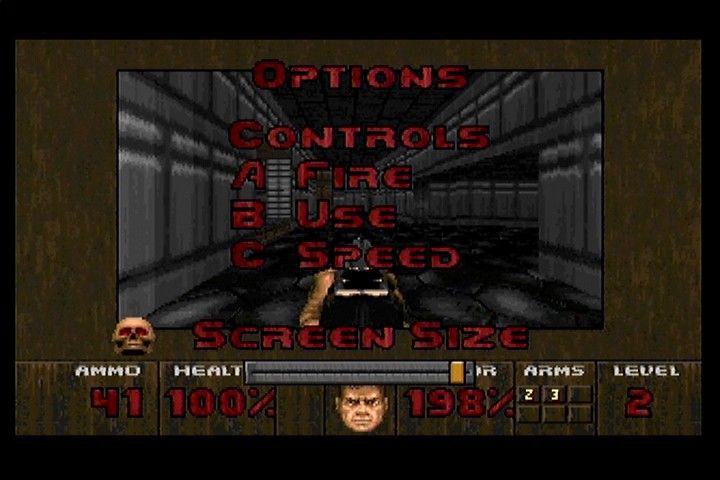
To get to the menu, press the X key on your control pad. Use the up & down arrows to move the skull cursor to a desired selection, press any button to activate that selection.
Sound Volume
This selection has two sliding bars, allowing adjustment of the volume from "off" to "maximum." One bar modifies the music and the other bar modifies sound effects.
Controls
Default keys are A = Fire B = Use/Open C = Speed. By pressing the Right and/or Left arrows you may change your Controls configuration.
Screen Size
Just below the "controls" option is the screen size option. With this option selected, use the left & right arrow keys to adjust the slide bar controlling the viewing area. A smaller viewing area increases the smoothness of the animation.
On-Screen Information
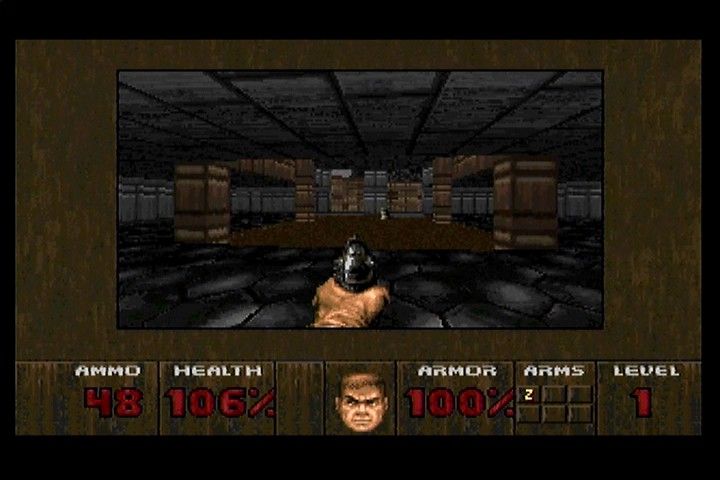
DOOM provides on-screen information that's necessary to survive. At the bottom of your screen is a status brown bar. From left to right, the segments of this bar indicate:
•
MAIN AMMO: In big fat numbers, you see the number of shots you've got left in the weapon you're currently using.
•
HEALTH: You start out at 100%, but you won't stay there long. At 0% it's time to start over. Try a little harder next time!
•
KEY CARDS: You can see any keys you possess right here. There are three key colors; Yellow, Red, and Blue.
•
YOUR MUG: This portrait isn't just for looks. When you're hit, your face looks in the direction from which the damage came, telling you which direction to return fire. Also, as you take damage you'll begin to look like raw hamburger-as shown to the left.
•
ARMOR: Your armor helps you out as long as it lasts. Keep an eye on it, because when it goes, you might, too.
•
ARMS: This list of numbers shows which weapons are available. If a number is highlighted, the weapon accessible by cycling over to it.
•
LEVEL: This indicates the current level you are blasting through.
The Automap
To help you find your way around DOOM, you're equipped with an automap device. By pressing both the USE and PAUSE keys simultaneously, you replace your normal view with a top-down map of everything you've seen up to date. The white arrow represents you, and points in the direction you're looking.
You enable zoom in and out by pressing the P key. Press the Left key to zoom in and the Right key to zoom out.
Using the control pad, you can move, while viewing the Automap. This is dangerous, since you can't see the enemy while viewing the Automap. To scroll the Automap without moving yourself, turn off Follow mode. Pressing the "P" key will toggle Follow mode on and off.
Controlling the Action
Most of the play commands in DOOM are a simple keypress away. You can use the control pad, the LEFT and RIGHT buttons, and the A, B, and C buttons on combination to move, pick up items, shoot, and open doors.
Moving
At first, you might find yourself bumping into walls while demons beat on you. Once you've got movement down, everything else follows.
•
WALKING: Use the up and down arrow keys to walk forward and backward.
•
TURNING: The left and right arrow keys turn you left and right.
•
RUNNING: Press the Speed key and the appropriate arrow key to speed yourself up.
•
STRAFE: Hold down the LEFT or RIGHT key to sidestep, rather than turn left and right.
Picking Up Stuff
To pick up an object, just walk over it. You're smart, and know if you need to take it.
Using Doors, Switches & Elevators
To open most doors and operate switches, stand directly in front of them and press the B Key. When you successfully operate a switch, it will change in some way (lights up, flips a handle, etc). If a switch does not change after a couple of tries, it is probably assigned to do a task that you cannot yet be accomplished.
Locked Doors
Some doors have security locks, and require you to have a color coded (yellow, red, and blue) security card or skull key to open them. Other locked doors are operated by a switch on a nearby wall. Rather than walking up to the door, you'll need to operate the switch.
Hidden Doors
Some doors are hidden. Many of these can be opened by finding a switch. In some cases you just need to walk up to the wall and press the B Key. If you've found a secret door, it will open for you. There are clues that reveal a secret door-a wall that's shifted down or a different color, a flashing light on a wall, etc.
Elevators
You'll see platforms that raise and lower. Some platforms operate continuously, while others must be activated.


.png)







.png)






.png)
.png)
.png)

_1.png)
