How to Play
Insert the Game Pak and turn on your system to view the introductory sequence and title screen.
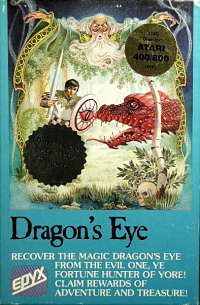
The Game Pak contains two main games: Shanghai II and Dragon's Eye. Shanghai II starts automatically upon power-up, while Dragon's Eye can be accessed through the on-screen menu by pressing the START key.
Shanghai II
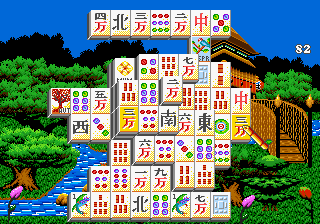
The game is played by removing pairs of matching, unblocked tiles. A tile is blocked if other tiles touch both its left and right sides, or rest on top of it. It is unblocked if it can slide left or right without disturbing other tiles. Tiles touching only the top or bottom edges are ignored.
To remove a pair, use the Control Pad to place the cursor over an unblocked tile and press the B button to highlight it. Move the cursor to the matching unblocked tile and press B again to remove both. Pressing A de-highlights a selected tile.
There are four of each tile in the 144-tile stack, requiring careful selection when removing pairs. The Mah-jongg set includes eight special tiles: any Flower tile matches any other Flower tile, and any Season tile matches any other Season tile.
No Matches Options
If you run out of available moves, a message will notify you and offer several options:
•
BACK UP ONE MOVE: Undo previous moves to try a different path.
•
SHUFFLE: Rearrange the remaining tiles on the board.
•
REPEAT: Restart the same game with the tiles in their original positions.
•
NEW GAME: Start a new game with a completely different tile arrangement.
•
LAYOUT: Start over with a different tile arrangement pattern.
•
DRAGON'S EYE: Switch to the Dragon's Eye game mode.
Special Play Modes
•
WILD TILE: Starts a new game with a special "Omnipotent" tile slot at the bottom right. Once per game, you can temporarily move a blocking tile to this slot, then remove it later when its matching tile is unblocked.
•
1 PLAYER: Starts a standard single-player game.
•
2 PLAYERS: A two-controller mode where players alternate turns removing pairs. Each player has a running timer, and the player with the lowest time wins. Timers stop running at 1,999.
•
TIME LIMIT: A timed single-player mode to track and beat your best times.
•
TOURNAMENT: A lengthy four-round mode that cannot be saved. Each round features a Dragon's Eye match followed by three Shanghai II layouts of increasing difficulty (Novice, Advanced, and Master).
Tournament Structure
•
Round 1: Dragon's Eye (Slayer) / Shanghai II (Boar, Dog, Rabbit)
•
Round 2: Dragon's Eye (Master) / Shanghai II (Snake, Monkey, Ox)
•
Round 3: Dragon's Eye (Slayer) / Shanghai II (Dragon, Rooster, Horse)
•
Round 4: Dragon's Eye (Master) / Shanghai II (Rat, Ram, Tiger)
Options Menu
•
TILE ANIMATION: Turns tile removal animations on or off to adjust gameplay speed.
•
BACKGROUND: Toggles the Great Wall of China background image on or off.
•
SOUND EFFECTS: Toggles sound effects on or off.
•
MUSIC: Toggles the game music on or off, and selects between stereo and mono sound.
Tiles Menu
This menu allows you to switch your active tile set, which will restart your current game. Different sets feature unique designs and special matching groups:
•
Mah-jongg: Seasons (Spr, Sum, Aut, Win), Flowers (Mum, Plum, Bam, Orc)
•
Lo-hi playing cards (Ace-9): None
•
Hi-lo playing cards (6-Ace): None
•
Hanafuda: Elements (Chinese characters), Faces
•
Sports: Officials (dark outline), Medals
•
Fantasy World: Treasure (blue outline), Court (red outline)
•
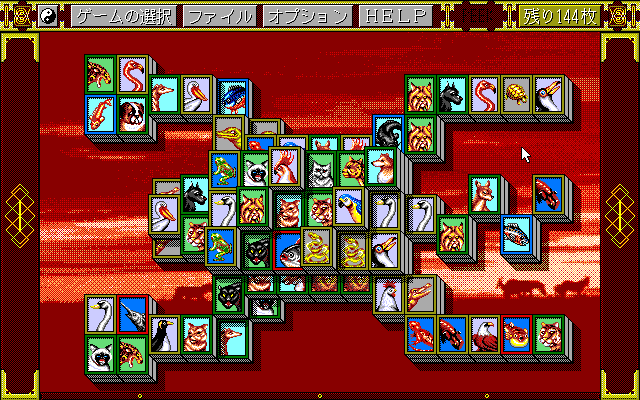
Animals: Salt Water Fish (red outline), Fresh Water Fish (blue outline)
•
Oriental road signs: None
Layout Menu
Press B on the highlighted Layout menu to view 13 different tile arrangement patterns. Scroll through them using the Control Pad and press B to select one. The layouts are categorized by difficulty:
•
NOVICE: Boar, Dragon, Rat, Snake
•
ADVANCED: Dog, Monkey, Ram, Rooster, Shanghai
•
MASTER: Horse, Ox, Rabbit, Tiger
Dragon's Eye Rules
This mode features a Dragon display with 8 central spaces (the heart and limbs) on the left, and player hands on the right. The Dragon Slayer starts with a 6-tile hand facing them, while the Dragon Master has a 3-tile hand kept hidden.
The Dragon Slayer wins by either clearing all tiles from the dragon's heart and limbs, or by preventing the Master from filling the display before all tiles are played. The Dragon Master wins by completely filling the display (two layers deep in the heart and limbs, and one layer deep elsewhere).
The Slayer plays first, matching tiles from the display or matching a tile from their hand with one on the display. If no matches can be made and the Slayer has fewer than 5 tiles in hand, they can click DRAW to take a new tile.
To end a turn, the Slayer must have 5 or fewer tiles in hand. If no matches can be made from a 6-tile hand, the Slayer must place one tile onto the dragon display and click DONE
.png)

.png)
.png)
.png)








.png)
.png)



.png)


.png)






.png)