Crazy Maneuvering
Learn how to perform these crazy maneuvers using different combinations of the Steering Wheel, Accelerator, Brake, and Drive/Reverse Shifting commands.
Crazy Dash
Propel the cab forwards with a burst of speed with this crazy move.
•
First, release both the accelerator and brake.
•
Then, just after shifting into Drive, press the accelerator.
Crazy Drift
Use this move to cause the cab to execute a sliding drift.
•
While moving forward, quickly shift into Reverse and back into Drive while cutting the Steering Wheel to the right or left.
•
Note: hold the Control Stick to execute a drift.
Crazy Back Dash
Execute a hasty retreat with this speedy thrust in reverse.
•
Shift quickly into Reverse just after executing a Crazy Dash.
Crazy Back Drift
With this move the cab will continue to move in reverse after spinning 180°.
•
While moving forward, quickly shift into Drive and back into Reverse while cutting the Steering Wheel to the right or left.
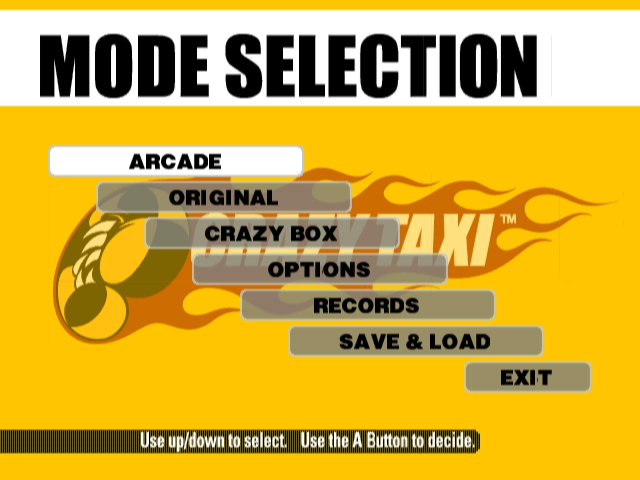
Mode Selection Menu
Use up or down on the Control Pad/Control Stick to select an item and press the A Button to enter your selection. Select 'EXIT' or press the B Button to return to the title screen.
Arcade
In this game mode, play using the same course as the one featured in the Arcade version of Crazy Taxi. Original
Select this game mode to play using the specially designed original course.
Crazy Box
Fine-tune your cab driving techniques by clearing each of these unique mini-games. Options
Use this mode to modify various settings of the game.
Records
Here you can view the records and rankings for each of the game modes.
Save & Load
Use this mode to save or load game data or perform name entry for player files.
Arcade/Original Mode
Both the Arcade and Original game modes have the same rules, content and menu. The only difference between these two modes is the course on which you play. After selecting either "ARCADE" or "ORIGINAL" from the mode selection menu, the following mode menu will be displayed. Use up or down on the Control Pad/Control Stick to select a mode and press the A Button to enter your selection. Select 'EXIT' or press the B Button to return to the title screen. Arcade Mode Menu
Original Mode Menu
Play By Arcade Rules
Select this item to play according to the same rules as used in the Arcade version of Crazy Taxi. Work For 3 Minutes
Play freely for three minutes. Note that in this mode there are no time bonuses available.
Work For 5 Minutes
Play freely for five minutes. Note that in this mode there are no time bonuses available.
Work For 10 Minutes
Play freely for ten minutes. Note that in this mode there are no time bonuses available.
Game Display
While driving a customer
•
Game Time: Once this time limit counts down to 0, the game is over.
•
Directional Arrow: This arrow shows the general direction of the destination.
•
Fares: The top figure is the Total Earned Fare and is a total of all fares earned. The bottom figure is the Fare for the current customer, which includes the base fare plus any tips earned, and will be added to the total earned fare once the customer is delivered to their destination.
•
Crazy Maneuvers & Combos: All crazy maneuvers performed will appear here with a counter that tracks any successive combos made.
At the destination
•
Destination and Distance Counter: A picture of the destination location and a distance counter indicating the distance to the destination, is displayed as the customer gets into the cab. Press the Y Button to display this image while driving. •
Customer Time Limit: If this time limit reaches 0 before reaching the destination, the customer will jump out of the cab without paying their fare.
•
Gear Indicator: Shows the gear, drive or reverse, currently selected.
•
Time Bonus Indicator: Indicates the time bonus earned for arriving early at the destination. The time bonus is only available when playing the "PLAY BY ARCADE RULES" of the arcade and original modes. •
Ranking: Shows your current ranking relative to the total rankings.
Pausing the Game
To pause the game and display the pause menu while playing in the Arcade, Original or Crazy Box modes, press START. Use up or down on the Control Pad/Control Stick to select a menu item and press the A Button to enter your selection. Press START to exit and continue playing. •
RESUME: Select to resume play where you left off.
•
RESTART: Select to restart the current game with the same driver in the same mode.
•
QUIT: Select to exit the current game and return to the mode selection menu.
•
RUMBLE FEATURE: Use left or right on the Control Pad/Control Stick to toggle this item ON/OFF.
Driver Selection
After selecting a game mode from either the Arcade or Original mode menu, the driver selection screen will be displayed. Use up or down on the Control Pad/Control Stick to select a driver and press the A Button to enter .png)