Starting Up
This disc is exclusively for the Sega Saturn™ System. Do not attempt to play it on other CD players, as this may damage headphones and speakers. Set up your Sega Saturn™ System and plug in Control Pad 1. Place the TNN Motor Sports™ HardCore 4x4™ disc, label side up, in the CD tray and close the lid. Press the Power button ON to load the game. The game will start after the Sega Saturn™ logo screen appears. If nothing appears, turn the system OFF and verify your setup. To stop the game or restart after it ends, press the Reset button on the console to return to the Title Screen. To return to the Control Panel at any time, press buttons A, B, C, and Start simultaneously.
If you turn on the power without a disc, the Audio disc Control Panel will appear. To play a game, insert the disc, press the Directional pad to move the cursor to the top left button, and press START.
Disc Care
Your Sega Saturn™ disc contains a security code required for reading. Keep the disc clean and handle it carefully. If the system has trouble reading the disc, remove it and wipe it carefully. Start from the center and wipe straight out towards the edge.
Introduction
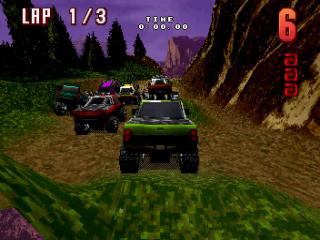
TNN Motor Sports™ HardCore 4x4™ features real vehicle physics, independent suspension, and 3D graphics for the Sega Saturn™. Rampage through six different courses in a hard-charging race to the finish. To begin, place the disc into the Sega Saturn™, close the lid, and press the POWER button. After the logo screens, you will reach the Title screen where you may choose START or OPTIONS. Use the Directional pad to highlight your choice, then press START or the C button to proceed to the Start Menu or Options screen.
Options
The OPTIONS screen allows you to configure various game settings. You can adjust the volume of music and sound effects, turn commentary on or off, customize the control pad setup, and adjust steering sensitivity.
Use the Directional pad (Up/Down) to select the function you want to access. Then use the Directional pad (Left/Right) to change the value.
When satisfied with the settings, highlight EXIT using the Directional pad and press the C or START button to return to the previous screen.
These settings remain active until changed or the machine is reset.
Start Menu Items
Each icon on the START menu allows you to set various gameplay features. Selecting the START RACE icon puts you into the race.
The default selection is Single Race, Novice Class, and Automatic Transmission. After making your race selections, highlight the START RACE icon and press C.
Race Types
There are three race modes to compete in:
•
Single Race: Race against 5 other trucks on one track at a time.
•
Championship: Race against 5 other trucks on all 6 courses. Win all 6 courses on the Extreme level to unlock a “hidden” truck for another championship run. After each race, view your standings and save results to the Memory cartridge.
•
Time Trial: Up to 8 players compete individually for the fastest time over up to 6 laps. You can save Time Trial results on your Memory cartridge.
Transmission
Choose between two types of gear shifting:
•
Automatic: Gears shift automatically.
•
Manual: The player must control gear shifting manually using the controller buttons.
Race Tracks
There are six different courses, each with unique terrain properties:
•
Dynamite Pass: Features multiple terrains in a mountain setting.
•
Ground Zero Gulch: Contains many ruts and bumps in a grand canyon environment.
•
Devil's Kitchen: A blinding desert sand track where you kick up dust storms.
•
Mercurial Forest: Drives over pavement and mountain terrains.
•
Hades Highway: Features the scorching heat of a volcano.
•
Arctic Inferno: Slip and slide through snow-covered terrains.
Driver Classes
Each class indicates the level of driving difficulty. Higher classes remain unavailable until you win the Championship Race in your current class. Vehicle damage adversely affects handling. •
Novice: Race 3 laps with minimum damage settings.
•
Pro: Race 4 laps with normal damage.
•
Extreme: Race 5 laps with maximum damage.
Weather Conditions
Choose different weather conditions to intensify the race. Note that each condition affects tracks according to their terrain type.
•
Good: Normal daytime conditions on all tracks.
•
Overcast: Cloudy conditions that obscure your view; varies by track.
•
Severe: Specific weather types per track:
•
Rain: Ground Zero Gulch, Mercurial Forest
•
Snow: Arctic Inferno, Dynamite Pass
•
Sandstorm: Devil's Kitchen
•
Day/Night: Race in either daylight or nighttime conditions on any track. Use the Directional pad and press C to make your selection.



 (Rev A).png)






.png)
.png)
